

Release May 2026
We are happy to deliver the brandnew May 2026 Release with many new frontend functions! Try it now!
Remember, the Frontend is the user friendly spreadsheet for your Collector Users to deliver their monthly/weekly/daily data. The Admin Center is the tool for the Power User to setup and control your organization’s collection workflows.
(1) Frontend: Performance impact of conditional formatting
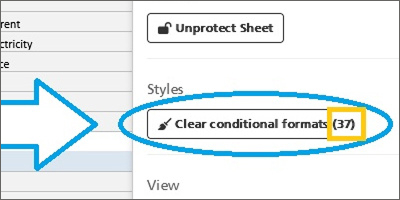
We have learned that a large number of conditional formatting rules in the Excel sheet, which is uploaded as workbook into your data1.io application, can cost a lot of READ performance.
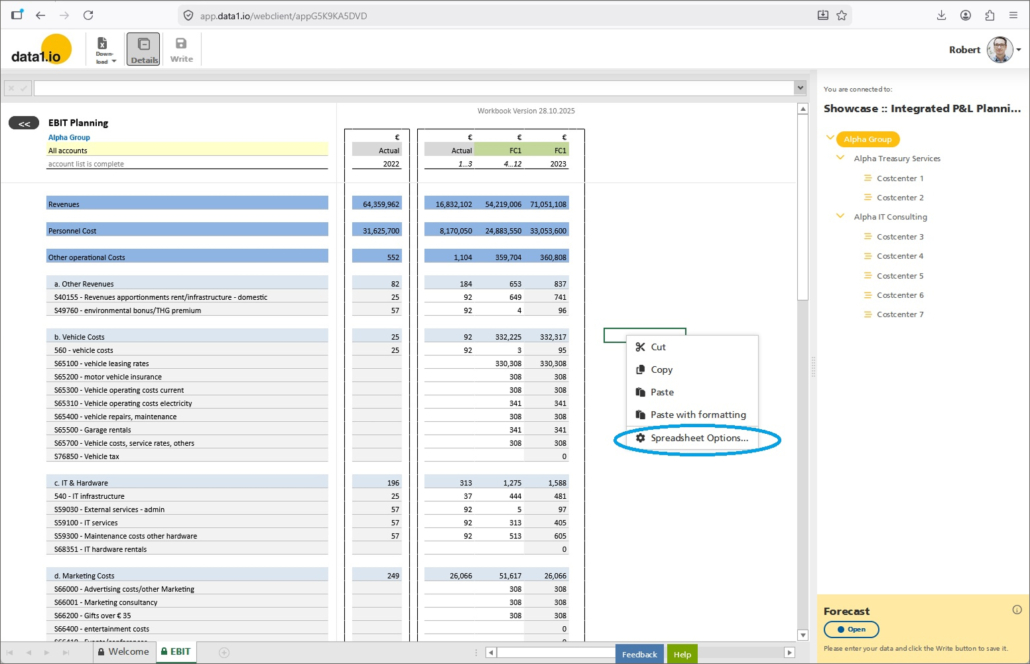
To find out, what is the impact of the conditional formatting rules in your workbook, simply open the “Spreadsheet Options” (available for admins of this application) …
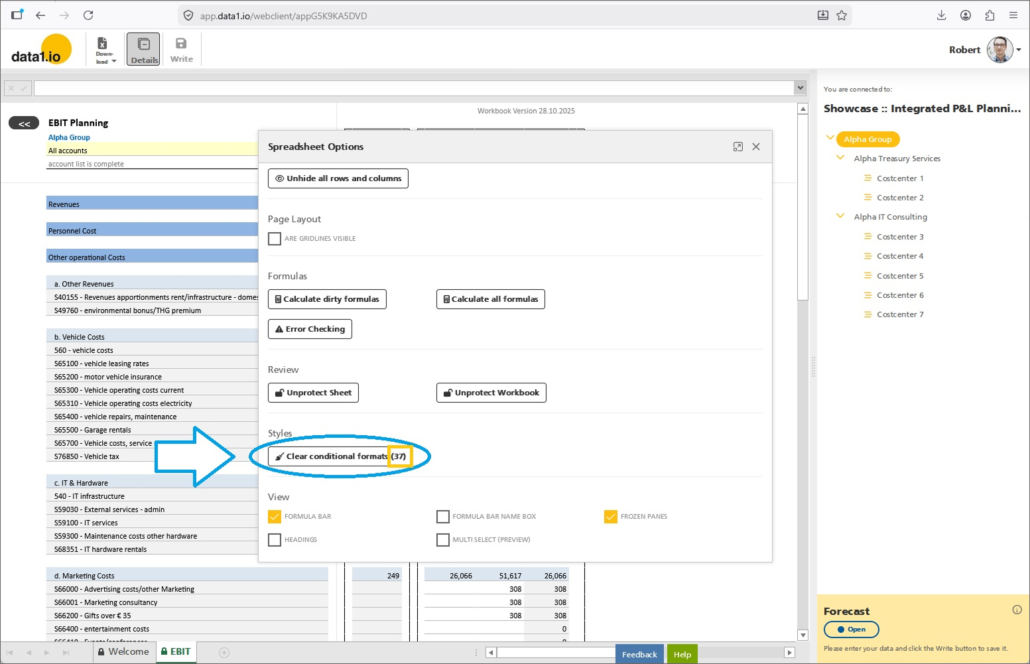
… and you will find a new button “Clear conditional formats” and the number of existing rules. By pressing the button, you can remove all formatting rules from your workbook:
Now you can test the performance of the read process of your worksheet with the performance analyzer (Strg + Alt + P):
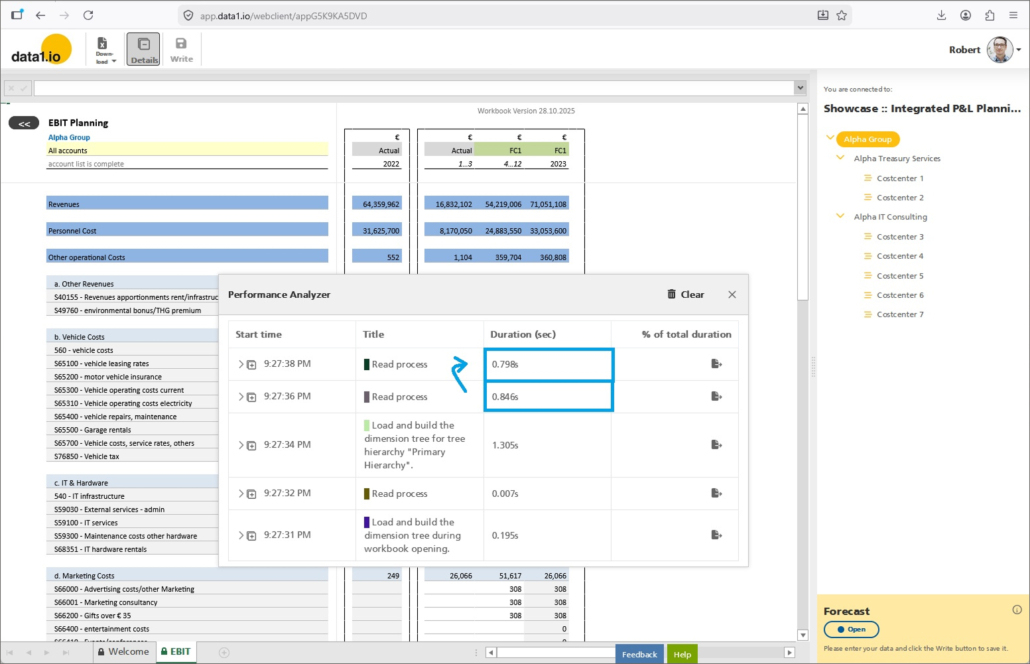
Please be aware that the conditional formatting rules are removed from the workbook permanently – you have to upload the workbook again to restore the conditional formatting rules!
(2) Frontend: Improved Calculation Wizard
We have introduced the Calculation Wizard back in July 2023. With this release we add the possibility to define which calculation modes should be supported.
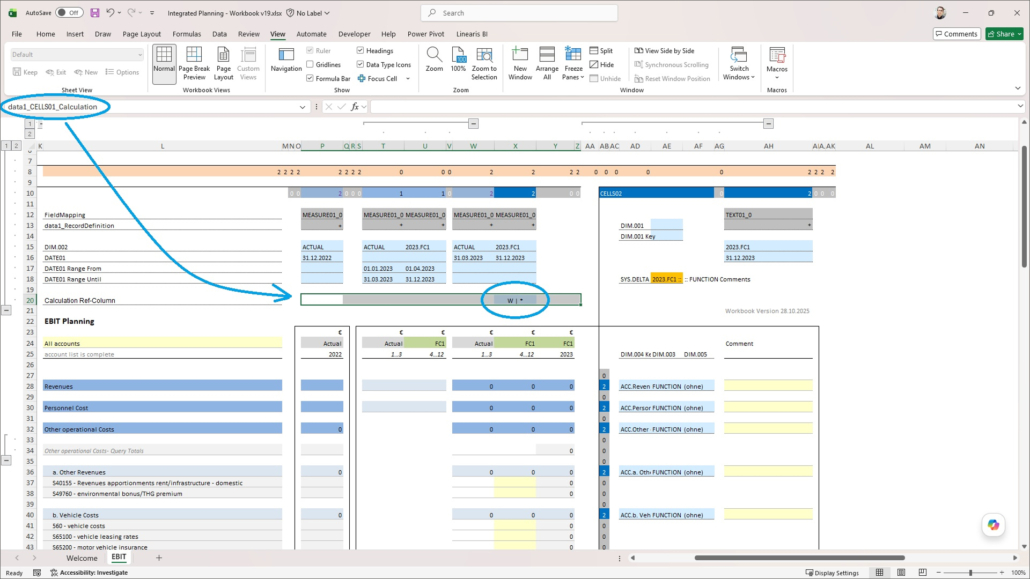
a) New definition
Until now, you could only define the reference column / row for the calculation. With this release, you can add the calculation mode after a pipe | as a separator:
- [column]
- [column] | *
- [column] | */
- [column] | */+-
b) How to use
Of course you can enter “*3” and the value of the reference column …
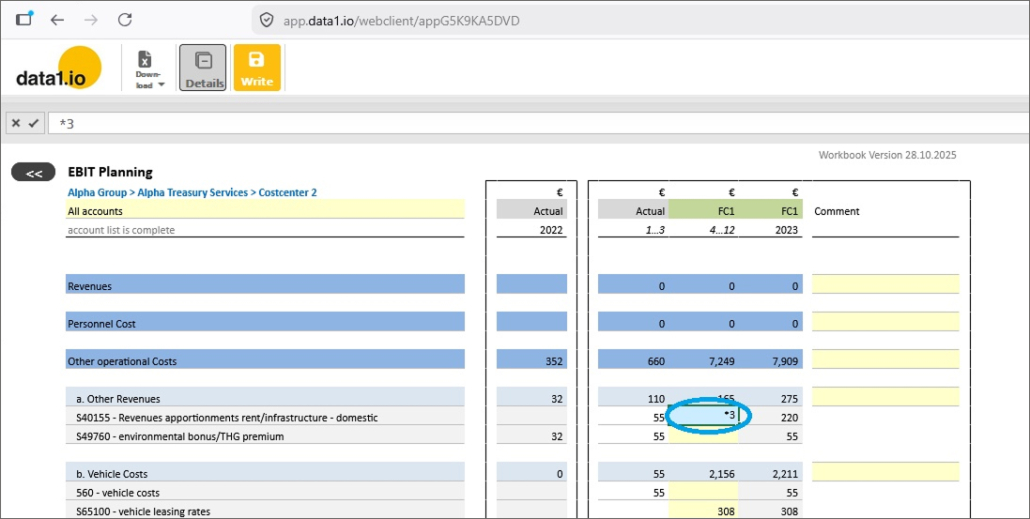
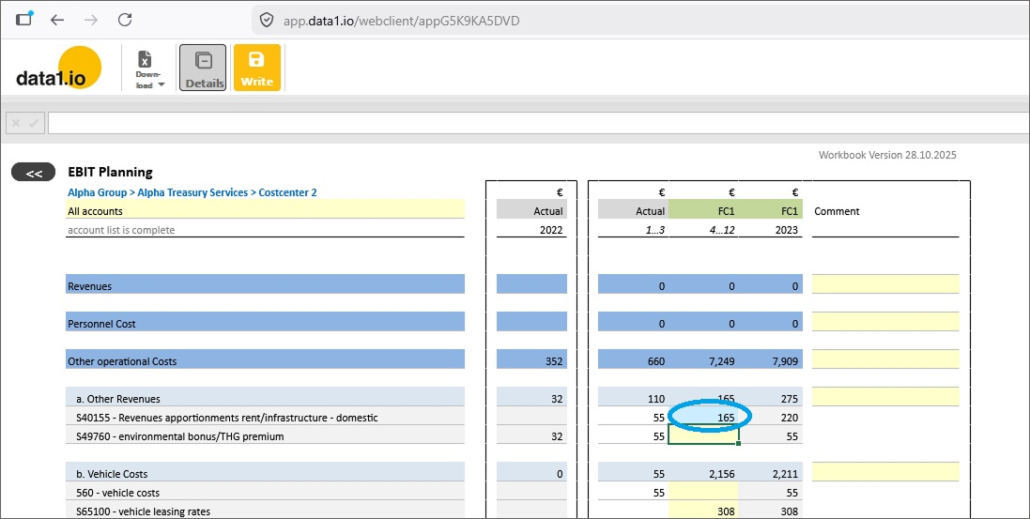
… will be multiplied by 3 and the result will be written into the cell:
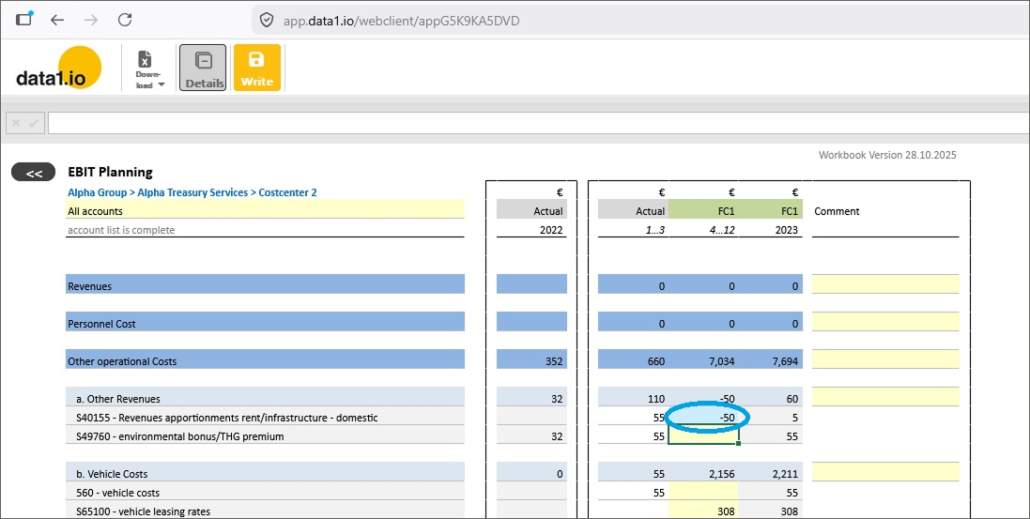
The new thing is, that you can now enter normal negative values (“-50”) or normal positive values (“+50”) without triggering a calculation executed by the calculation wizard:
(3) Frontend: New mode for Write Validations
We have added a new mode for Write Validations. Until now, write validation had only 2 states – none ore blocking writeback. With this release, we have added the warning which still enables writeback of the data:
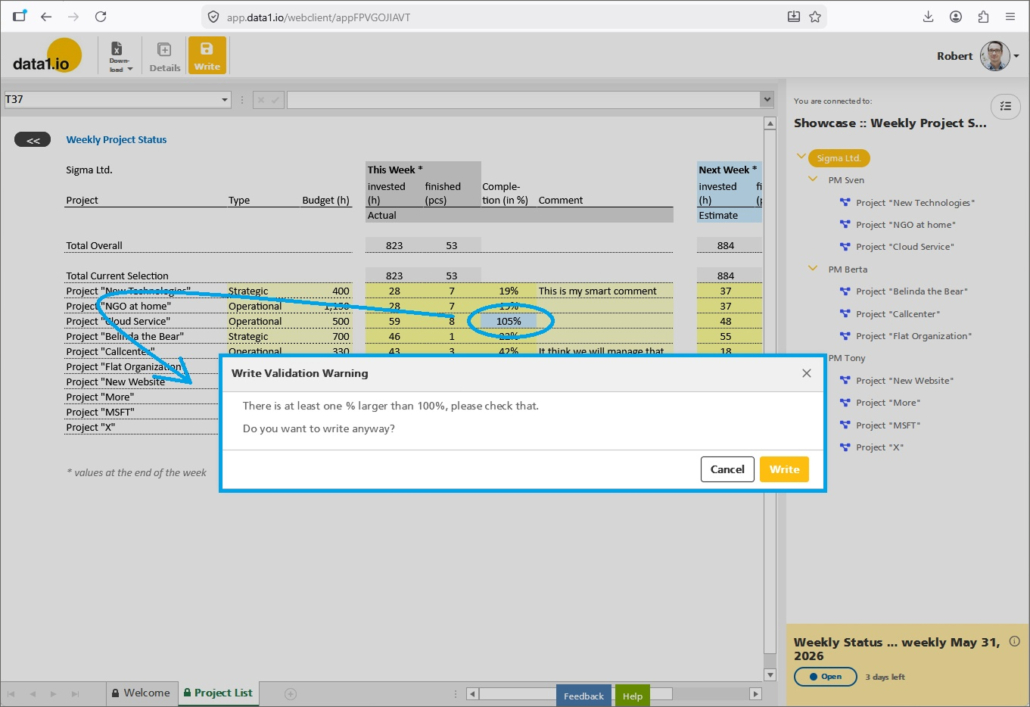
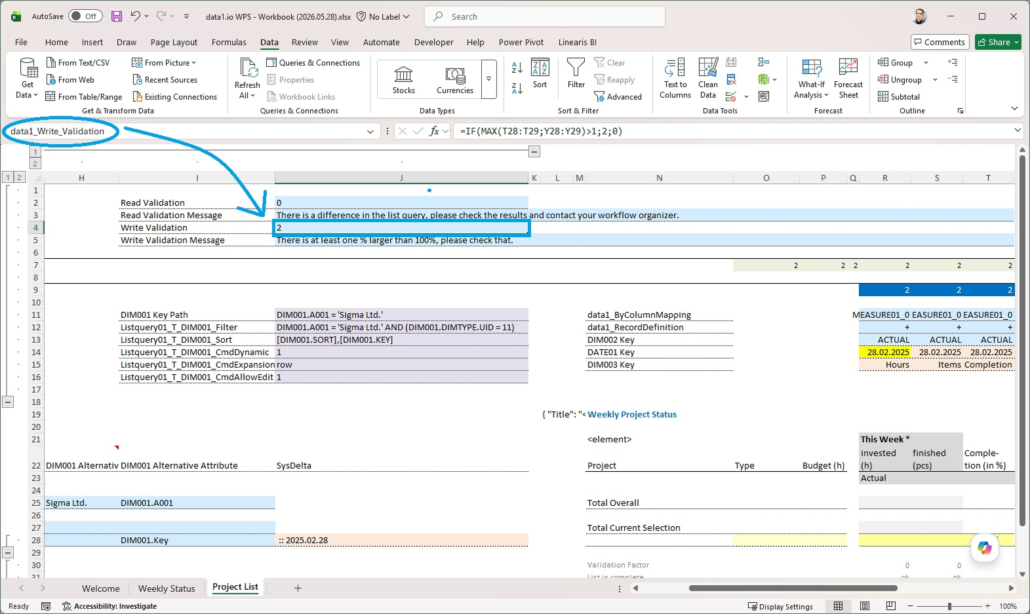
The parameter data1_Write_Validation knows 3 states now
- 0 = no message
- 1 = message & writeback is blocked
- 2 = message & writeback is still active
(4) Frontend: Changed Cell Format
There were some issues with the Changed Cell Format feature. That means, when you change the value of a cell, this cell will be formatted in the defined way (here: turquoise background).
a) with % sheets
Until now, sheets with the entry of exclusively % values, were not formatted as defined. With this release, this also works now without any restrictions.
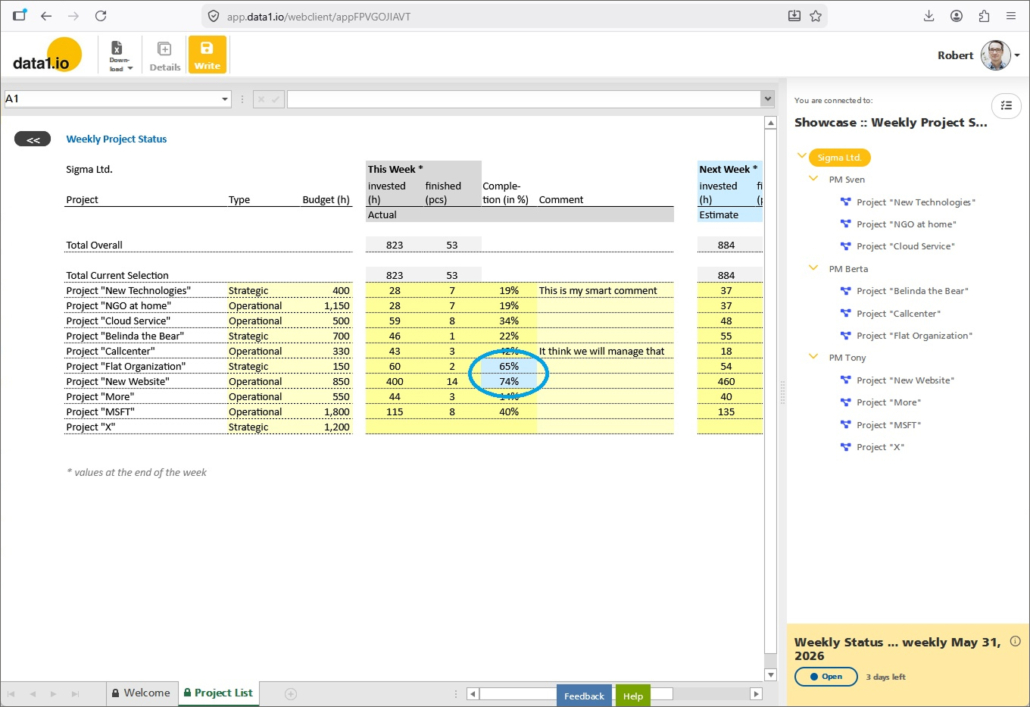
b) with conditional formatting
If you define your “yellow cells” as a conditional formatting, then this was stronger than the Changed Cell Format definition. If the base colour was yellow and the top level formatting was defined as conditional formatting, then the Changed Cell Format definition worked on the bottom level.
With this release, the Changed Cell Format is now stronger than the conditional formatting rules of the worksheet.
(5) Frontend: Write Always On now also with Aggregated Level Queries
We have introduced the “Write Always On” parameter with Release November 2024 and we have extended this function to sum levels with Release March 2025.
Until now, the Write button was automatically deactivated when the sheet contains aggregated level queries. With this release, the “Write Always On” function activates the Write button in such scenarios.
Please be aware that rows or columns with aggregated level queries are always read-only and furthermore cannot be activated for writeback. With the new function you can use writeback
- in other rows or columns without aggregated queries in the same CELLS0x area
- in other CELLX0x areas within the same sheet
This new feature can be used for instance
- enter comments directly in aggregated reports
- enter adjustment bookings directly in aggregated reports
This new feature opens many possibilities to create combined workbooks for (aggregated) reporting and planning.
(6) Further Improvments
We have improved the loading process of the “Your active collections” page. This is done now workflow by workflow which is more interesting if you have more than one active workflow.
Also on the “Your active collections” page there was a miscalculation in “Finished” time on the workflow tile due to UTC conversion topic.
On the “Public Showcases” page there were some minor issues (also the space between the tiles were linked etc.).
In the frontend there was an issue with triggering changes in the visibility settings (with formulas) after changing a dropdown.
In the frontend we have improved the performance of ExceptionType0 definitions (which was slow with 100 or more rows).
In the frontend the comments (“red cell corners”) were not shown correctly under some circumstances.
In the mobile frontend view the dimension tree was not refreshed when switching the sheet of the workbook.
In the Admin Center we have improved the upload of the RLS definitions and we have removed the “Update” mode for the RLS table and all other UID-based tables (since an update is not possible in those cases).
In the Admin Center the “View” button in the Import/Upload screen did not show the records in some cases.
In the Admin Center there were some minor issues in the workflow editor.
We hope you like the new features – we are very curious about your feedback!
Please let us know what you think about data1.io and what kind of planning and data collection processes you evaluate to automate.
we #StandWithUkraine


Leave a Reply
Want to join the discussion?Feel free to contribute!