Release February 2026

We are happy to deliver the brandnew February 2026 Release with the new Showcase “Baustellenbewertung” and the GA for the Dimension Writeback! Try it now!

Remember, the Frontend is the user friendly spreadsheet for your Collector Users to deliver their monthly/weekly/daily data. The Admin Center is the tool for the Power User to setup and control your organization’s collection workflows.

(1) New Showcase “Baustellen Bewertung”

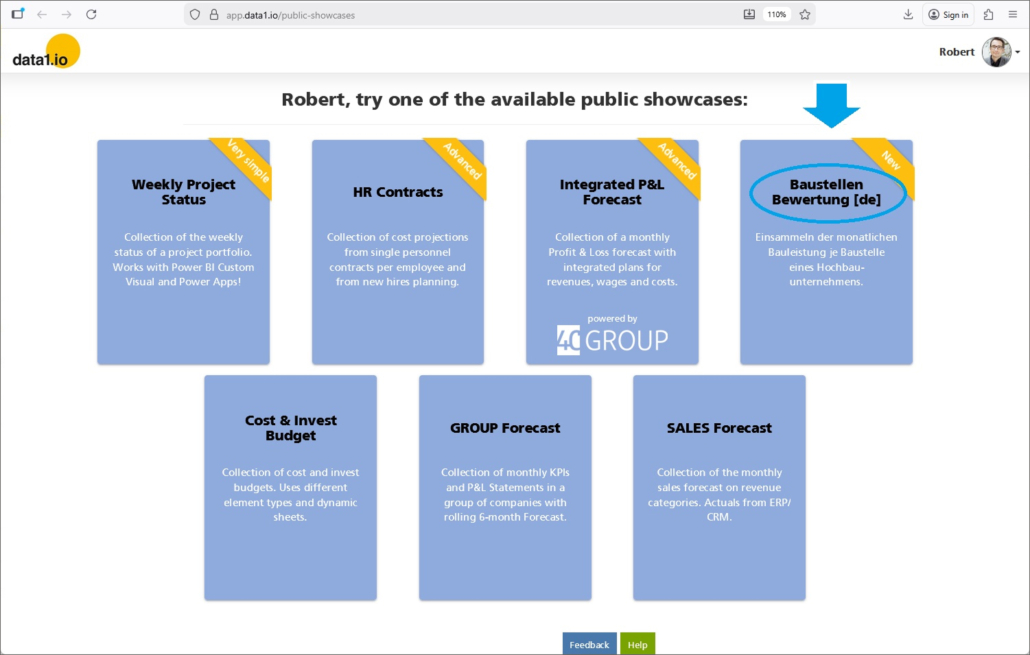
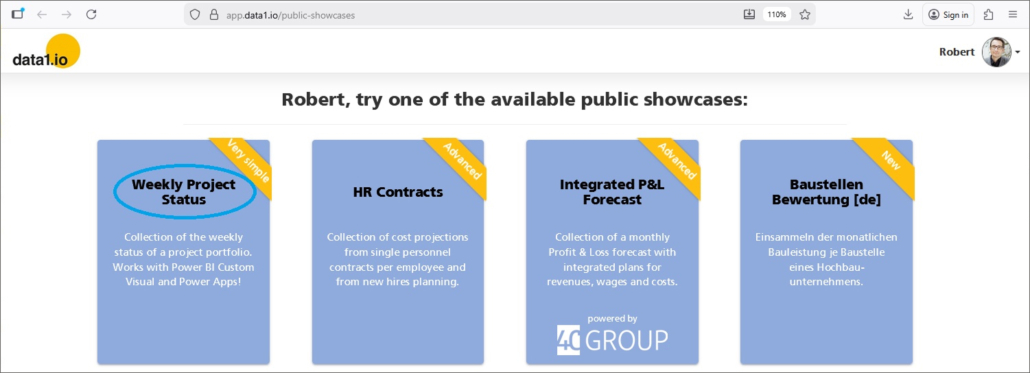
We are happy to deliver a new showcase in our “Public Showcases” Gallery – it is called “Baustellen Bewertung” and is setup in German language:
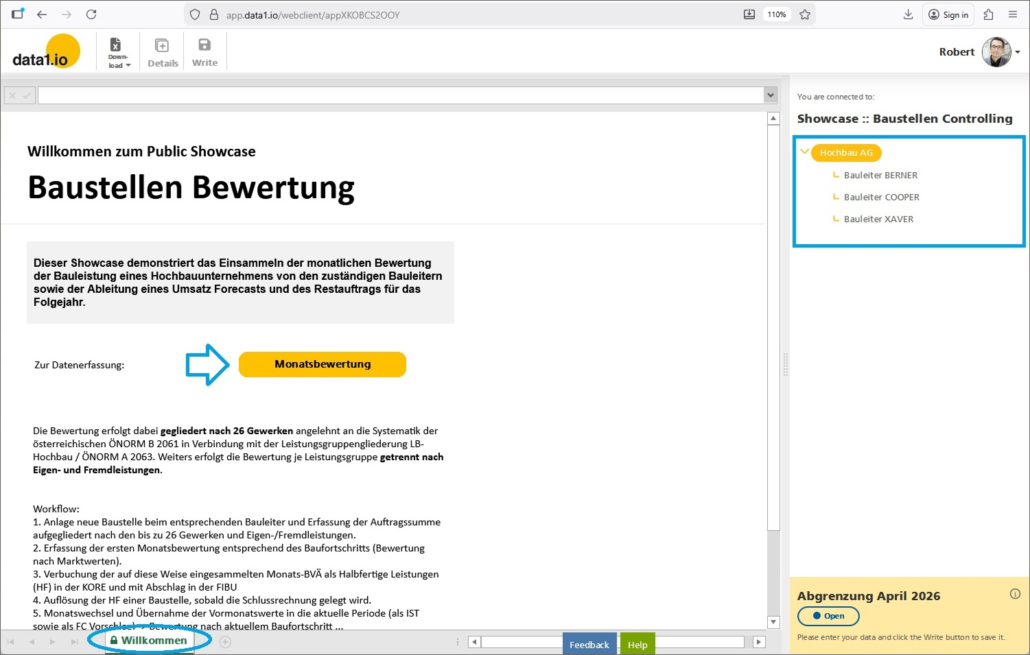
After opening this new showcase you`ll see a description of the showcase and a button to enter the data entry sheet:
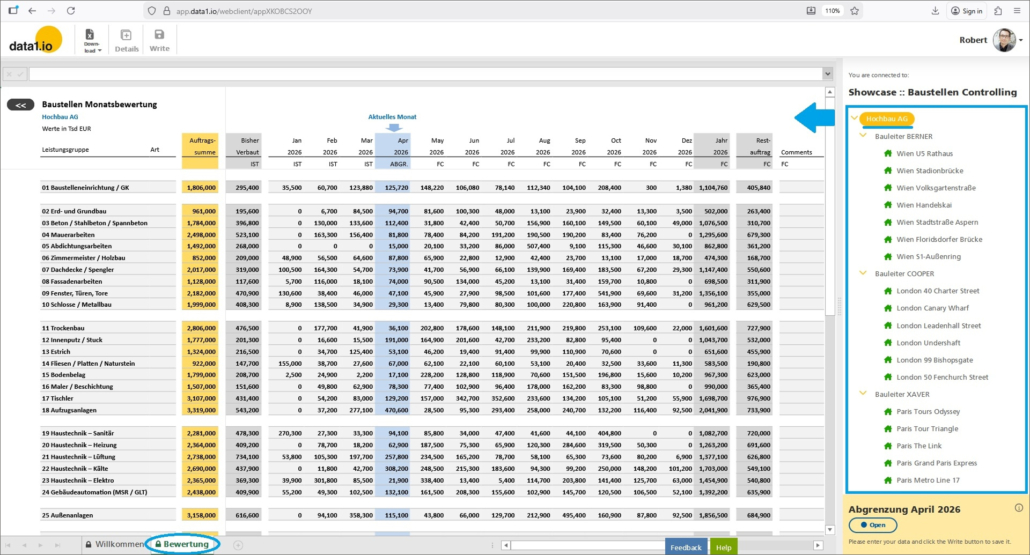
The content of this showcase is the monthly evaluation of the responsible site managers about the construction progress (in EUR) on their construction sites. The line structure of the data entry form follows the Austrian Standard List of trades on a building construction site based on the Austrian classification system according to ÖNORM B 2061 in conjunction with the service group classification LB-Hochbau / ÖNORM A 2063:
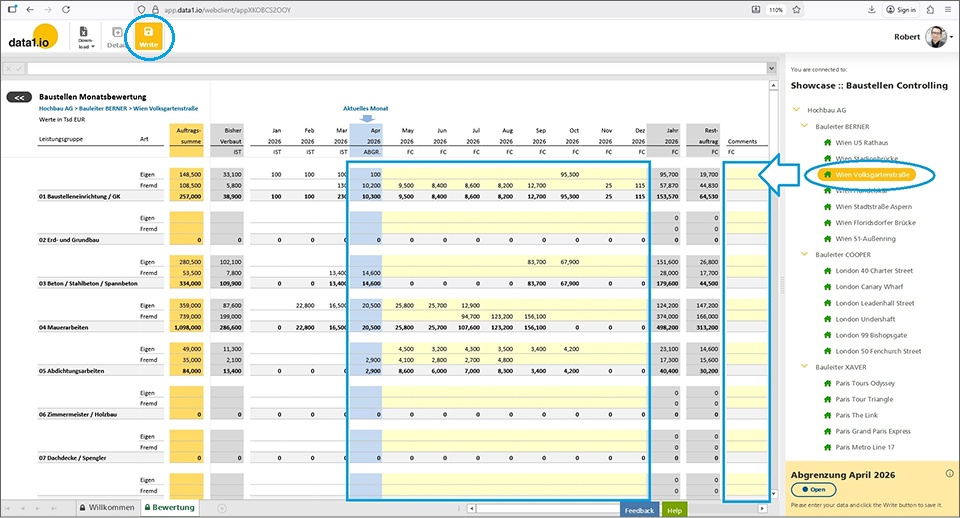
On the bottom level data entry is done on the categories “Eigen” and “Fremd”. Mainly for the current month (= blue column) and additionally a forecast until the end of the year (= yellow columns):
(2) Improved Showcase “Weekly Project Status”

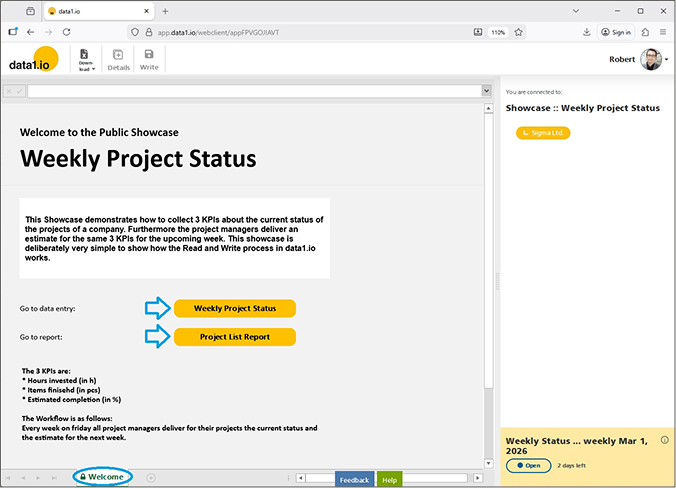
We took the chance and also improved our existing showcase “Weekly Project Status”:
We added a Landing Page with important background information about the showcase and navigation buttons as well as …
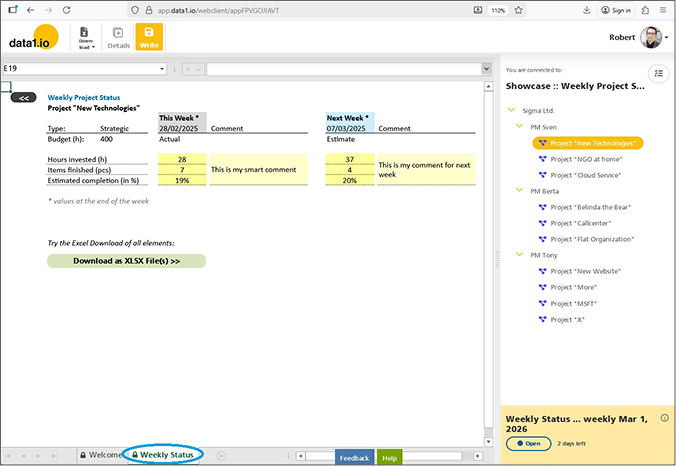
… adding a “back” navigation on every single page:
(3) Dimension Writeback

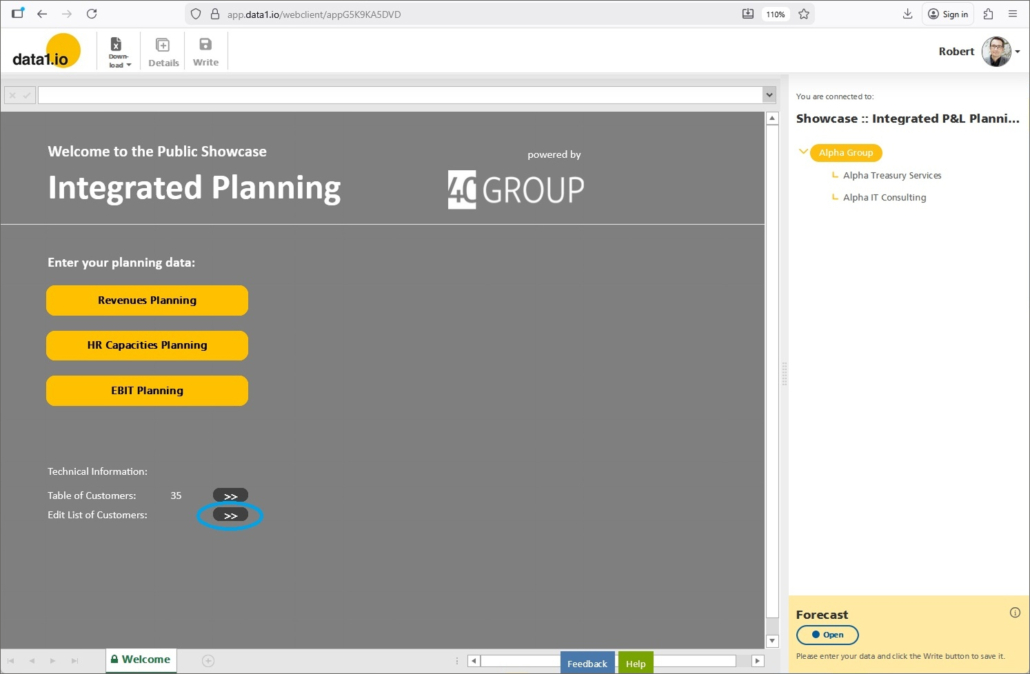
We introduced the Dimension Writeback with the October 2025 release as preview and improved it in the November 2025 release. With the latter release we have also added the dimension writeback in our P&L Public Showcase:
(a) Generally Available (GA)

With this release, the dimension writeback is generally availabe (GA). Just to rememember: with this feature master data from the dimension tables can be edited and added directly within the workbook by the collector users:
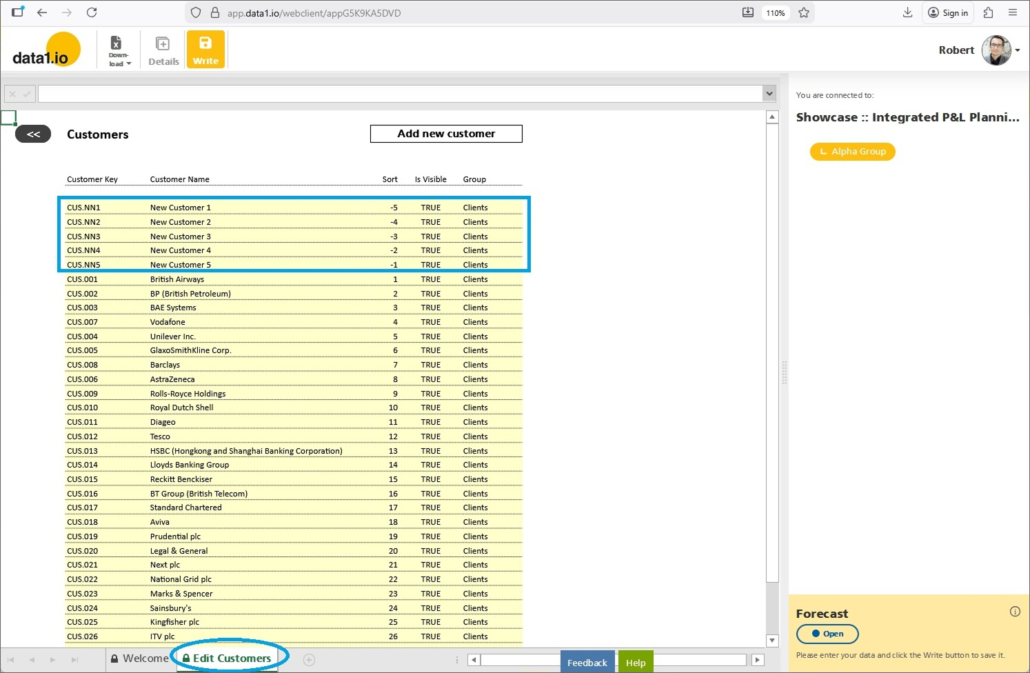
Make your changes to the master data and execute the writeback …
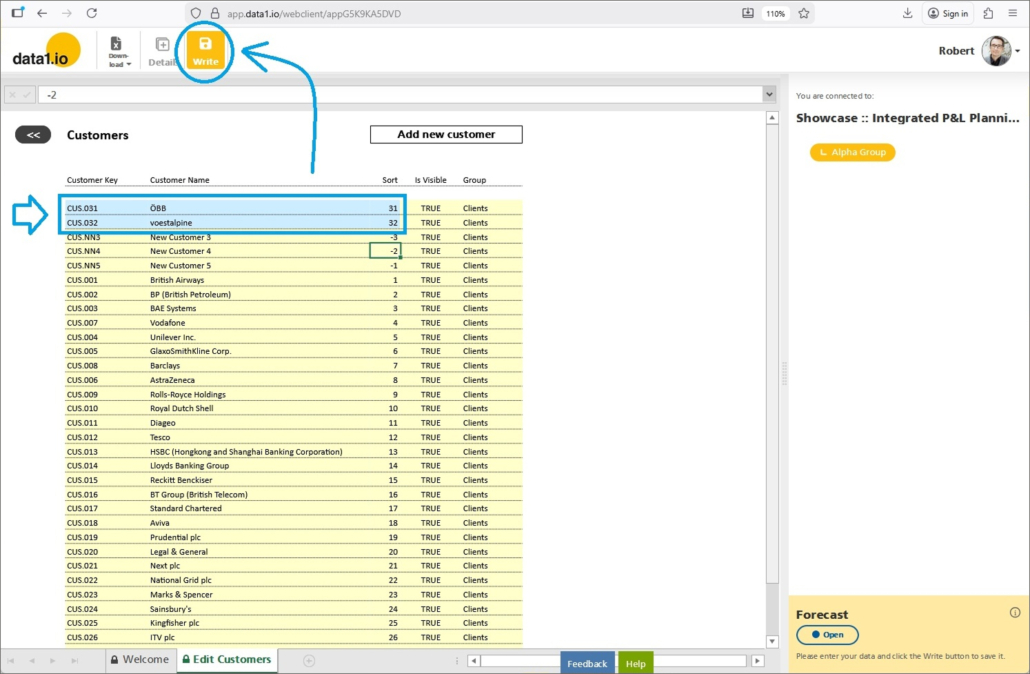
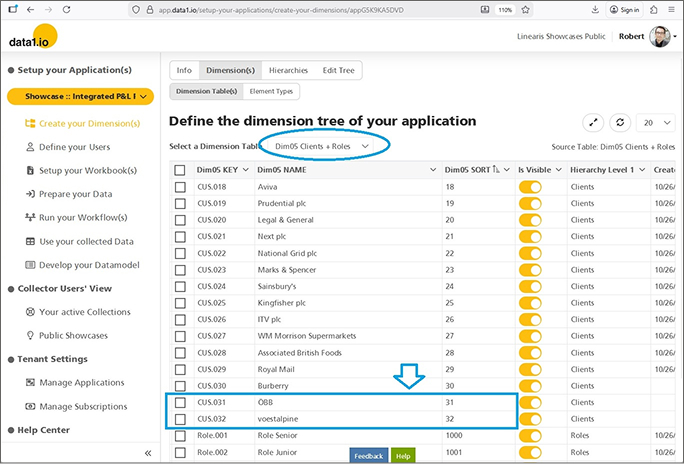
… and the master data is changed in the underlying dimension table:
(b) Dimension Audit Table

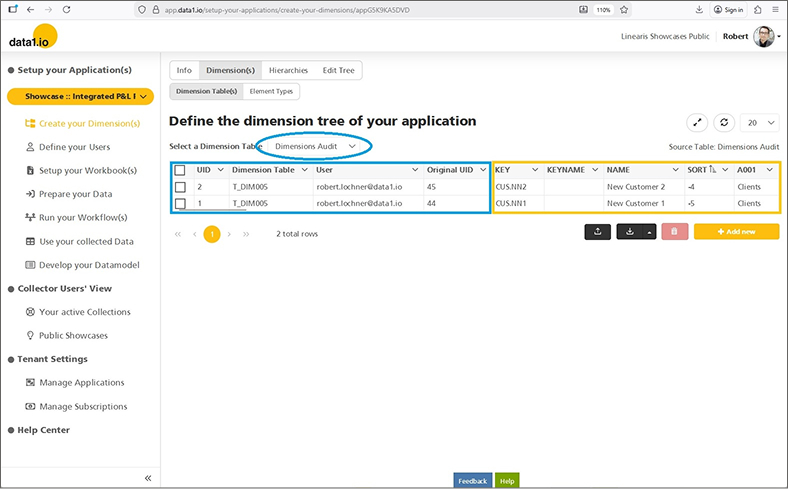
With this release we deliver the “Dimension Audit Table”. In this table all historical versions of the updated records are stored to make changes transparent:
(4) Huge Technical Update to .NET 10 / ASP.NET Core 10

During the last months we prepared the migration of the whole data-one-service project to .NET 10 / ASP.NET Core 10. The final migration was done last weekend.

  • Long-term support (LTS)
  • Improved performance
  • Platform independence
  • Built-in dependency injection
  • Modern authentication
  • Improved developer tools
  • Actively maintained libraries
  • Enhanced security

(5) New Subscription Prices 2026

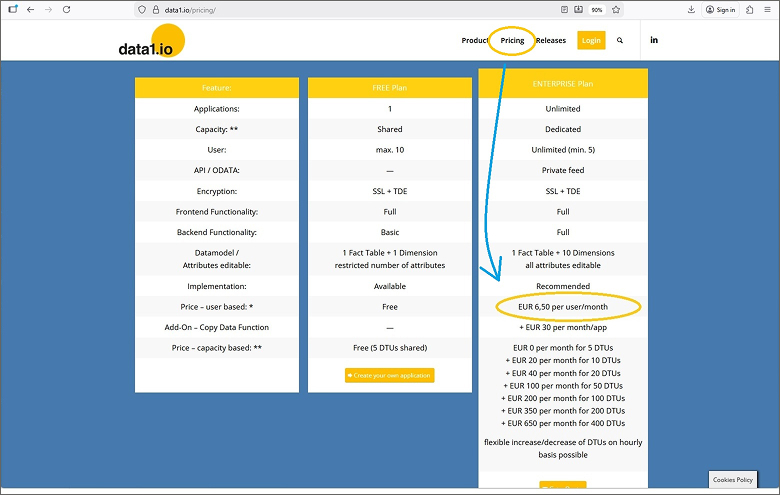
We have changed our prices the last time in January 2024 from 2,50 per user, month and app to 4,50 per user, month and app. With the maturation of the data1.io software, we change our subscription prices now to EUR 6,50 per user and month. Therefore we have increased the subscription fee per user, but we have removed the “per app” condition which makes the solution cheaper for multi-application customers.

As always, this new price is valid for all new customers (= tenants). Existing Enterprise Plan customers of course keep their early adopter conditions for lifetime as promised and of course can opt to the new pricing model if this is more favourable!
(6) Further Improvements

The “Key Wizard” has been moved from the menu item “Create your Dimension(s)” to the menu item “Prepare your data”.

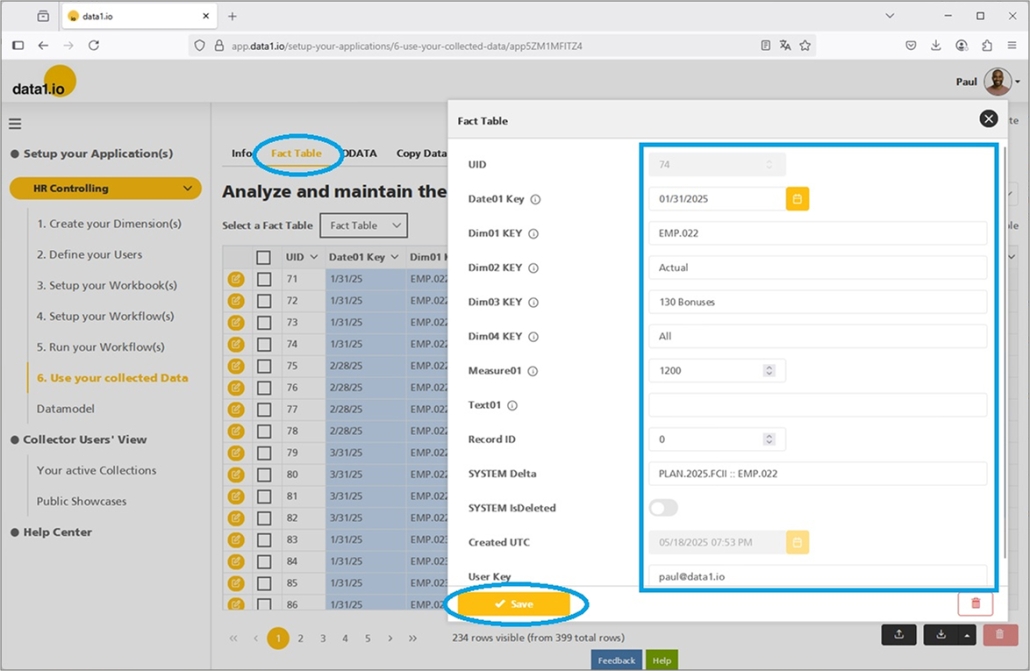
There was an issue with the dates in the “Copy Data” definitions. Under certain circumstances the saved date switched back automatically on the day before. This happened due to UTC conversion and this is solved now.

There was another issue with the Tenant Admin user list. Under certain circumstances you saw only yourself as a tenant admin but not the other tenant admins of your tenant(s). This is solved now.


We hope you like the new features – we are very curious about your feedback!

Please let us know what you think about data1.io and what kind of planning and data collection processes you evaluate to automate.

we #StandWithUkraine
Release January 2026

We are back with the brandnew January 2026 Release with the new Import/Upload area and the new Admin Center navigation! Try it now!

Remember, the Frontend is the user friendly spreadsheet for your Collector Users to deliver their monthly/weekly/daily data. The Admin Center is the tool for the Power User to setup and control your organization’s collection workflows.

(1) Admin Center: New area “Import / Upload your data”

Until now, actuals and other reference data had to be uploaded directly into the fact table. Now you can use additionally the new menu item “Import / Upload” which was designed especially for importing / uploading actuals.

Please be aware that this new screen shows only new uploads either here or in the fact table – formerly imported / uploaded actuals cannot be shown here. You can download and delete your existing actuals from the fact table and upload it once in this new area.

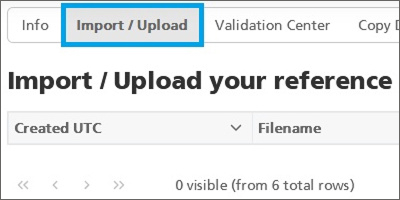
a. New menu item “Import / Upload”

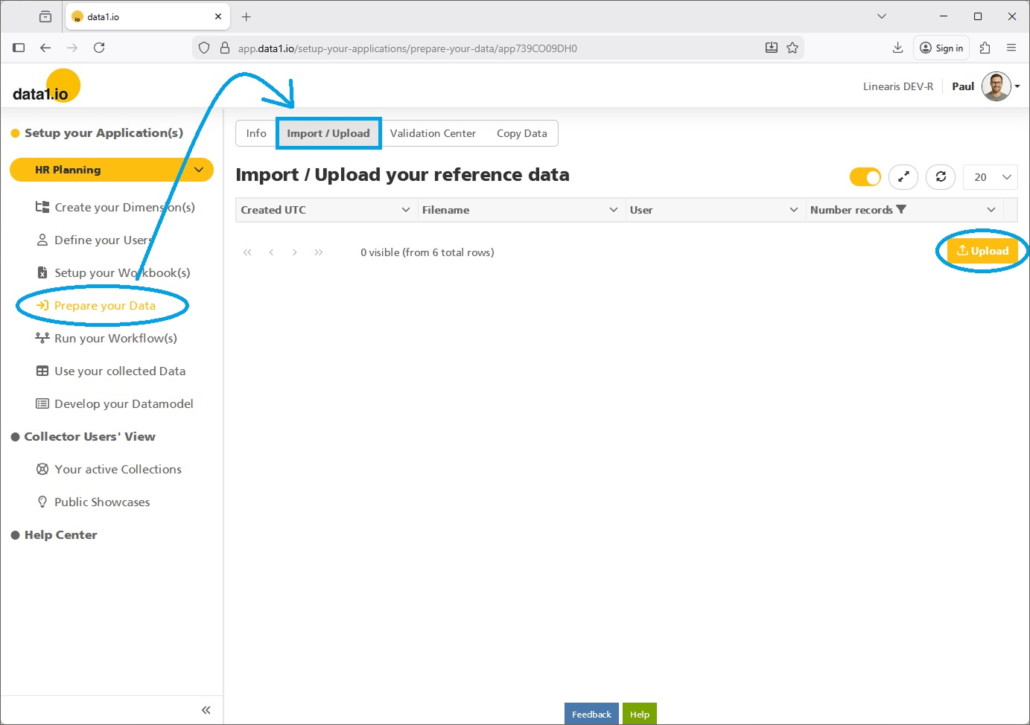
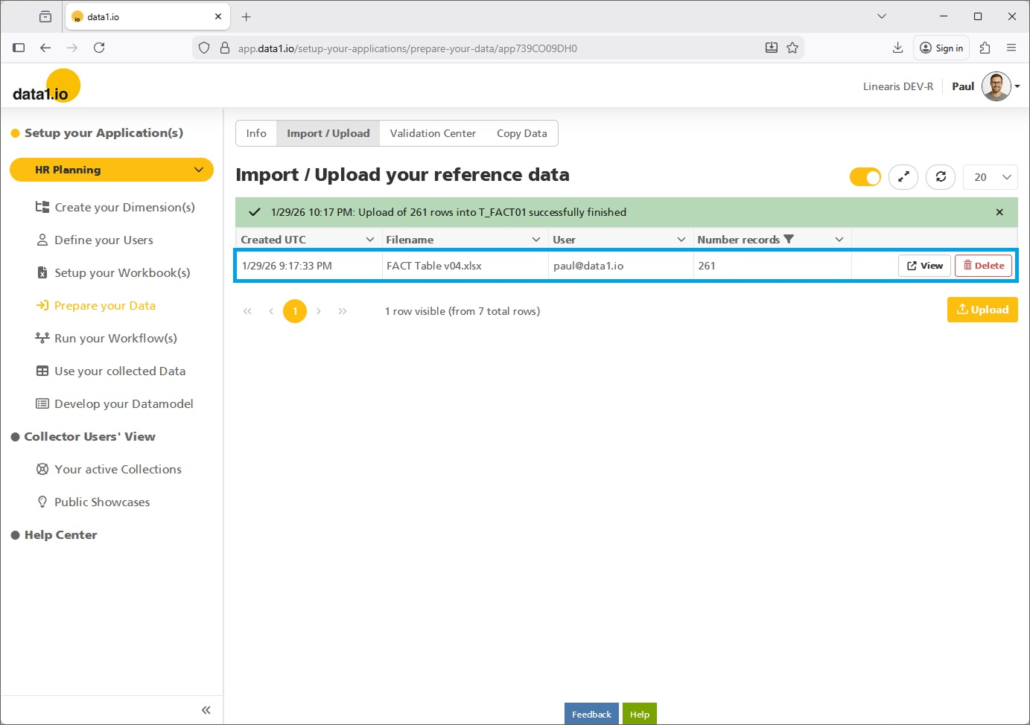
In the main menu you`ll find now the new entry “Prepare your Data” with the new “Import / Upload” area:

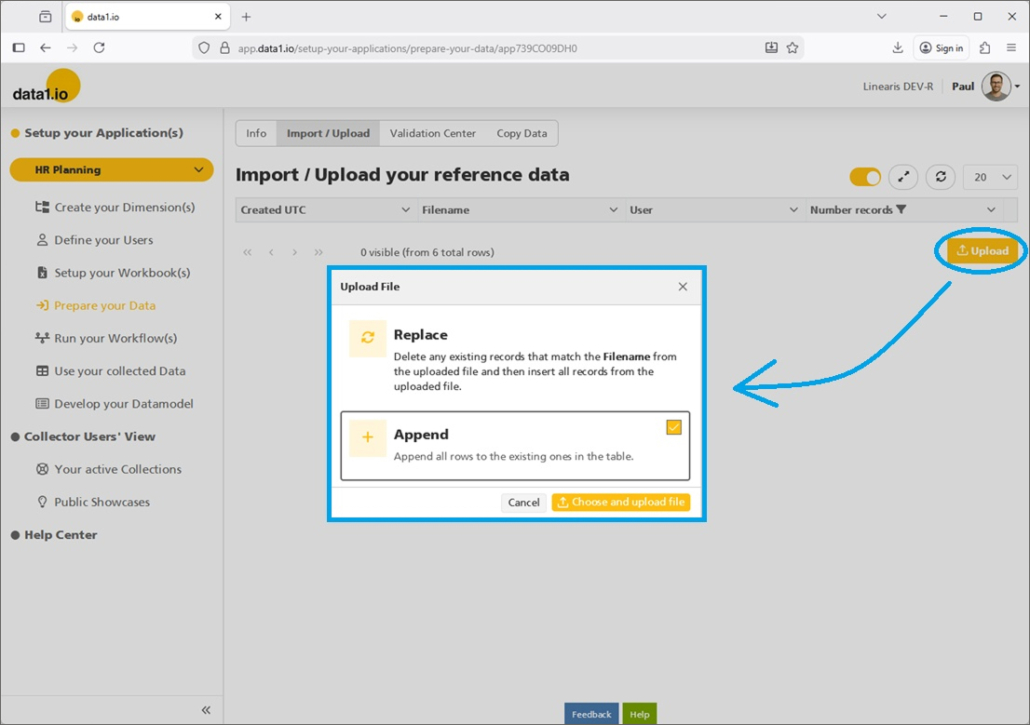
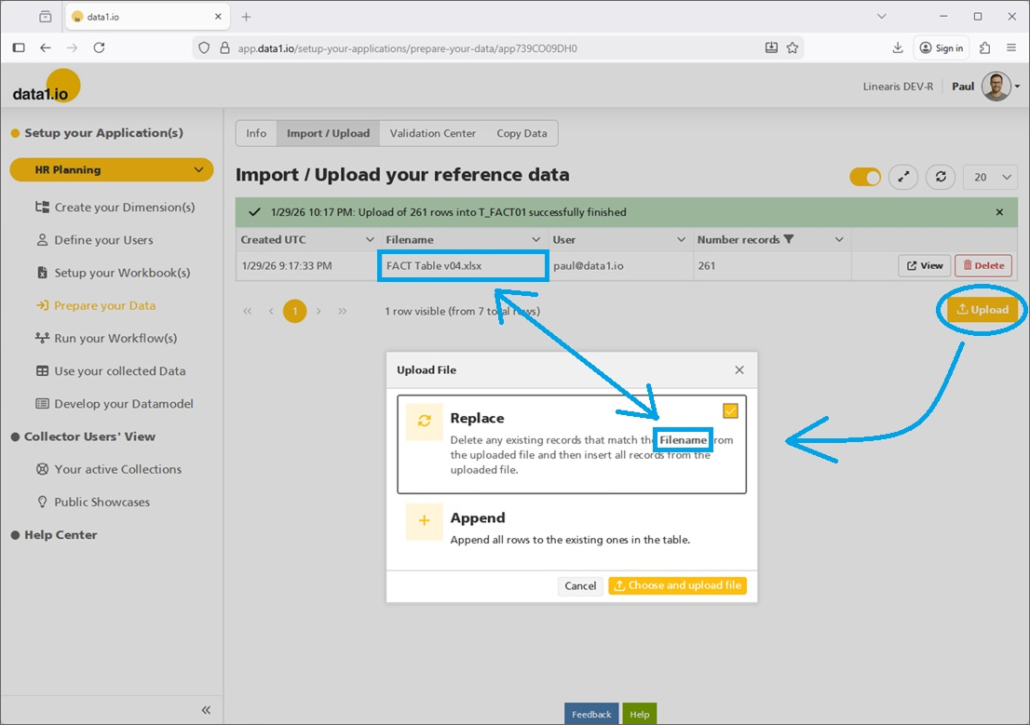
Pressing the “Upload” Button will open the already from the fact table known dialog with the selection Replace or Append mode:

The uploaded data are not shown in detail but as aggregated “upload records“:

b. View and Delete Records

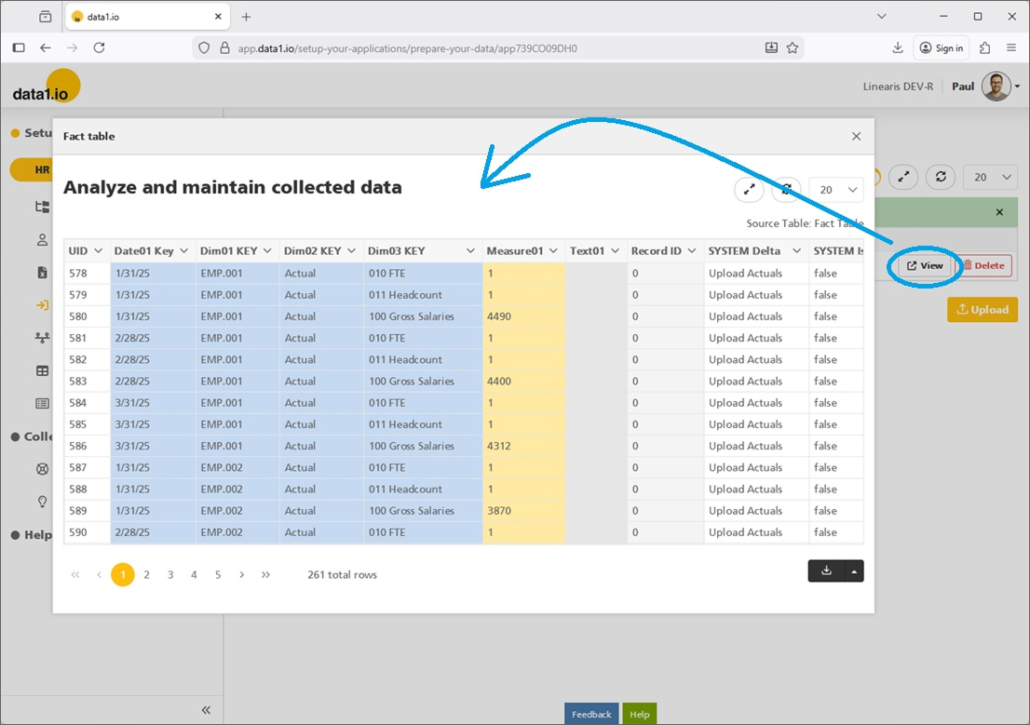
The detailled records behind an “upload record” can be analyzed with the “View” button:

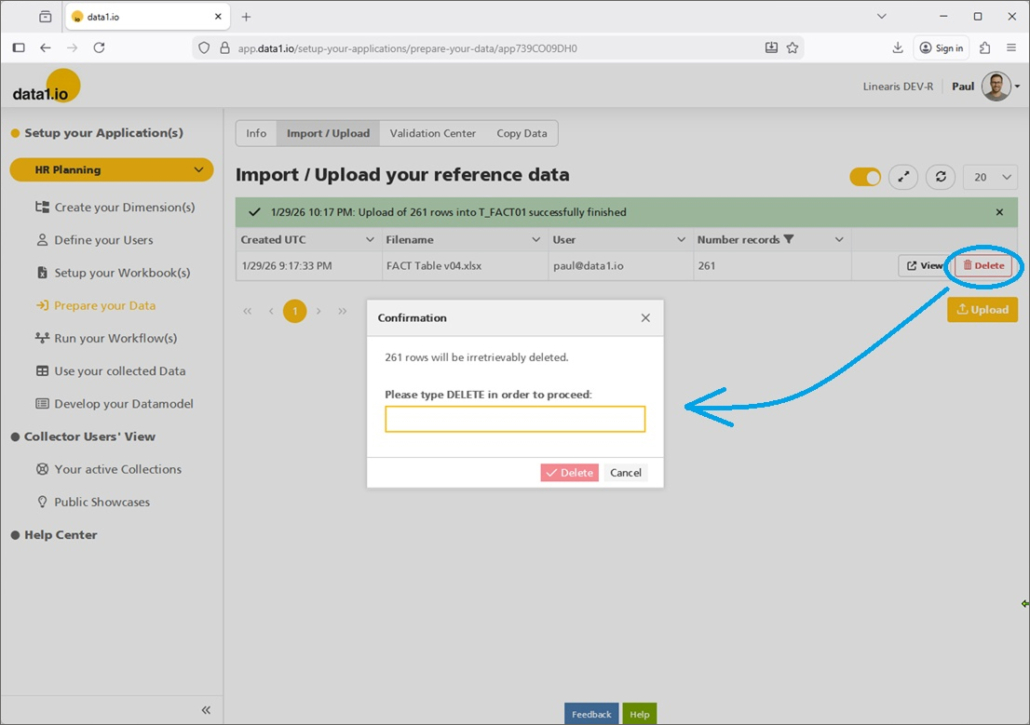
We guess that the new “Delete” button can be very useful for many of you since you can delete accurate all the records from one upload batch:

c. New Replace Mode

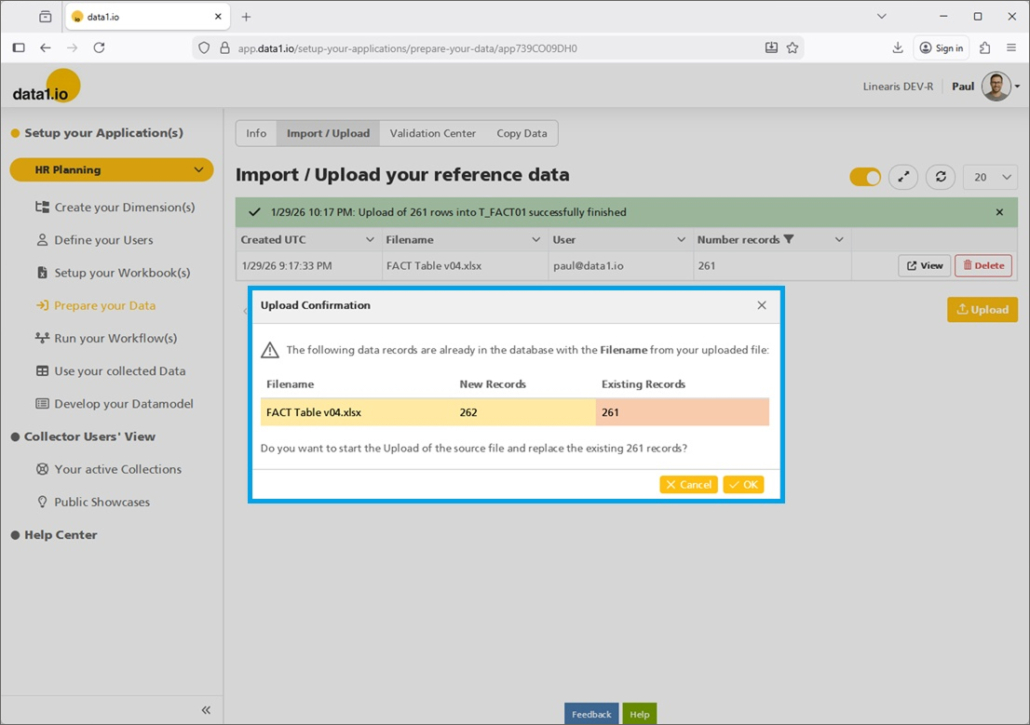
Please be aware that we have changed the Replace mode. Until now, this replace mode referred to the field “SYS_Delta”. This was in many cases not useful – therefore we have changed the criteria for the replacement to the name of the uploaded file:

Before you execute the import with the replacement you`ll get an preview where you can check if this is plausible:

d. New column in Fact Table

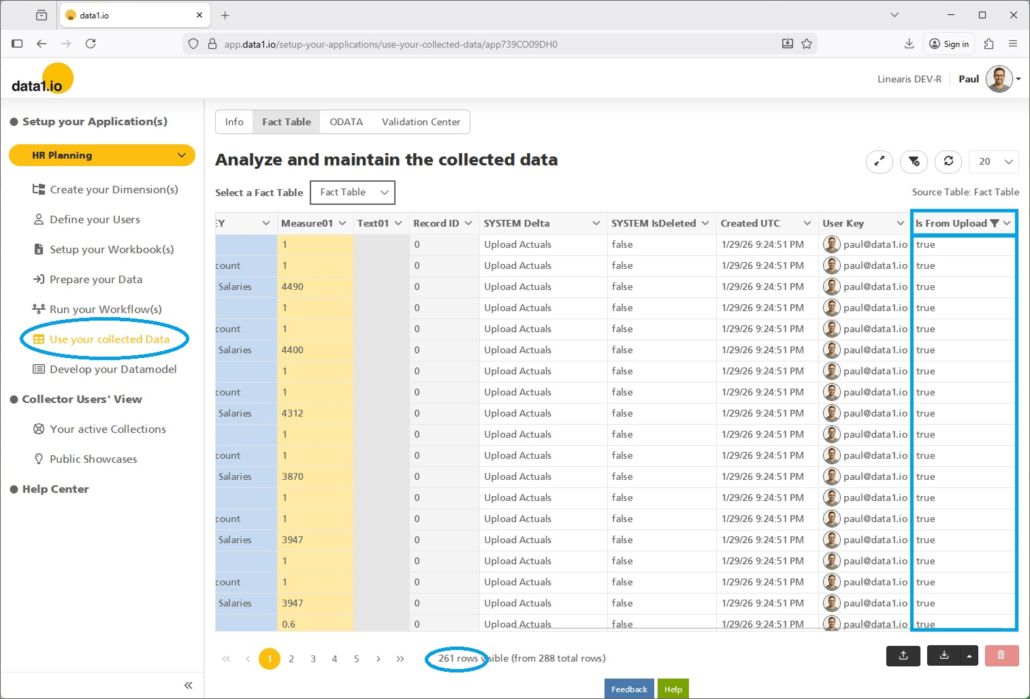
We have added a new column “Is From Upload” to the Fact Table. With this column you can filter exactly the records that you see in the new screen “Import / Upload” …

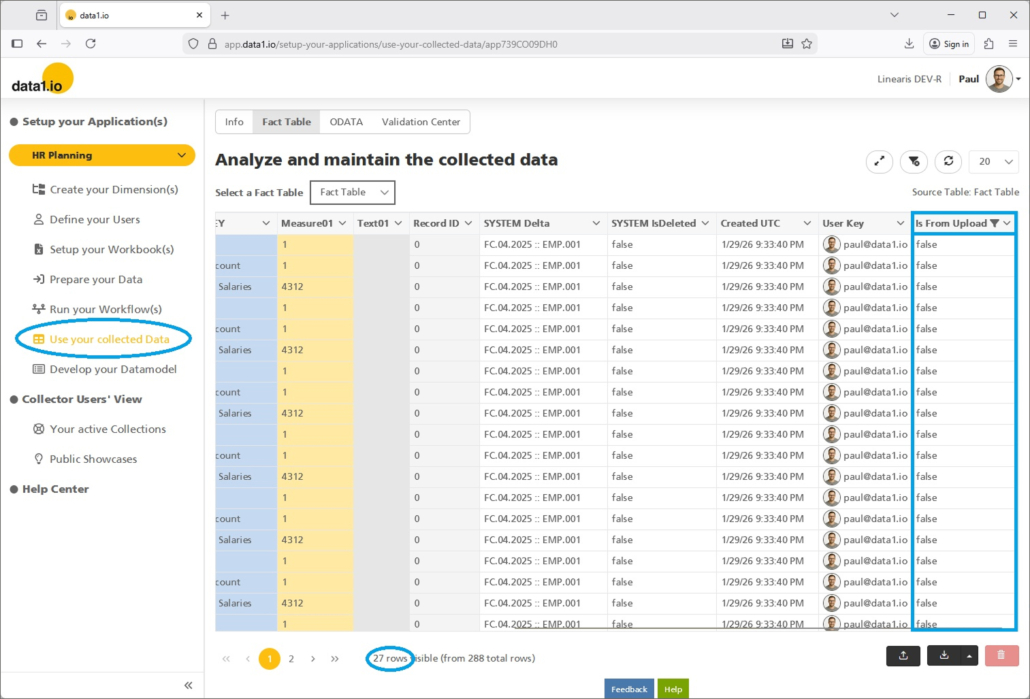
… and also vice versa the records which were written back from the frontend:

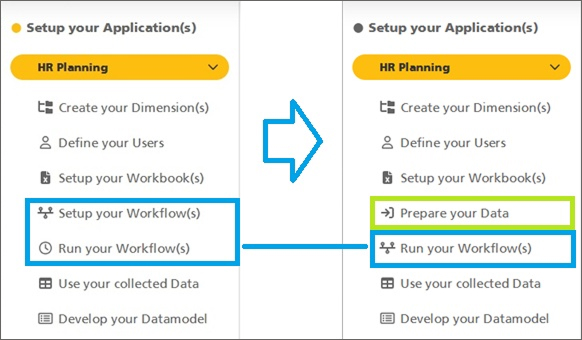
(2) Admin Center: Adopted main menu structure

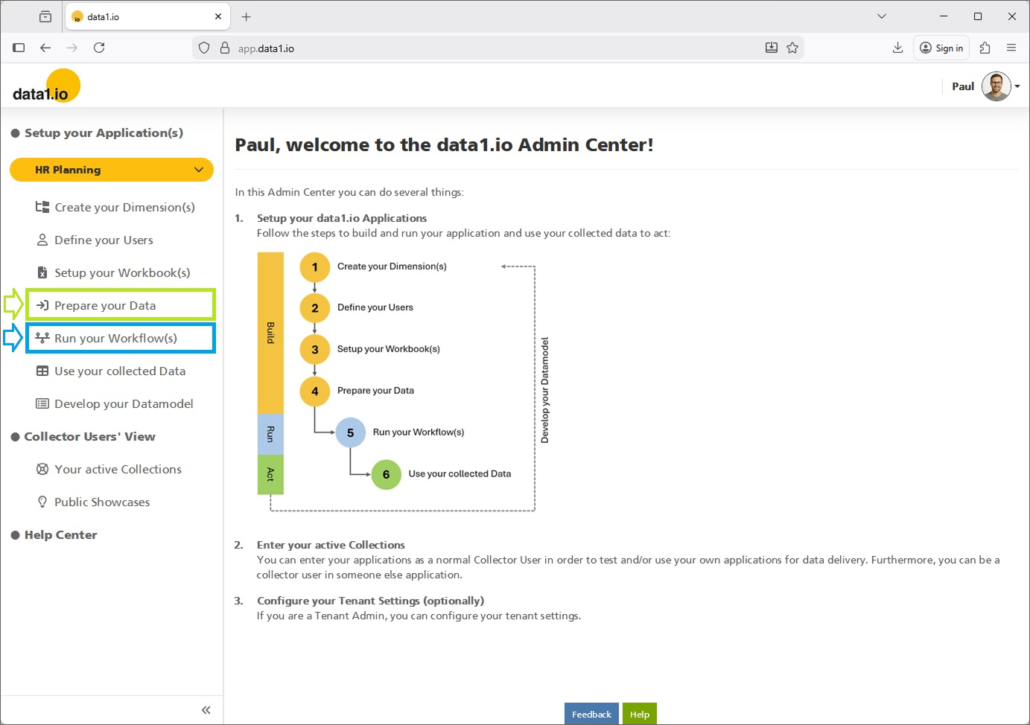
We have changed the main menu structure …

… by adding the new item “Prepare your data” and the new combined item “Run your Workflow(s)

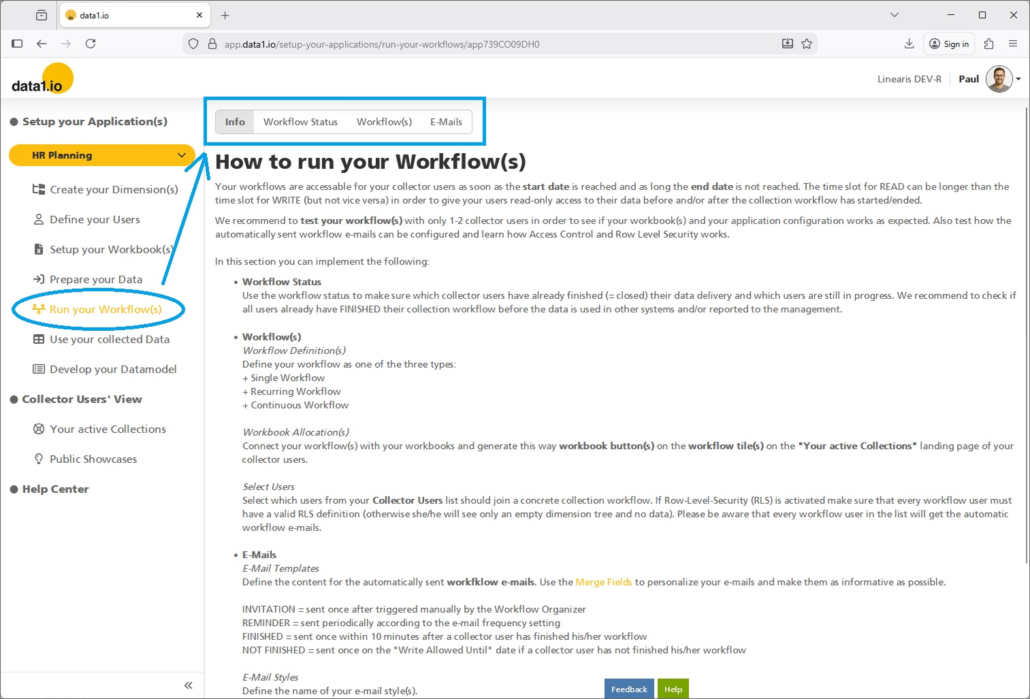
(3) Admin Center: New horicontal navigation

We have redesigned the horicontal navigation in the Admin Center with a second level.

a. New horicontal navigation

We have changed the layout and usability of the horicontal navigation …

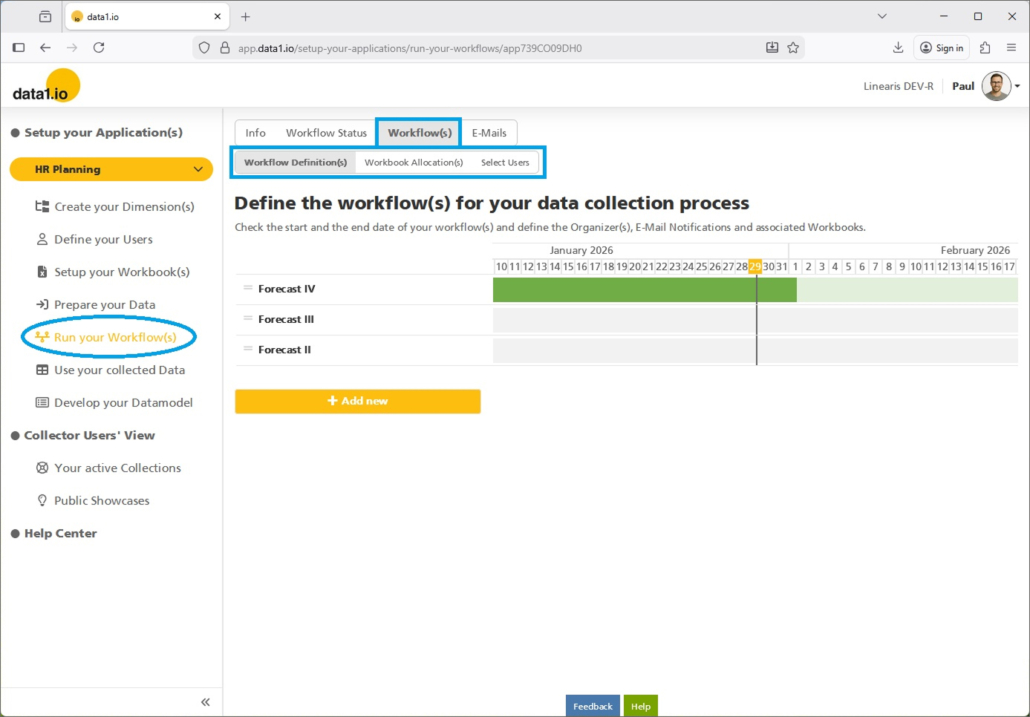
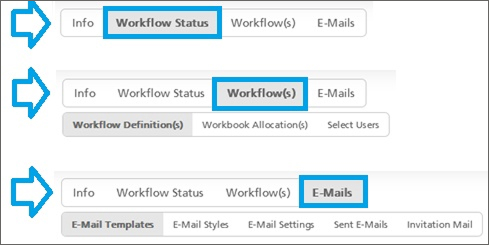
… and we have added an optional second level to the horicontal navigation:

c. Adopted “Run your Workflow(s)” menu

This is the new menu structure in the new combined “Run your Workflow(s)” main item:

You can compare it with the old navigation structure:

b. Adopted “Use your collected Data” menu

We have moved the item “Copy Data” to the new main item “Prepare your data”.

(4) Discontinued Excel Add-In

In the January 2020 Release have launched the current Frontend which was called then “Web Client” and it took us only about 1 year to reach production readiness. Until then the “Excel Client” – which was an Javascript Add-In – was the major frontend for the collector users. We have stopped investements in this Excel Client years ago since we realized that we could not reach our strategic goals with this client.

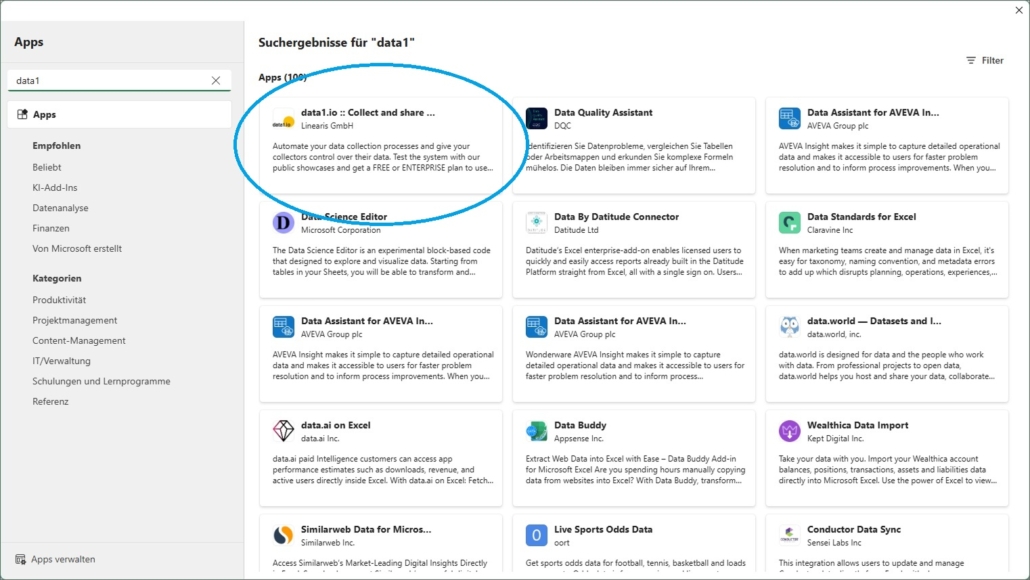
In order to streamline the data1.io ecosystem, we retire now this Excel Add-In and removed it from the Office Store:

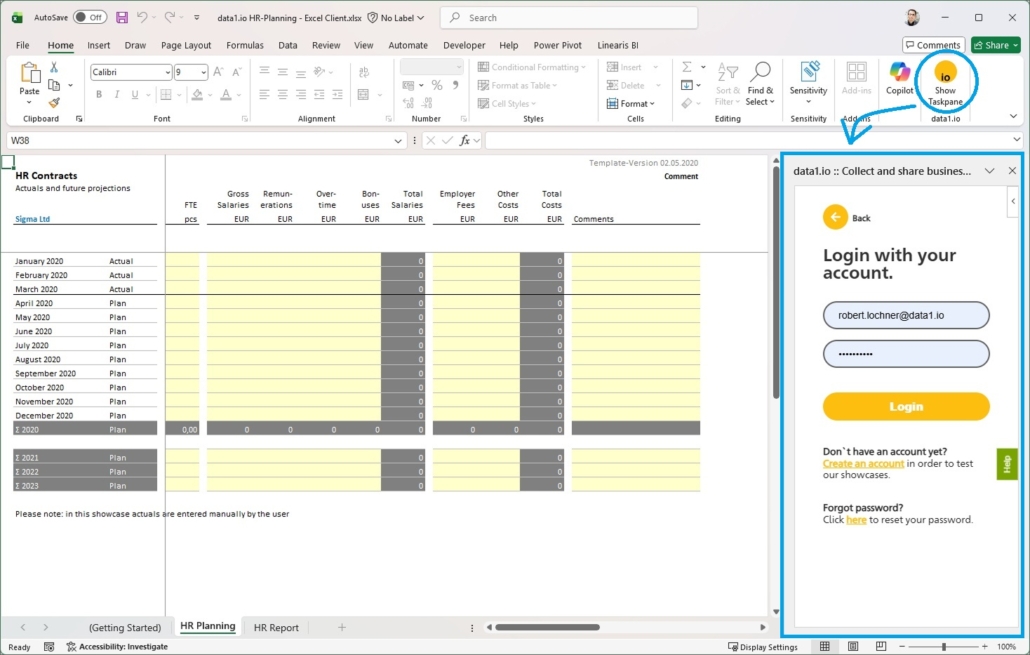
Just for nostalgic reasons let me show some last screenshots from the login screen …

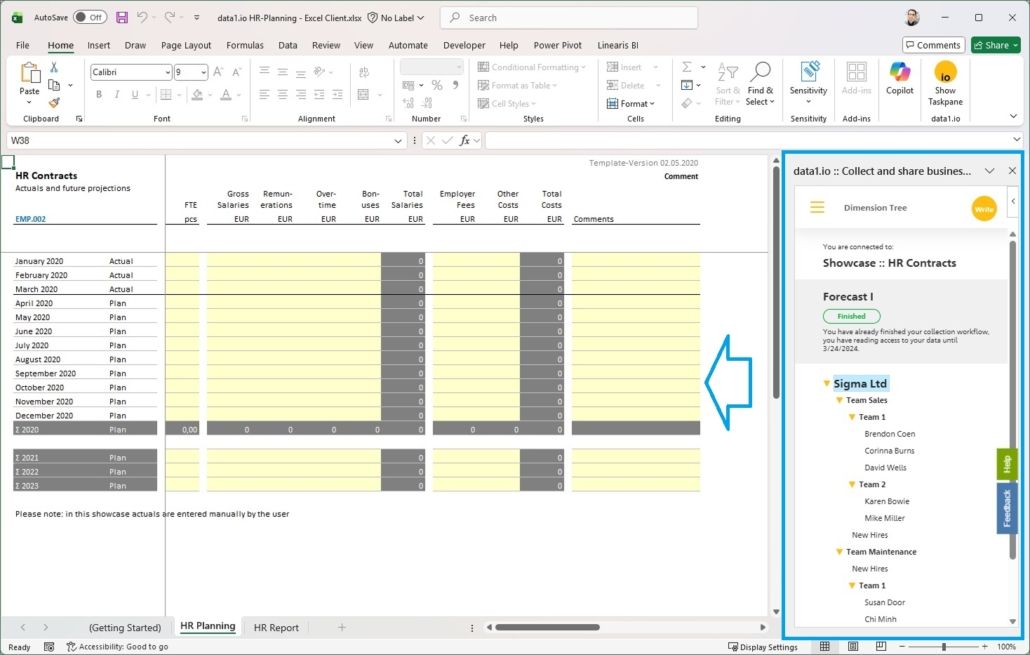
… and from the dimension tree:


We hope you like the new features – we are very curious about your feedback!

Please let us know what you think about data1.io and what kind of planning and data collection processes you evaluate to automate.

we #StandWithUkraine
Release November 2025 (before christmas break)

We are happy to deliver the brandnew November 2025 Release with the new Writeback for Dimensions and many other Features! Try it now!

Remember, the Frontend is the user friendly spreadsheet for your Collector Users to deliver their monthly/weekly/daily data. The Admin Center is the tool for the Power User to setup and control your organization’s collection workflows.

(1) Frontend: Improved Writeback for Dimensions (Preview)

We have introduced the new Writeback last month in the October 2025 Release. This month we deliver a new field of application in our public P&L showcase and a new action button.

(a) New P&L Showcase

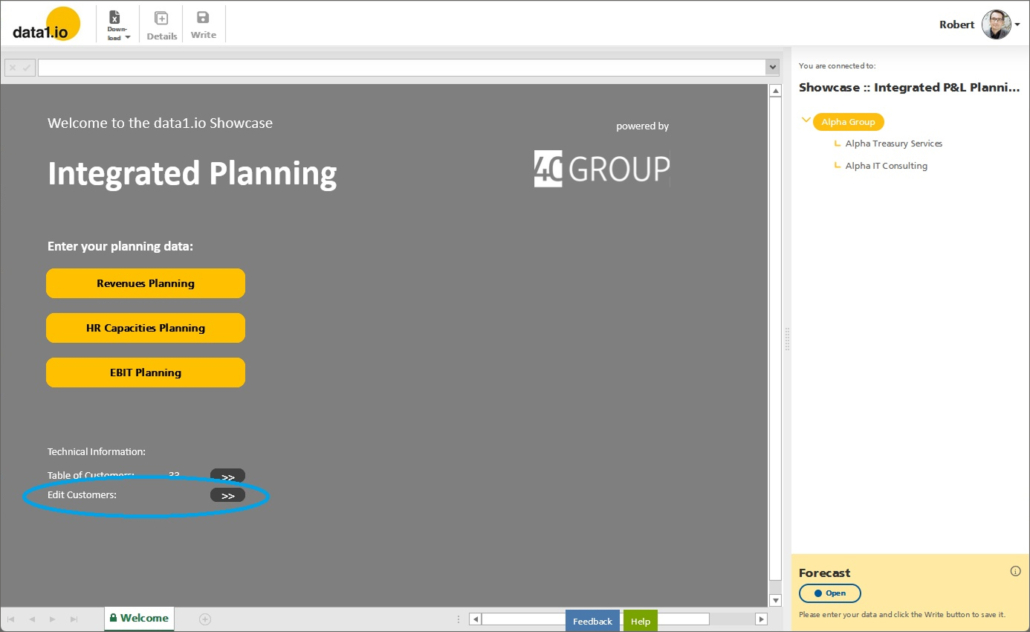
In our P&L Public Showcase have added a new sheet for editing the customer dimension table (which is used as basis for the customer dropdown in the Revenues Planning).

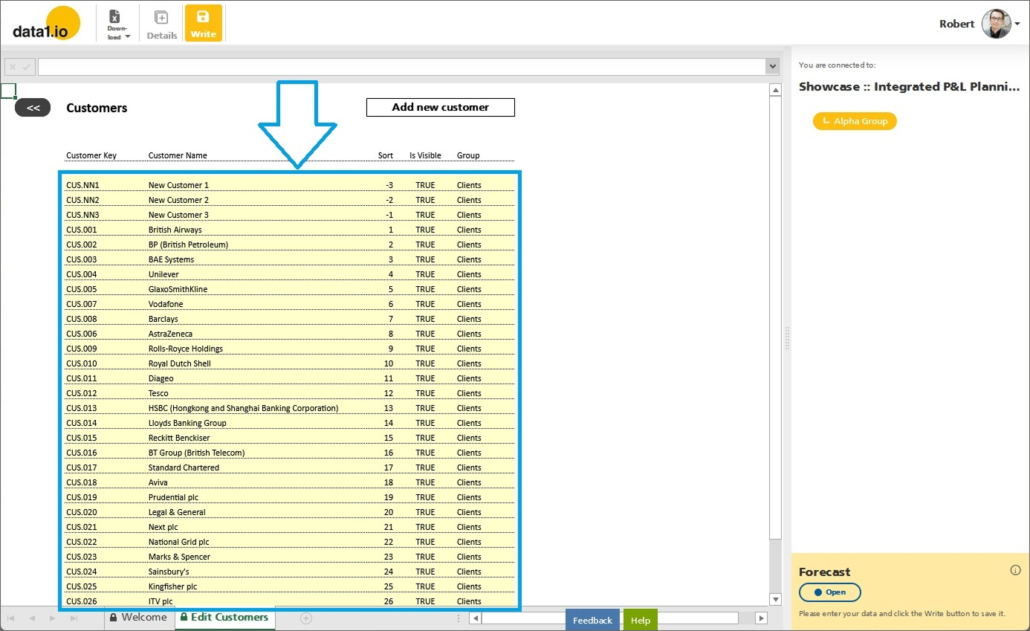
In this sheet all the columns and records of the “Dimension 005” are shown with a dynamic list query:

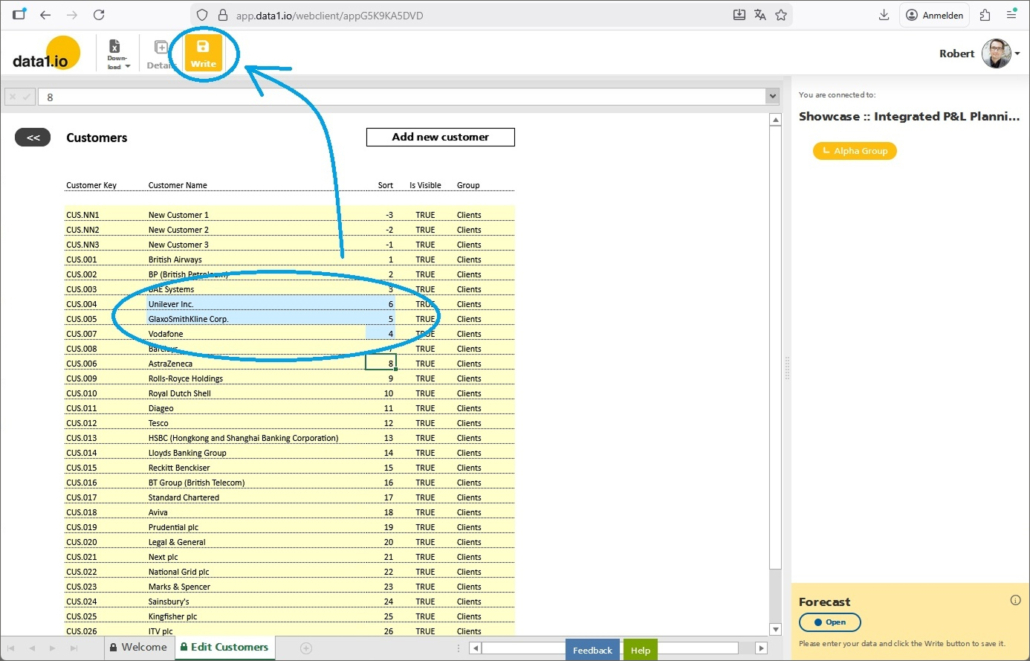
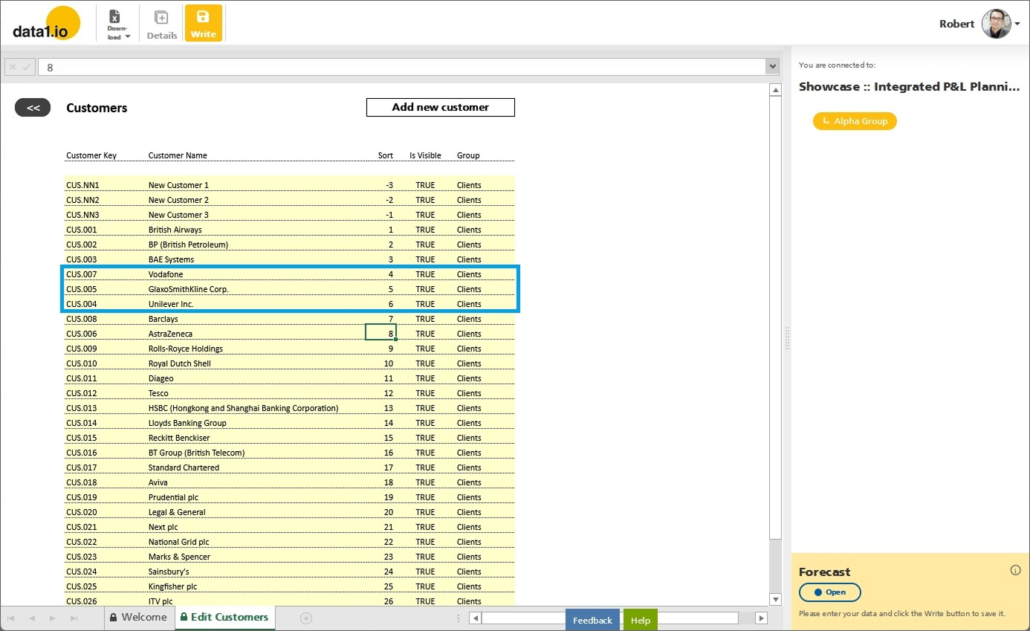
You can edit the data of this table and execute the writeback:

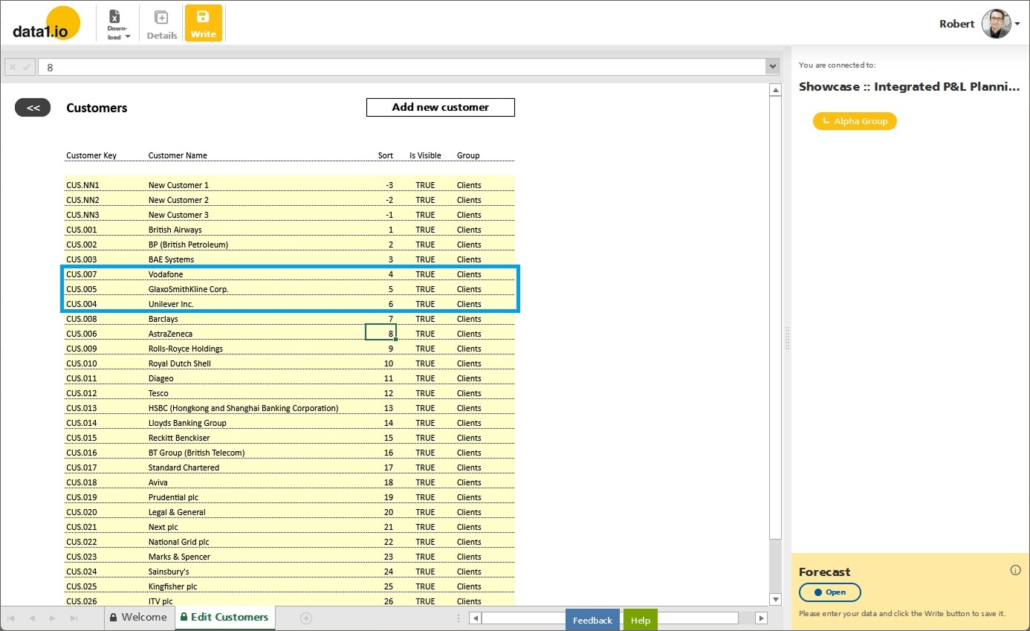
After refreshing the list query you can see that the table was updated by the writeback process:

(b) New Action Button for new records

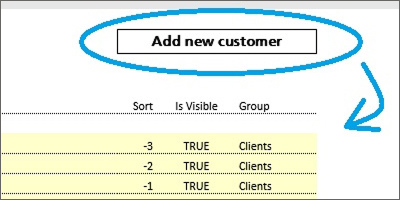
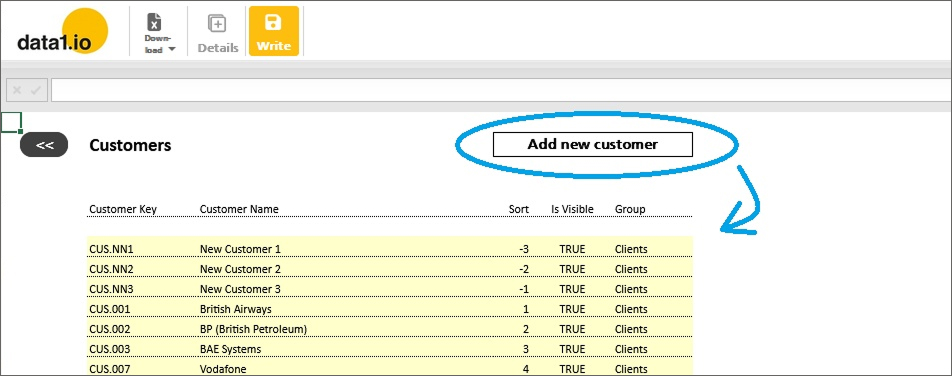
Action Buttons are very important feature in data1.io and are established very well. This month we have added the new action type “AddNewRowToListQuery” which makes it possible to create a button that inserts a blank row – either at the start or the end – of a list query:

{ "Title": "Add new customer", "Action": "AddNewRowToListQuery", "Action Parameter": "data1_LISTQUERY01", "Action Parameter 2": "start", "Status": "Enabled" }

Pressing the button …

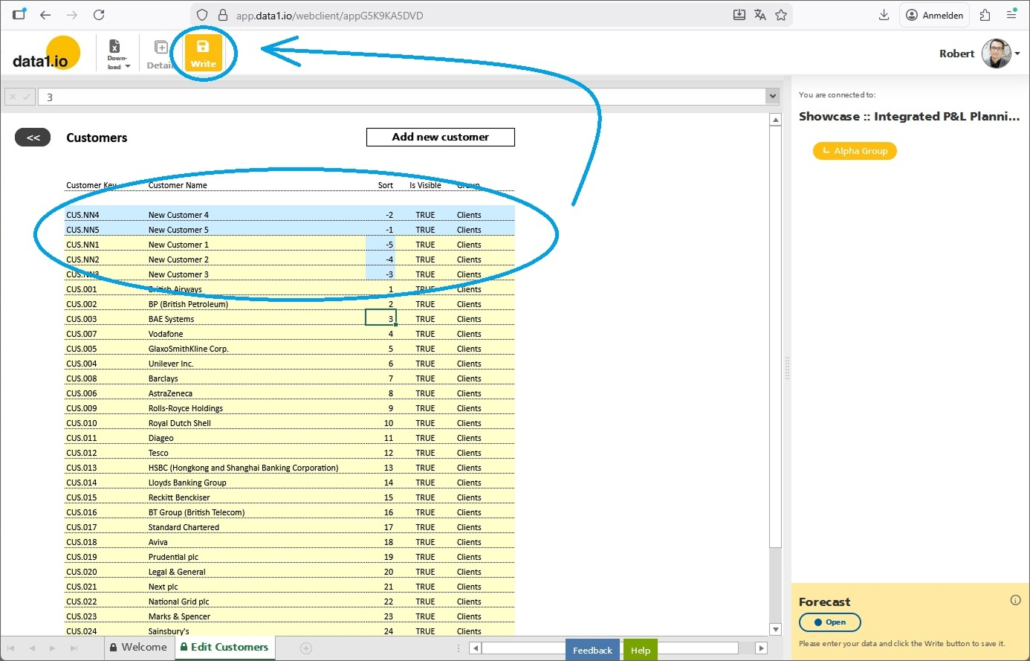
… inserts an empty row at the top of the list query, pressing the button double will insert two blank rows. In those new blank rows new records can be added and written back withe Write button:

Refreshing the list query proves that the writeback of the new records was succesful:

(2) Admin Center: New Validation Views

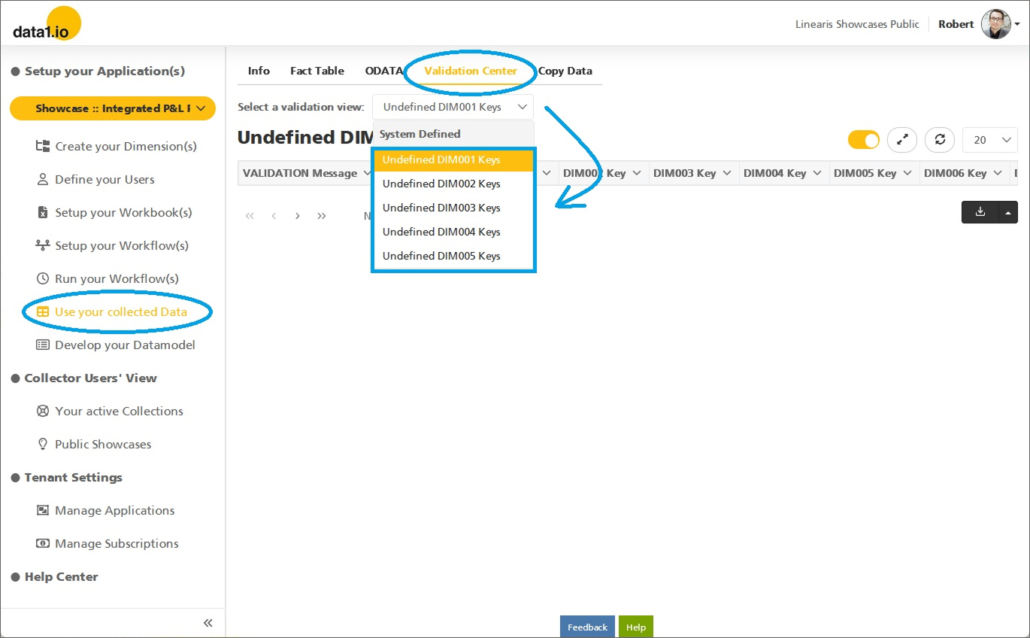
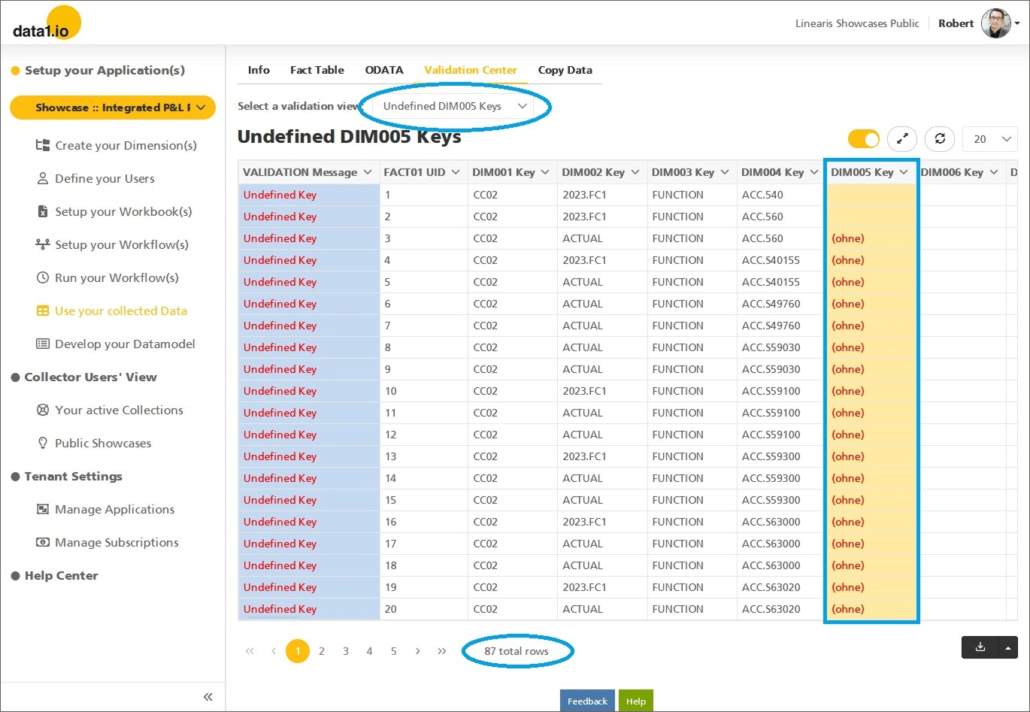
We are very happy that we can deliver the brand new section “Validation Center” with the new validation views. Those views will help you to and identify inconsistencies and keep the data in your datamodel clean. You will find in the dropdown validation views for those dimensions that are activated in your datamodel:

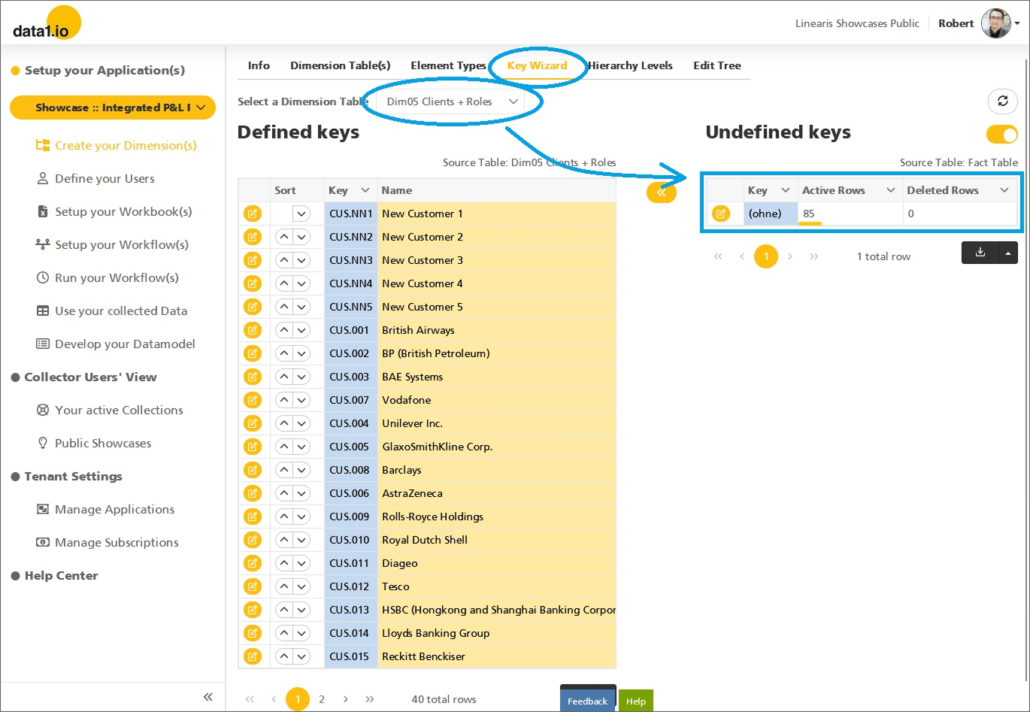
The validation view for DIM005 in this application shows, that 85 fact records use a DIM005 Key which is not defined in the corresponding dimension table and 2 fact records don`t have a DIM005 Key at all.

Those views basically shows the same information as the long-established “Key Wizard” with two key advantages:

  1. Validation views also shows the records with blank keys
  2. Validation views show the records and can be filtered down to the currently most relevant data

(3) Admin Center: New Popup Screens

We have streamlined the menu structure and have moved two section to new popup screens.

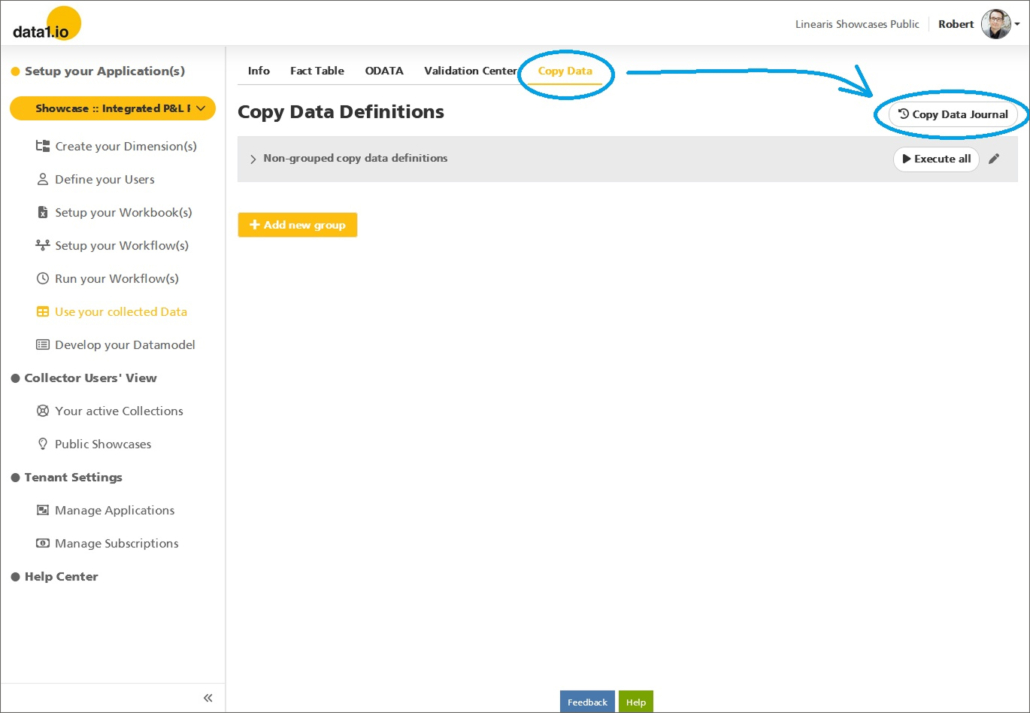
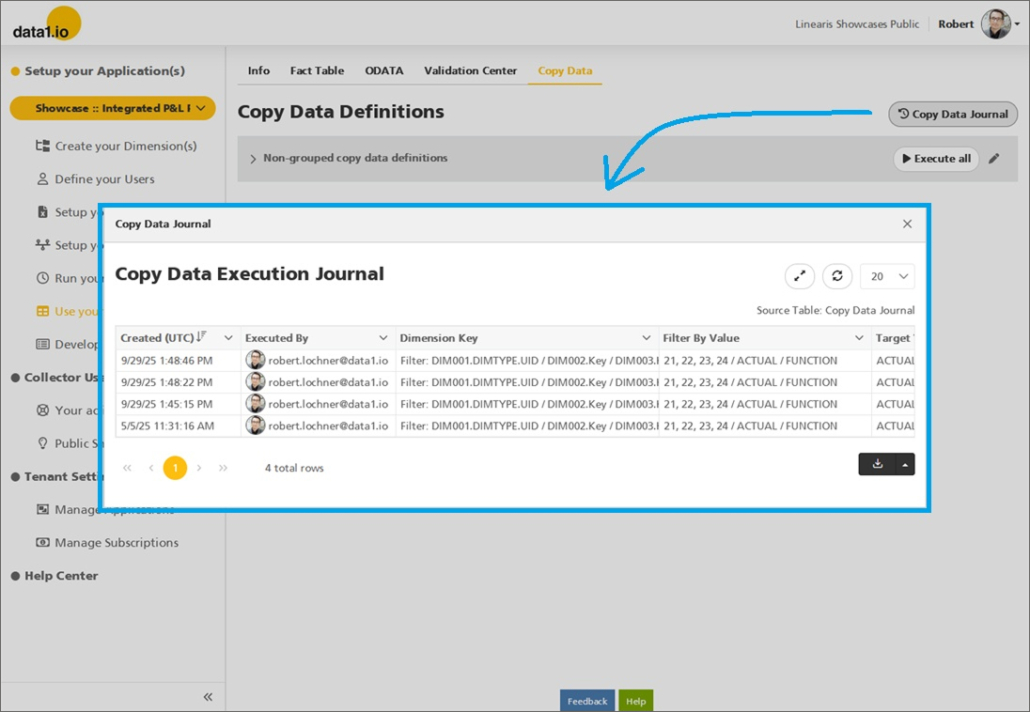
The first one is the Copy Data Journal which can be accessed by the new button within the Copy Data section …

… and is shown now as popup screen:

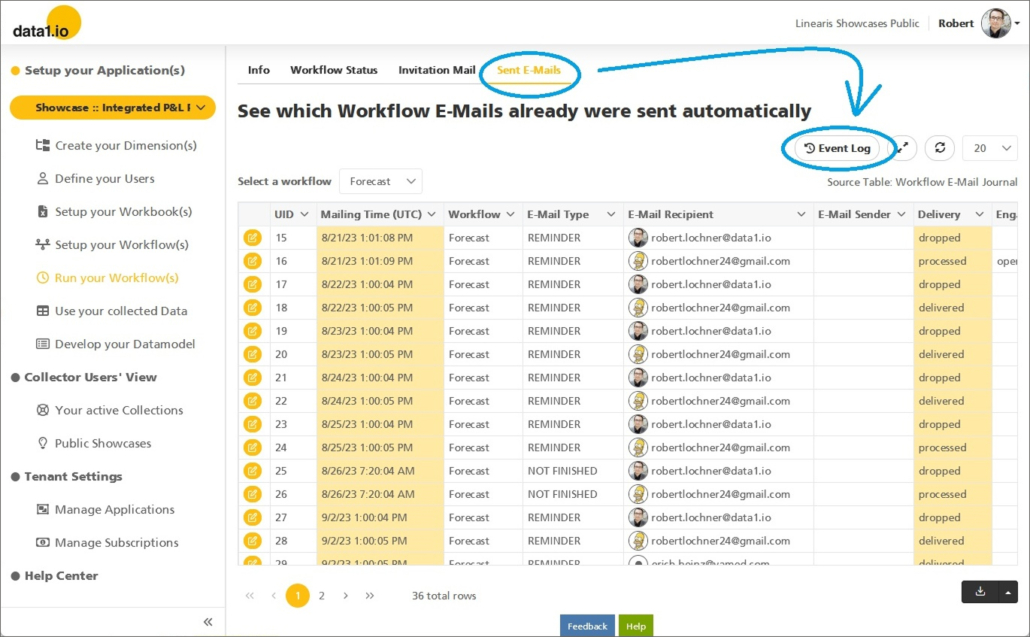
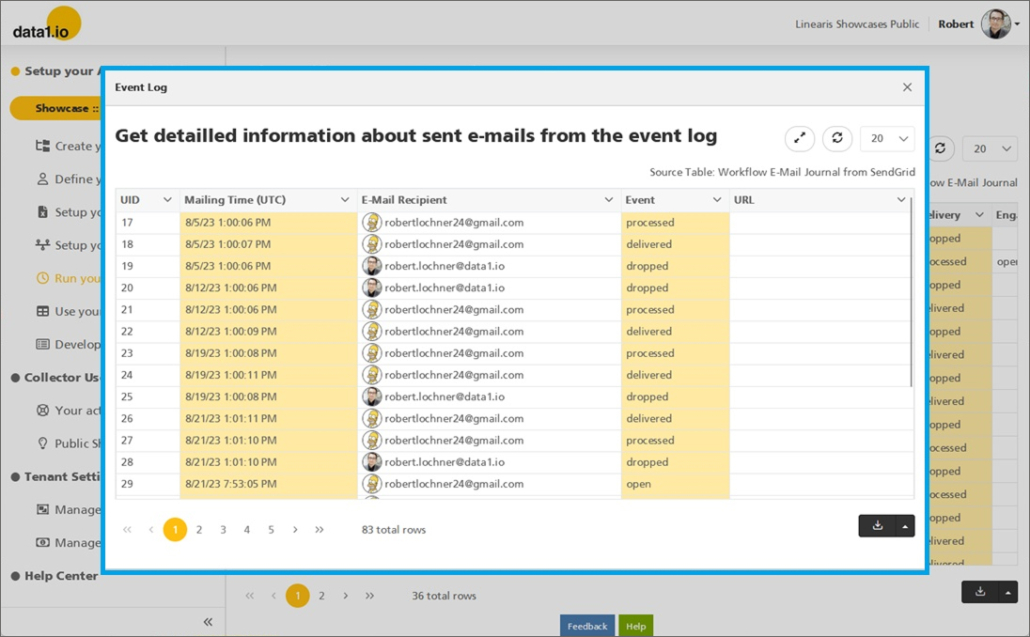
The second one is the Event Log which can be accessed by the new button within the Sent E-Mals section …

… and is also shown as a space-saving popup screen:

(4) Frontend: Changes for Attributes on Sum Levels

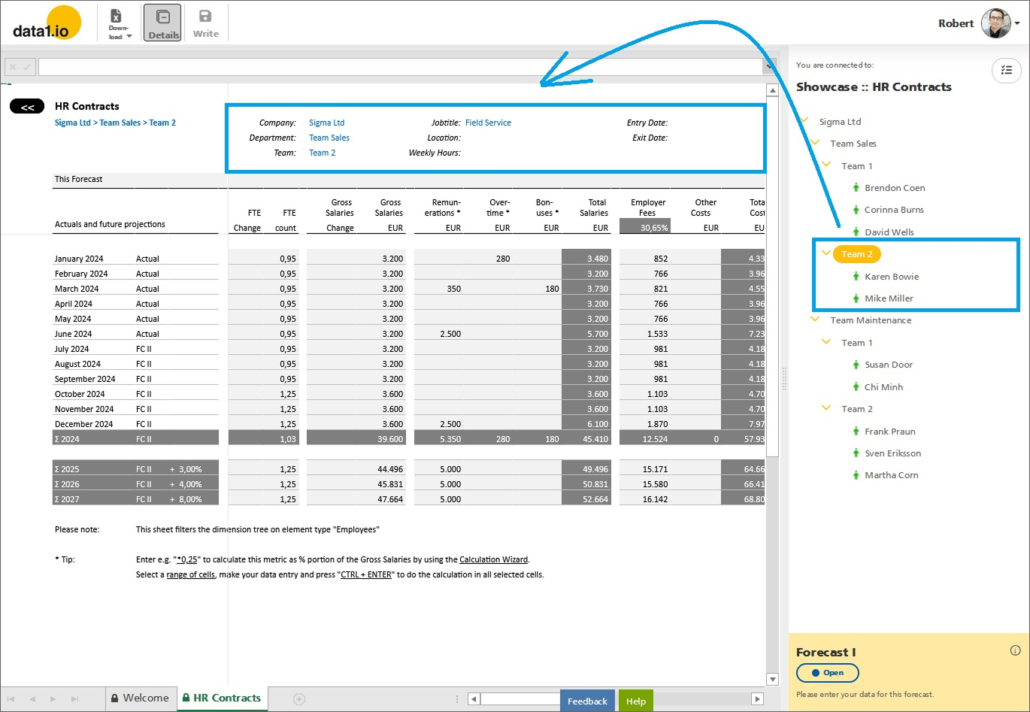
Attributes from the dimension table already have been shown on a sum level, if all the elements below have the same entry for the attribute:

We have changed two things:

  • The attribute is also shown if some of the elements have blank values
  • The attribute is also shown if the elements below are not visible in the dimension tree

This is important for “sum-level” applications and applicatons with large dimension structure.

(5) Discontinued “By Cell Mode”

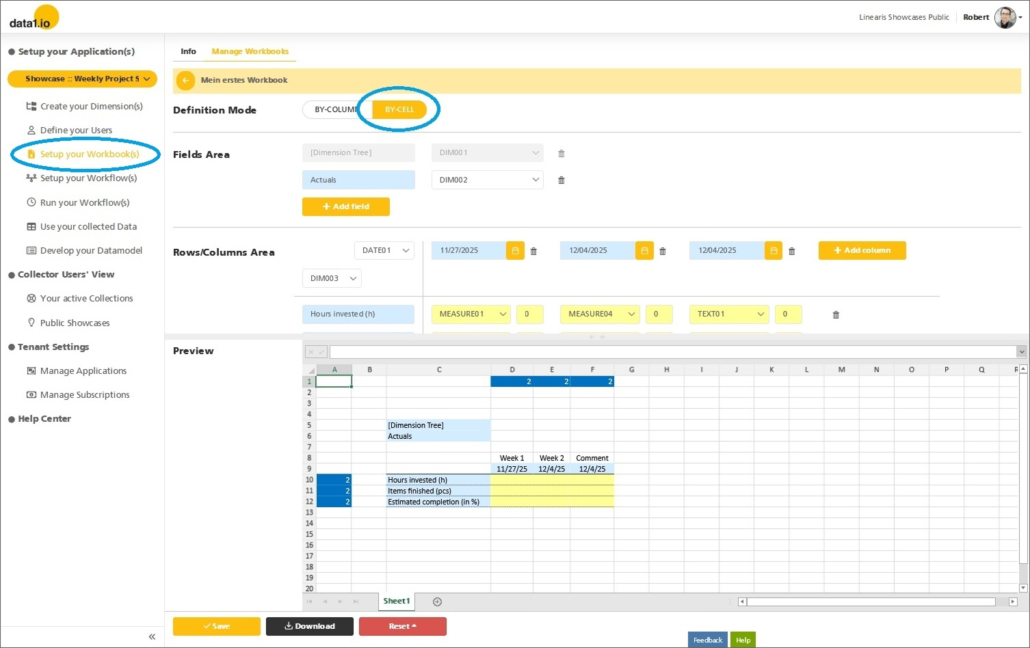
We are in a process of cleaning up our software to focus on the important features. Last month we have started with the discontinuation of two of the older showcases. This month we remove the so-called “By Cell Mode”, which never got practical relevance and makes data1 more complex than necessary.

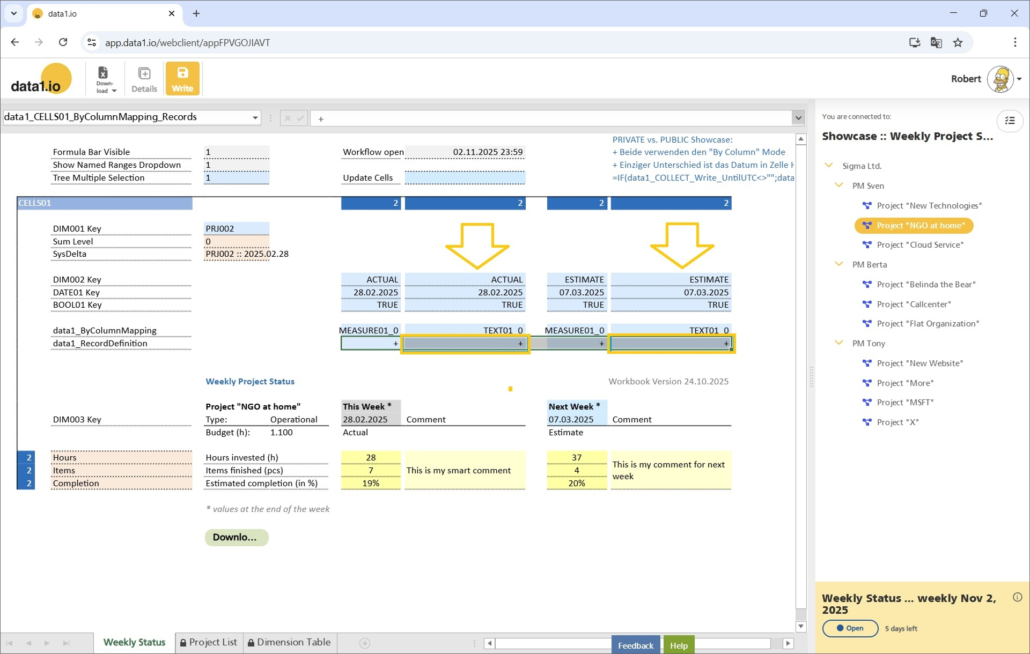
We removed the “Definition Mode” selection from the Workbook Wizard. With the “By Cell Mode” the data from the workbook (= yellow cells) are all written on the one same record.

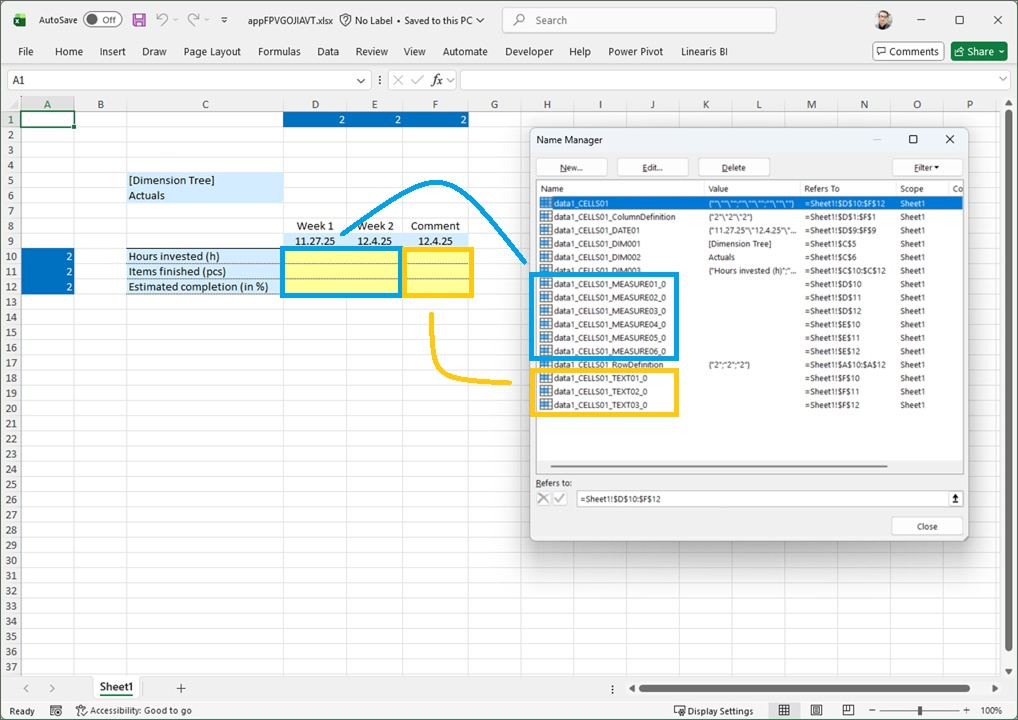
The “By Cell Mode” can be recognized in a workbook by multiple “MEASURExx” and maybe also multiple “TEXTxx” definitions:

The idea was to be compatible with alternative frontends like Power Apps, but this never got practical relevance. The removal of this mode reduces complexity and creates room for new functions.

(6) Technical Updates

We have updated our Angular Framework to the current version 20. Furthermore we have solved “vulnerabilities” in our Angular Web Client Projects and we have automatized the replacement of Refresh-Tokens for security reasons.


We hope you like the new features – we are very curious about your feedback!

Please let us know what you think about data1.io and what kind of planning and data collection processes you evaluate to automate.

We`ll be back after christmas break with the January Release!

we #StandWithUkraine

Release October 2025

We are happy to deliver the brandnew October 2025 Release with the new Writeback for Dimensions and many other Features! Try it now!

Remember, the Frontend is the user friendly spreadsheet for your Collector Users to deliver their monthly/weekly/daily data. The Admin Center is the tool for the Power User to setup and control your organization’s collection workflows.

(1) Frontend: Writeback for Dimensions (Preview)

Until now, Writeback from the Frontend was only possible into the fact table. With this release, it is also possible to edit data from the dimension tables directly in the frontend by your end users!

(a) Fields of application

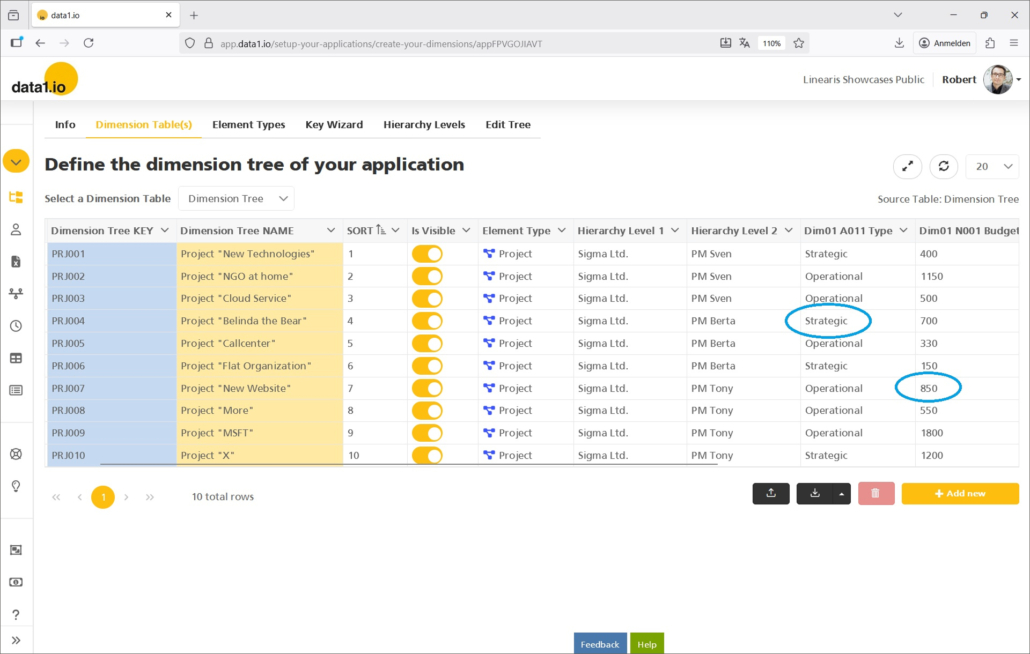
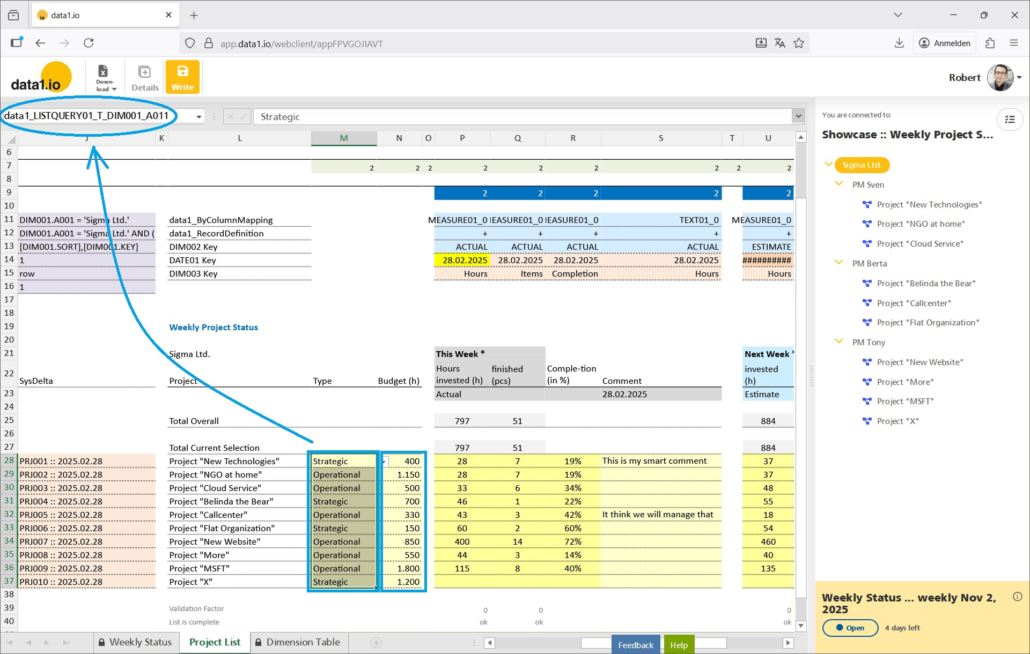
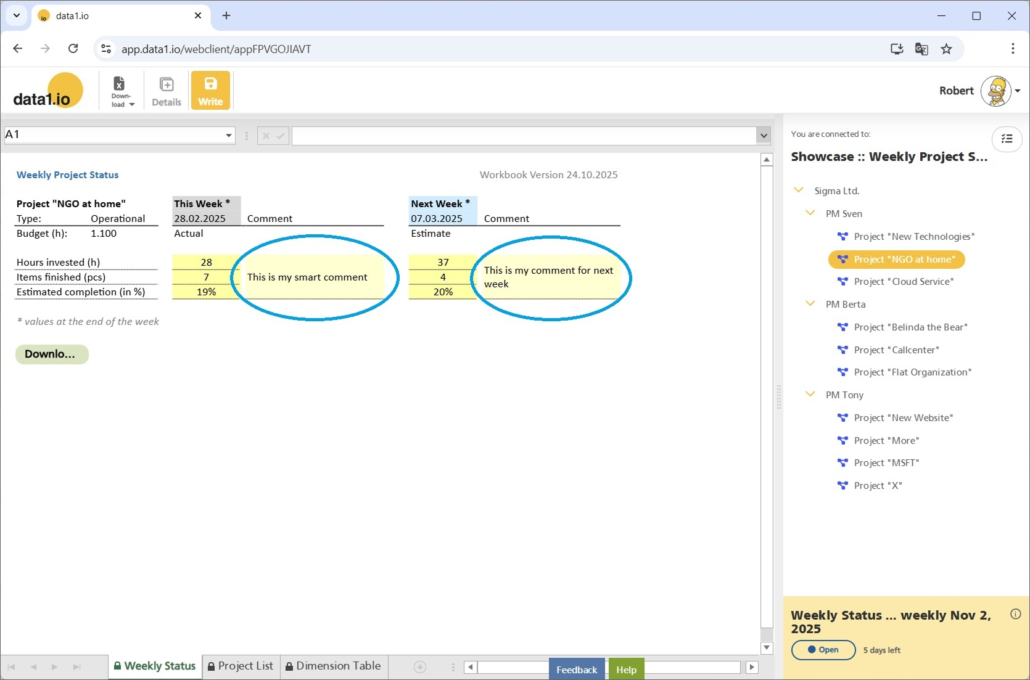
Think of a data entry sheet which gives your users not only the possibilty to enter weekly data but also to edit the attributes for the dimension tree elements – in our case the columns “Type” and “Budget (h)”. With this release, changes in dimension attributes can also be written back to the dimension table:

As a result, the records in the dimension table are updated directly from the frontend:

(b) How it works

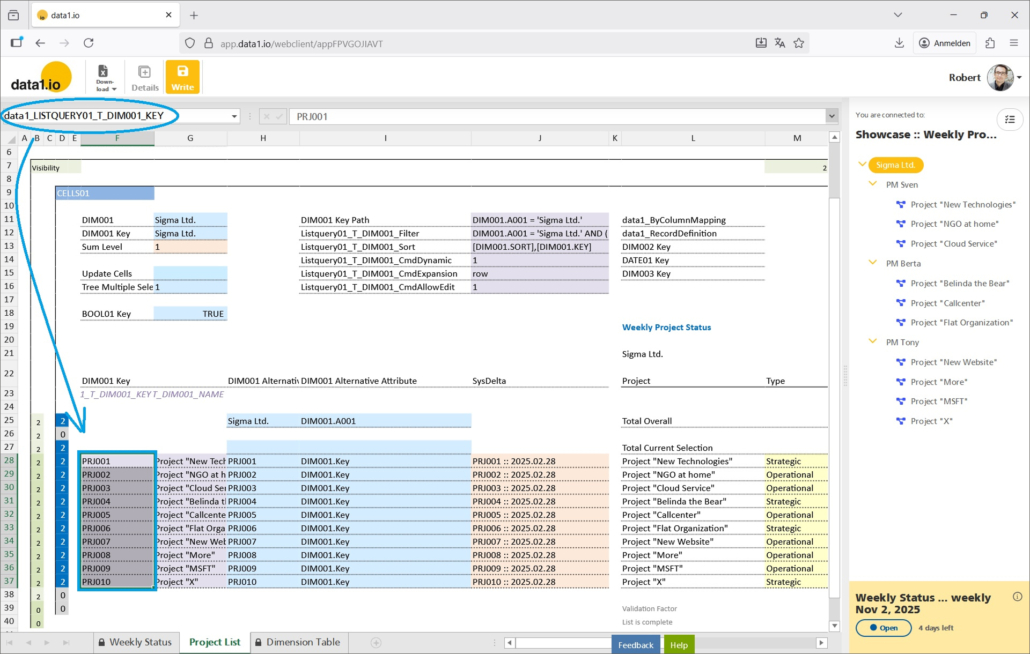
Writeback into dimensions is possible via list queries. That means, the editable field(s) must be attributes in a list query. In our showcase we have two columns which are filled by list queries:

  • data1_LISTQUERY01_T_DIM001_A011 = Column “Type”
  • data1_LISTQUERY01_T_DIM001_N001 = Column “Budget (h)”

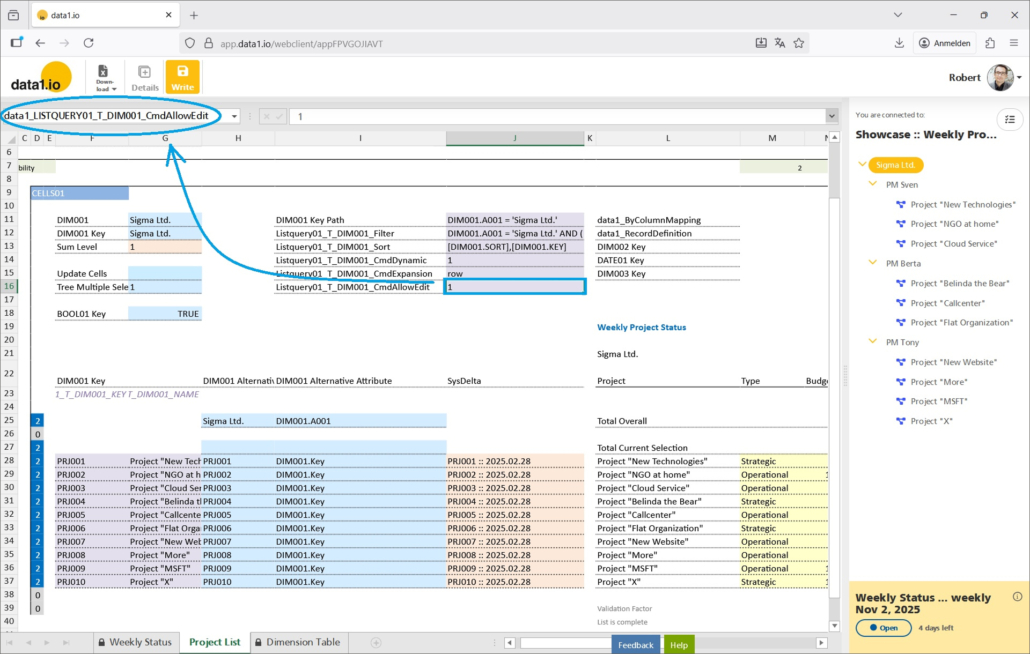
Then, you need to define the new parameter “AllowEdit” in order to activate Writeback for a certain list query in your sheet:

  • data1_LISTQUERY01_T_DIM001_CmdAllowEdit
    0 = default
    1 = Writeback is active

Last but not least it is a prerequisite for every editable list query to deliver the key column:

  • data1_LISTQUERY01_T_DIM001_KEY

This is necessary since the update of the attributes is done via the keys in the key column.

Please note, that every attribute from every dimension table can be edited – but not the keys.

(2) Frontend: Streamlined READ algorithm for Comments

The allocation of comments and other fact attributes to records in the fact table on WRITEBACK are nothing new in data1.io. But there were some blurrings between the two modes – the Plus mode (+) and the Star mode (*) – when READING the comments back into the workbook. Those blurrings sometimes led to desired results although the definitions were not correct and in other cases it simply did not work as expected. With this release we have streamlined the READ algorithms for the two modes so that they both now work as they should.

(a) Plus Mode (+)

Plus mode is the default mode and means that the comments are strictly written on “comment records” of their own using exactly the dimension keys from the workbook. And this is true now also for the READ process – data1.io will show only the comment which exactly matches the dimension keys that are defined in the workbook.

You will use the Plus mode when you have more than 1 comment per row:

And the READ mode will use exactly the dimension keys from the workbook:

(b) Star Mode (*)

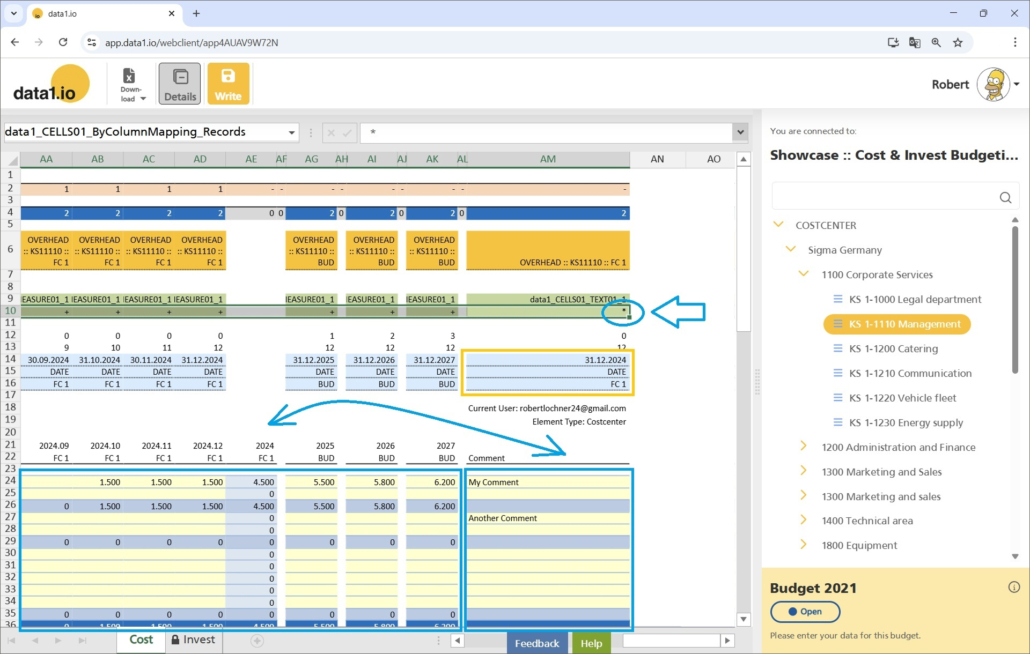
Star Mode means that a comment basically is NOT written on a record of its own but will be added to already existing “measure records” of the same row (or column) in the workbook. Therefore the dimension keys defined are only directly relevant for comments in a row without any values in the other cells of the row.

You will use the star mode if you have only 1 comment per row and when you want to save the comment on every “measure record” of this row.

The READ process works the same way: if there is any “measure record” in this row available then the comment is taken from the first record found. If none is found then a “comment record” with exactly the dimension keys from the workbook definition is searched for. This algorithm is used from now on only for Star definitions (*) and no more for Plus definitions (+).

Please check your workbooks if all comments and all other fact attributes (text, dates, numbers) are allocated in your workbook as expected.

(3) Frontend: Multiple Tree Selection for Advanced Scenarios

We have intdroduced the Multiple Tree Selection in September 2025 Release. With this release we have made this feature ready for advanced scenarios with sum-level trees (which were also introduced in September 2025 Release).

  • Improvement for Alternative Level Queries
  • Improvement for Write button activation / deactivation
  • Improvement for visible / invisible rows refresh

Therefore the multiple tree selection can now be used in every scenario.

(4) Admin Center: Consistent Workflow Times

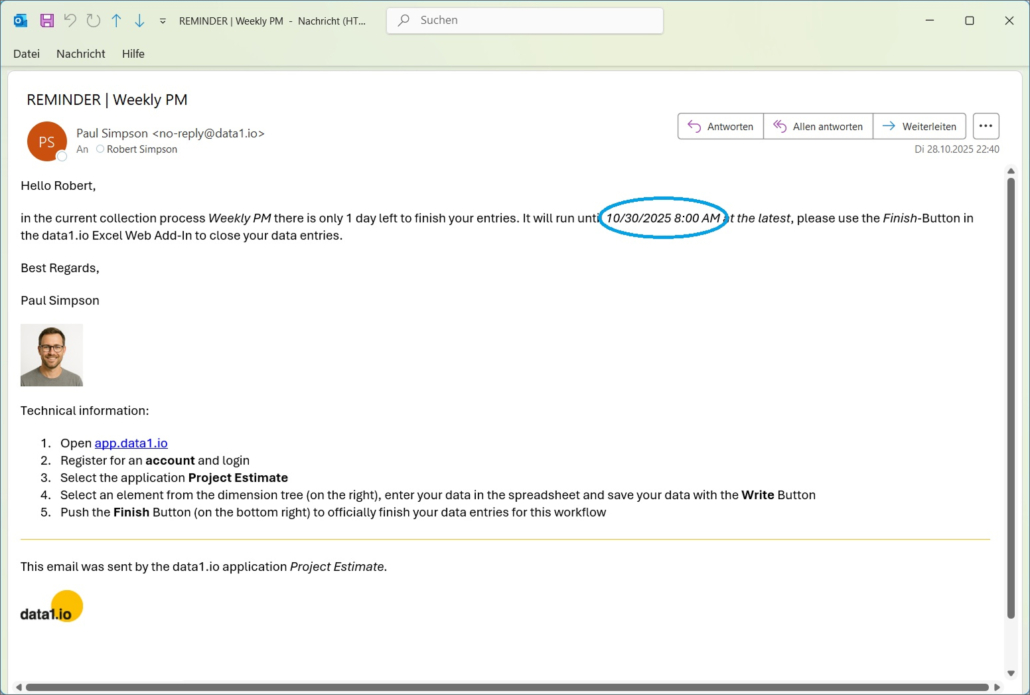
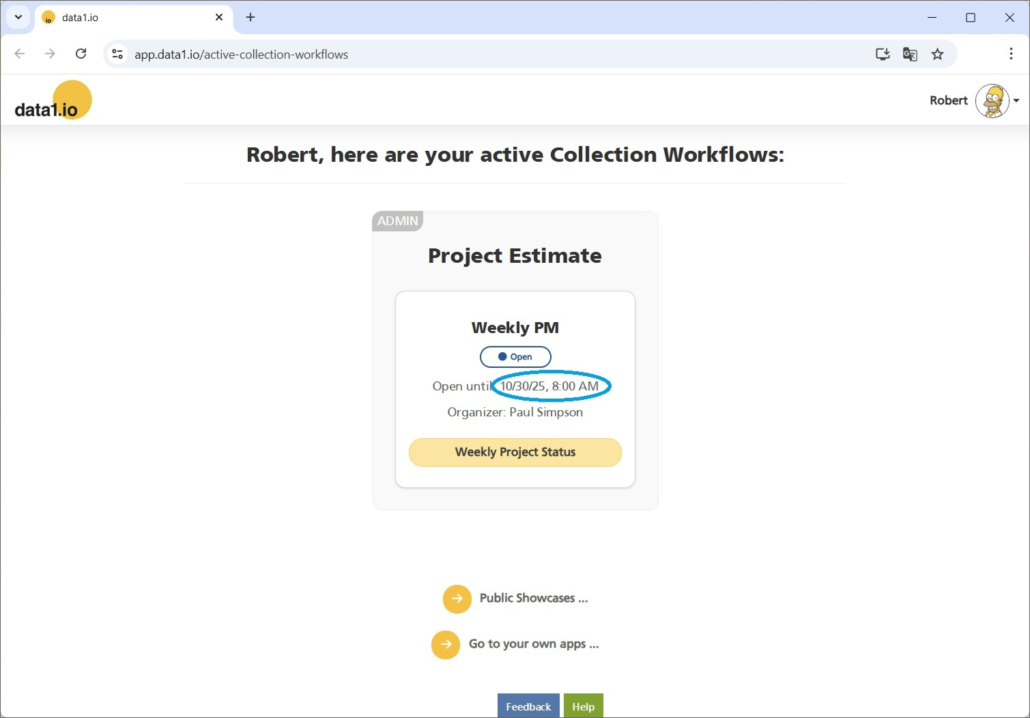
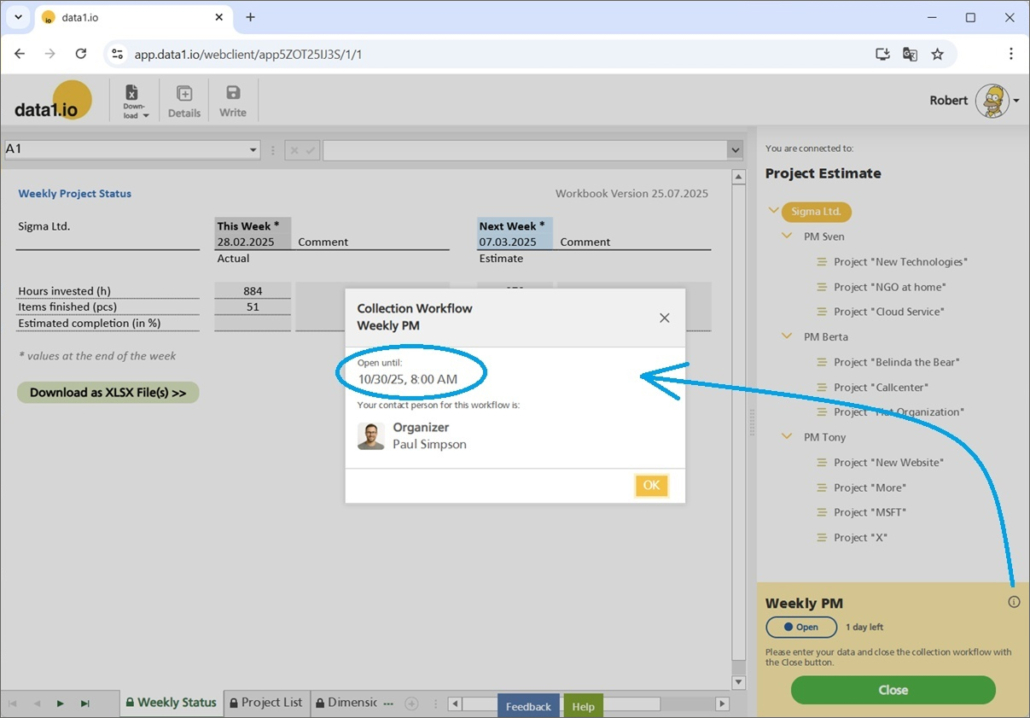
There were inconsistencies with the display of workflow times throughout the data1.io application. With this release, workflow times are consistently the same in Workflow e-Mails

… on the workflow landing page

… and in the workflow box of the frontend:

(5) Discontinued Showcases

We have decided to remove two of our Public Showcases since they did not meet our current technical demands:

  • Financial Forecast
  • Weekly Cash Planning

The remaining 6 showcases are up to date and highly relevant for the demonstration of the feature set of data1.io.


We hope you like the new features – we are very curious about your feedback!

Please let us know what you think about data1.io and what kind of planning and data collection processes you evaluate to automate.

we #StandWithUkraine
Release September 2025

We are happy to deliver the brandnew September 2025 Release with the new Multiple Tree Selections, the new Audit Table and many other Features! Try it now!

Remember, the Frontend is the user friendly spreadsheet for your Collector Users to deliver their monthly/weekly/daily data. The Admin Center is the tool for the Power User to setup and control your organization’s collection workflows.

(1) Frontend: Multiple Tree Selection

a. How it works

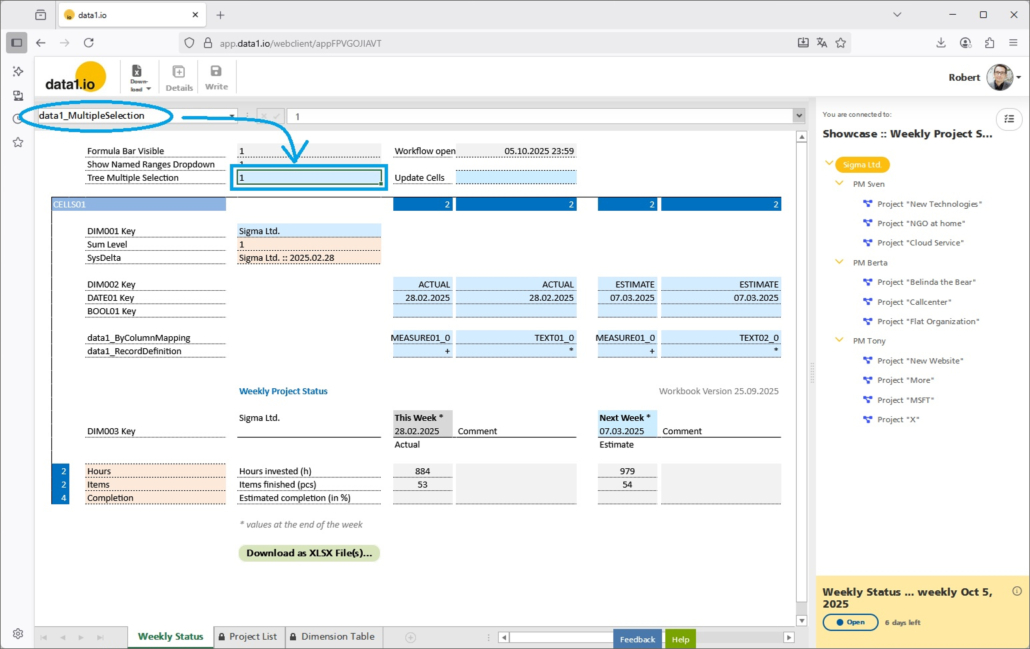
Simply define the new named range data1_MultipleSelection and use the following parameters:

  • 0 = Single Tree Selection (default behaviour)
  • 1 = Multiple Tree Selection

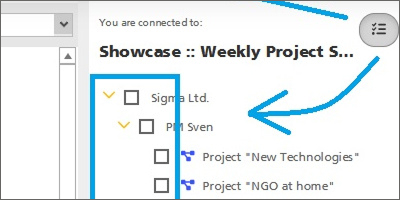
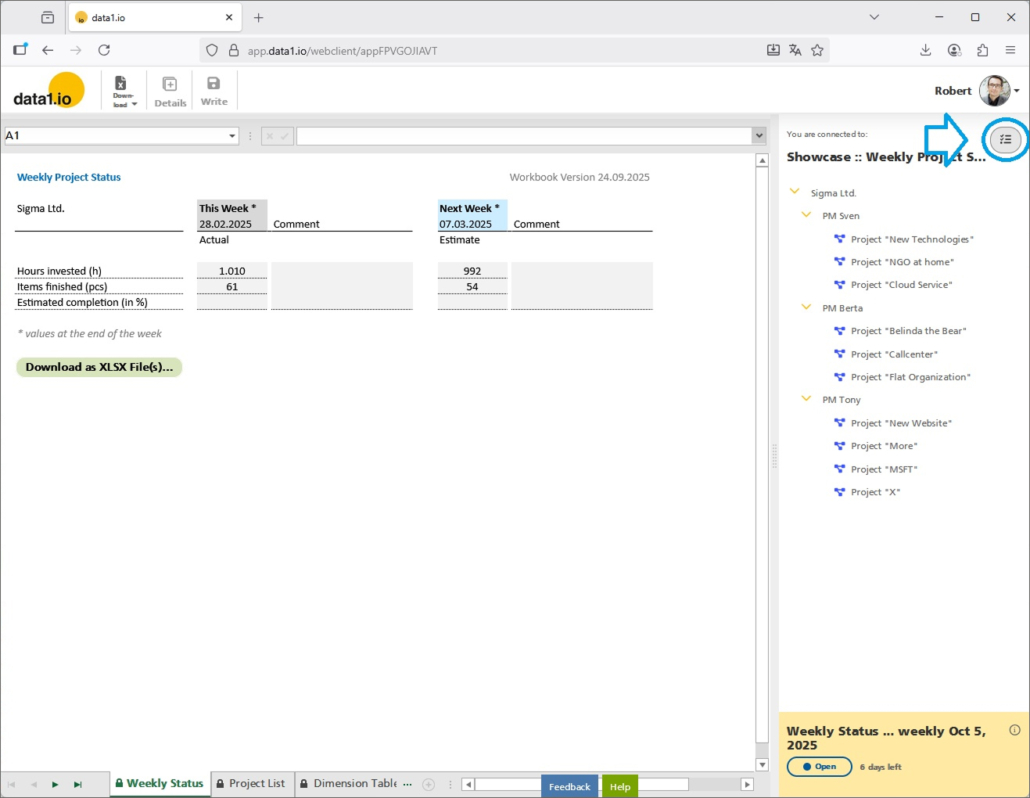
This will activate the new Multiple Selection button in the right top corner of the dimension tree:

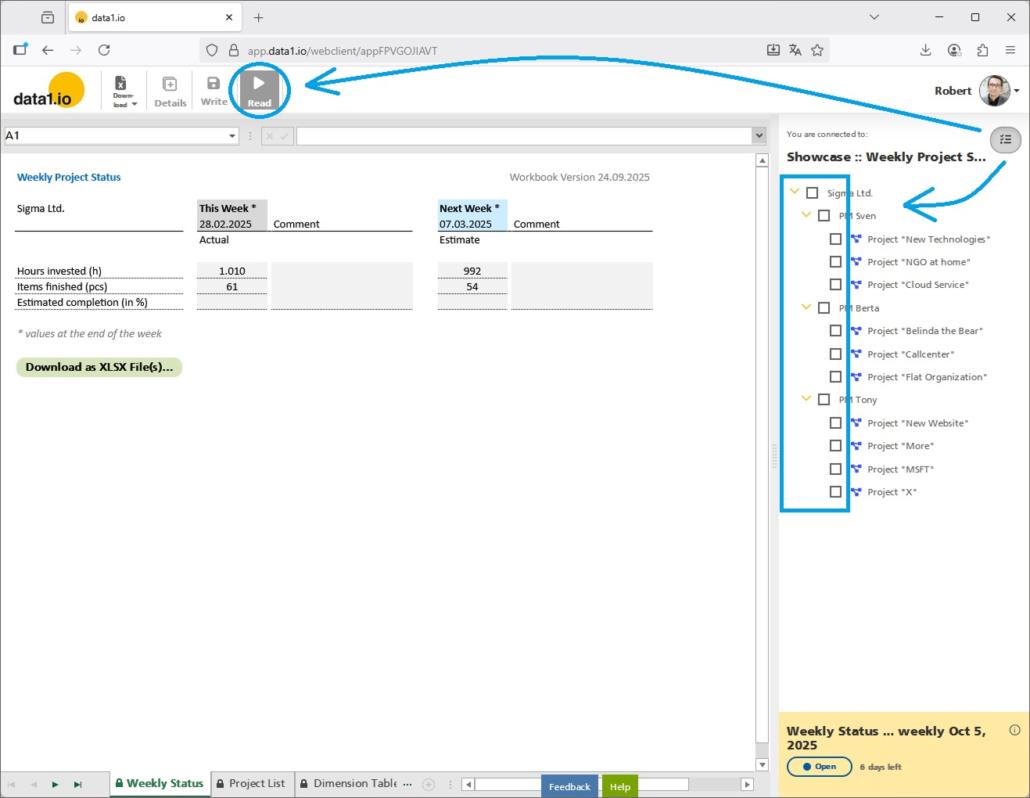
Pressing the button will switch the dimension tree into multiple selection mode and will make visible the new Read button in the menu bar (which is not activated until a selection is made):

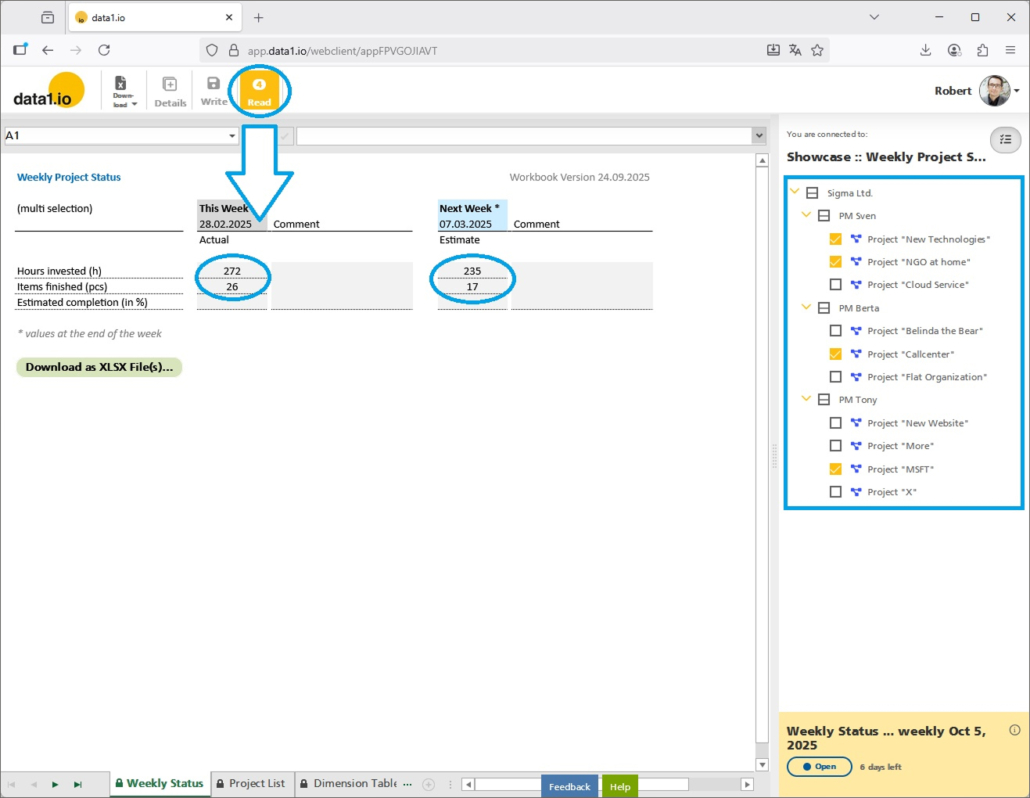
Select the elements from the tree which should be summed up and press the Read button (which will be activated after a selection is made):

As always in data1.io, of course you can also formulas to dynamically control the parameter and therefore the appearance of the dimension tree.

b. Multiple Selection in List Queries

Multiple selection is automatically applied also to List Queries on the DIM001 dimension table:

c. Multiple Selection in Dynamic Tables

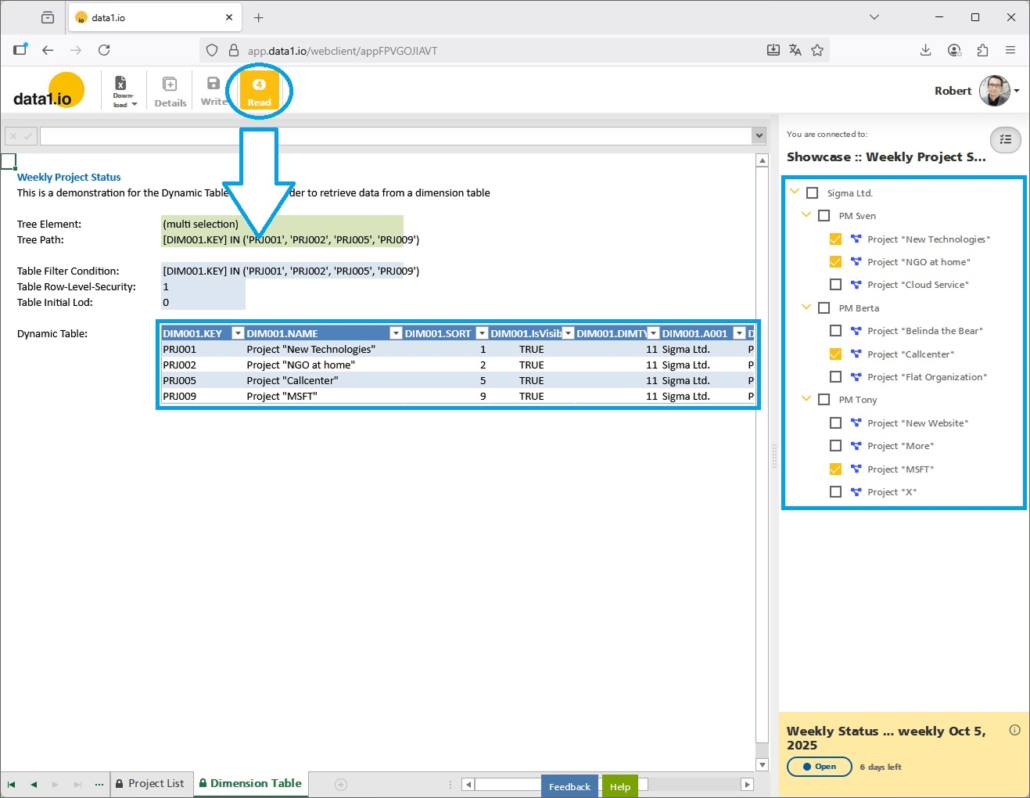
Last but not least, multiple selection is also automatically applied to Dynamic Tables connected on the DIM001 dimension table:

(2) Showcase: Writeback on Sum-level Elements

We have added a writeback on sum-level elements to our Integrated P&L Planning Public Showcase. Writeback on sum-level elements is not a new feature but an interesting combination of already existing features.

a. Fields of applications

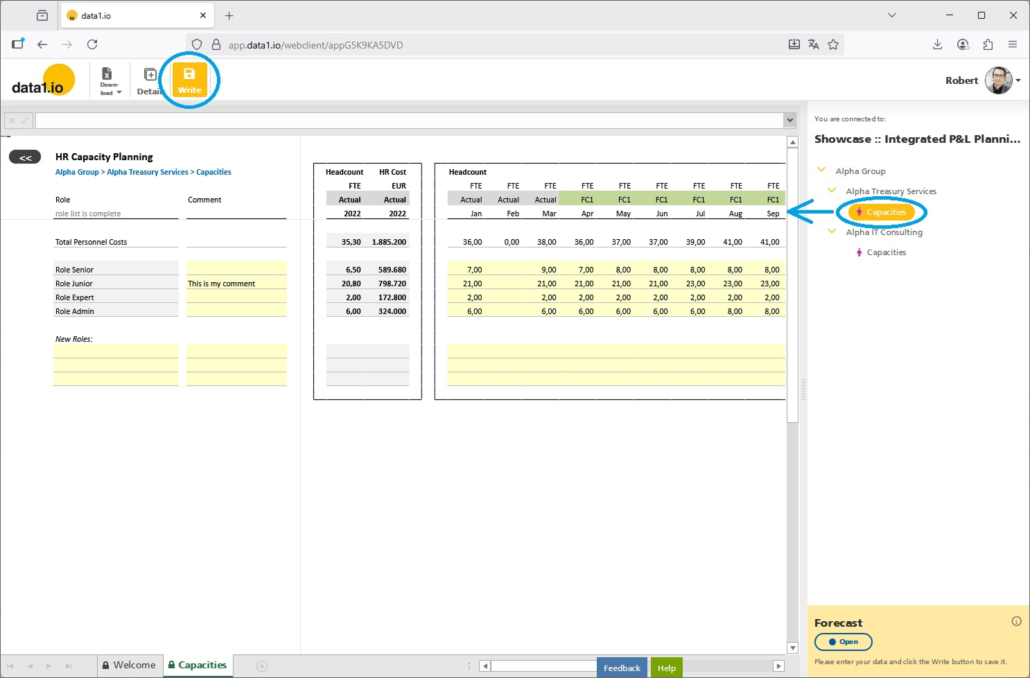
There are many plans which are not detailled to profitcenter, costcenter, employees but are entered e.g. on a company level. Until now, it was necessary to have a “receiving element” e.g. for capacities planning on a company level (= 1 element per company):

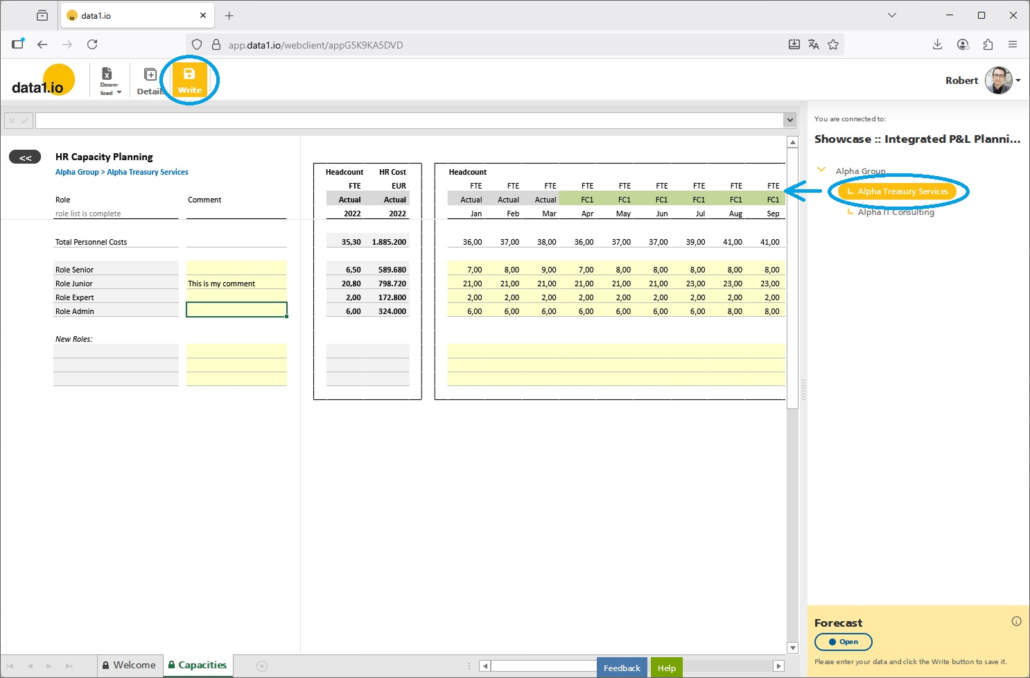
It is possible to make the “receiving element” invisible in the tree and make your data entry directly on the sum-level element (whereby the values are still written to the “receiving element”):

b. How it works

In order to implement this behaviour, you use the following features:

  • Parallel hierarchy
    To make the “receiving element” invisible in the tree (but it continues to exist in the dimension table).
  • Parameter “Planning Level”
    To determine your individuel data entry level, since data entry should not be possible on every sum-level node but only the ones which make sense. In our showcase it is the “company level” from the 2-levels tree.
  • DIM001_Alternative definition
    To write the entered value to the “receiving element” which is not visible any more but continues to store the entered values. Therefore the key of the “receiving element” for specific sum-level node must be determinable.
  • Parameter “data1_Write_AlwaysOn”
    Set it to the value “2” in order to activate the Write button on your relevant sum-level nodes.

In summary, the “receiving element” is not visible any more but the values now entered on the sum-level are still written on the “receiving element” (which must be known).

(3) Backend: New Audit Table

When you write your data to your fact table, the replaced records are not deleted but only set to “IsDeleted = True”. This makes it possible to recover your data if a planning incident happens.

Until now, we have saved all – current and deleted – records in the one Fact Table. With this release this has changed and data1.io uses two separate tables for the current and another one – the “Audit Table” – for the deleted records. The historical data in your fact table was moved to the new Audit Table.

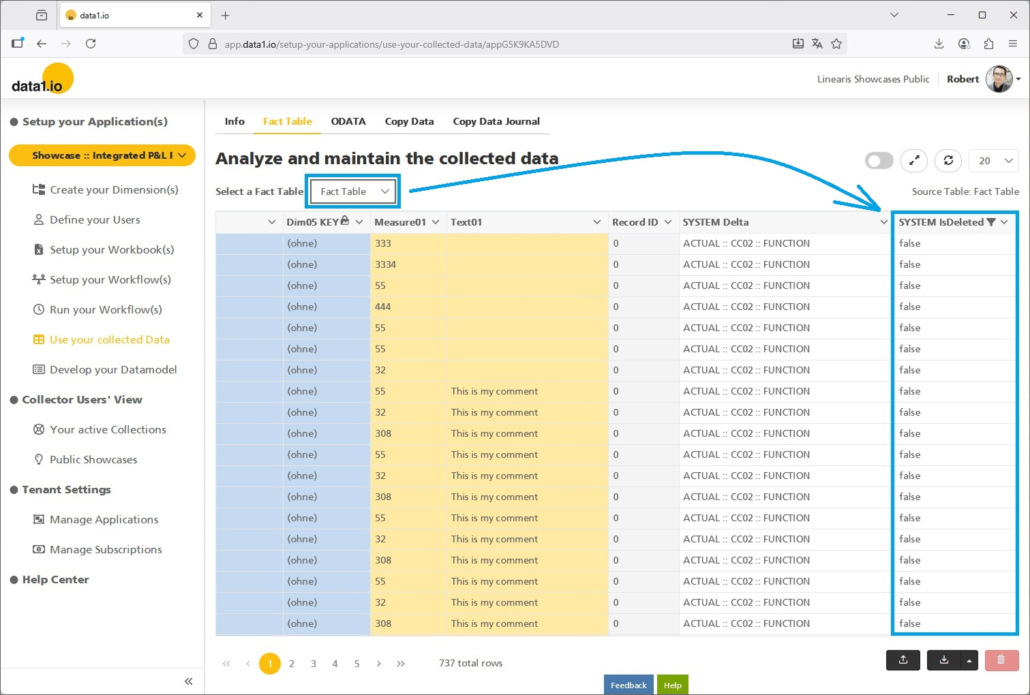
Therefore, from today on you`ll find in your Fact Table only the currently active records with the flag “IsDeleted = false” …

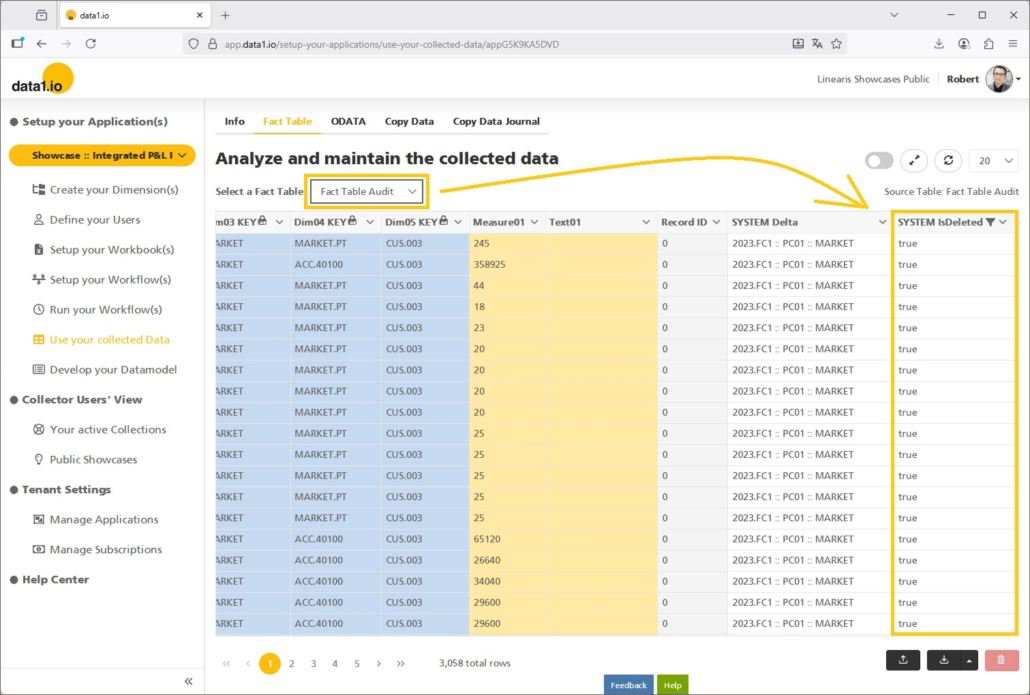
… and in the new Fact Table Audit you will find all the new and also historically replaced records with the flag “IsDeleted = true”

This is a major change in the data architecture of data1.io since this will solve the issue that the fact table continously grows due to replaced records during the planning process.

(4) Backend: Workbook Filename

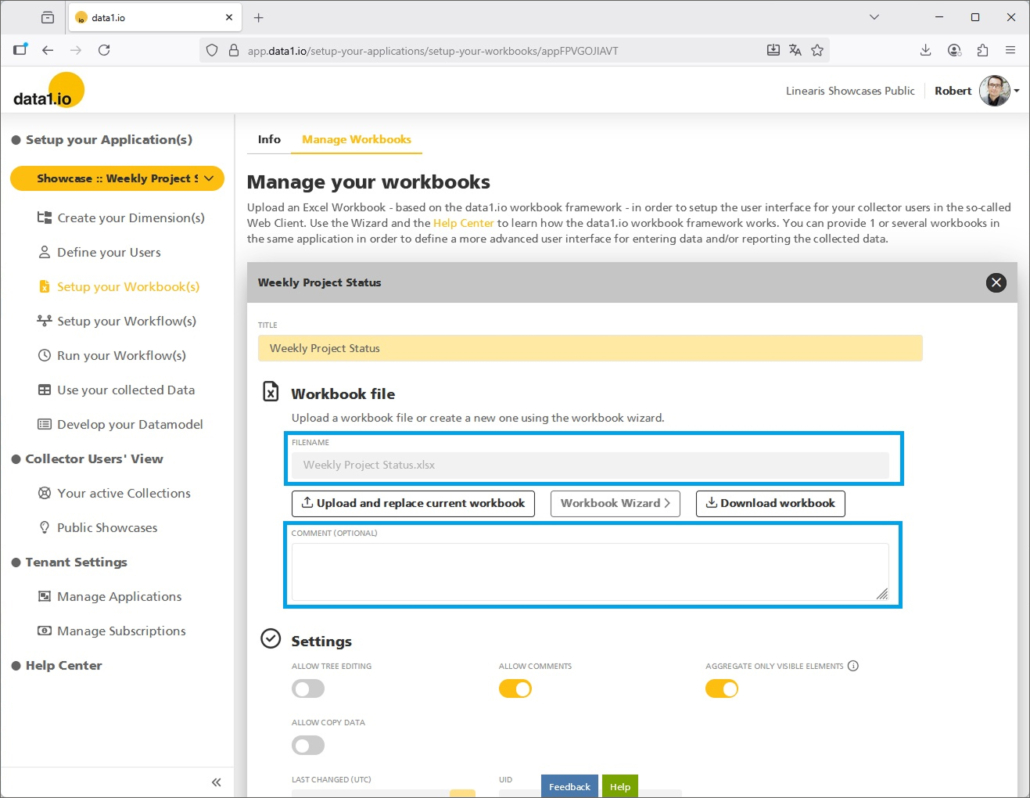
With this release, the filename of the uploaded workbook is saved which makes it easier to find out later, which file you are currently using as workbook. Furthermore we have added a comments field, which can be used e.g. to save also the Path where the file came from.

(5) Backend: New Boolean Fact Dimensions

In our standardized data model we have 10 alpha-numeric dimension keys and 10 date keys in order to clearly identify your records in the fact table. Now we have extended our data model by additional 10 boolean dimension keys which can ber used for small, binary dimensions with only two possible states.

a. Fields of application

  • booked / non-booked records
  • proved / unproved records
  • Version 1 / Version 2 records
  • and many more

Please be aware that the boolean dimension keys are keys and not fact attributes (like TEXT01, NUM01, etc.) and help you save the 10 alpha-numeric dimensions for more larger “real” dimensions.

b. How it works

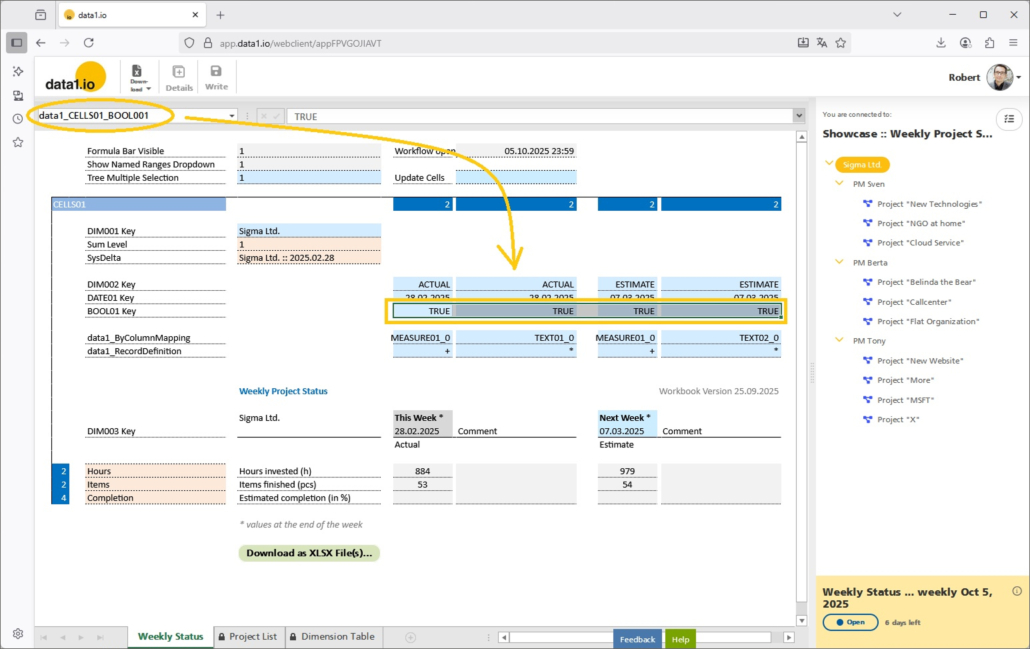
Use the new named ranges for the boolean dimension keys:

  • data1_CELLS01_BOOL001
  • data1_CELLS01_BOOL002
  • data1_CELLS01_BOOL003
  • data1_CELLS01_BOOL004
  • data1_CELLS01_BOOL005
  • data1_CELLS01_BOOL006
  • data1_CELLS01_BOOL007
  • data1_CELLS01_BOOL008
  • data1_CELLS01_BOOL009
  • data1_CELLS01_BOOL010

Use those values:

  • TRUE or 1
  • FALSE or 0

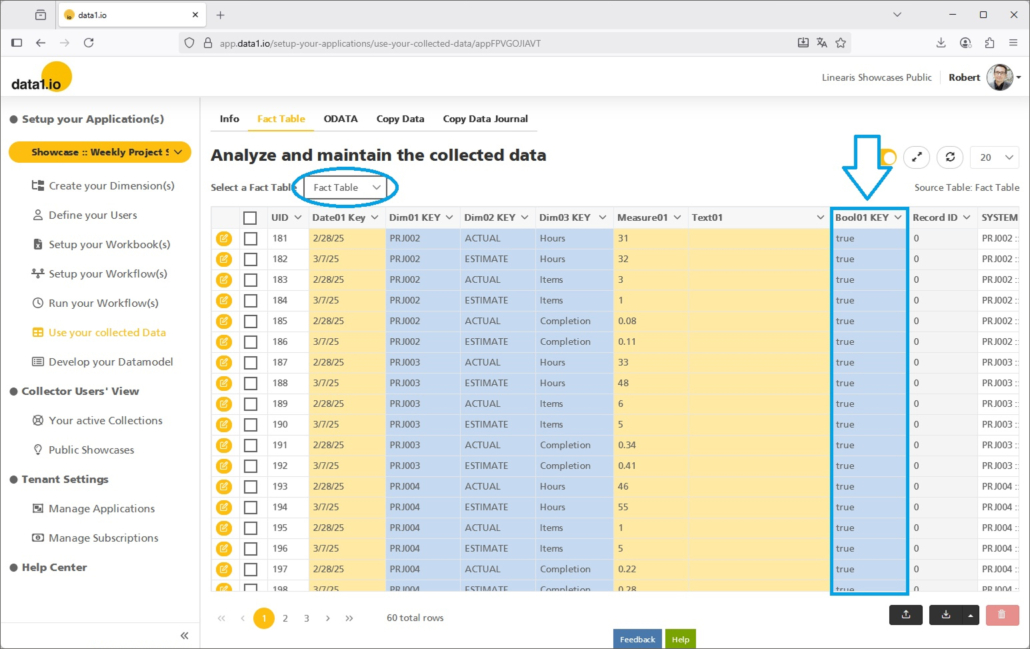
You will find the boolean key(s) in your Fact Table:

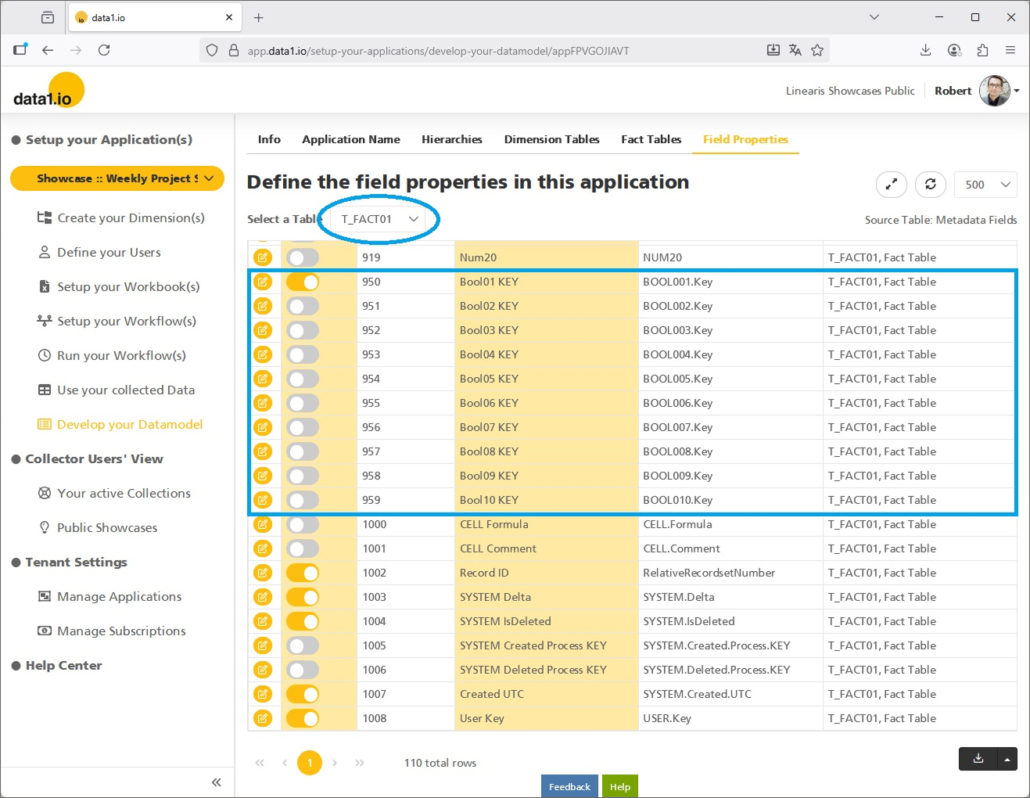
If you cannot see them, please activate the boolean key(s) in your data model (and define a proper name):

(6) EU Data Act

The EU Data Act (Regulation (EU) 2023/2854) is a central part of the EU’s data strategy, aiming to make access to and use of data fairer, more transparent, and more innovation-friendly.

The EU Data Act entered into force on 11 January 2024, with this date, the regulation formally became part of EU law, but most obligations were not yet applicable. On 12 September 2025 the Data Act became applicable in practice. From this date, the majority of rights and obligations take effect — including user rights to access and share data generated by connected devices, rules on fair contractual terms for SMEs, and obligations for cloud and SaaS providers to enable data portability and switching.

We are proud to be a European SaaS provider and we are very happy to announce that data1.io has long met the requirements of the EU Data Act:

  • No risk of blocking
    No hidden costs, no exit fees or no exit conditions
    Export all your data everytime
  • Cloud hosting in the EU
  • Encrypted storage
  • Data protection agreements

Our DNA is complete transparency regarding data export and technical interfaces and no risk of blocking at all. data1.io guarantees full interchangeability, easy switching and full control over your data.


We hope you like the new features – we are very curious about your feedback!

Please let us know what you think about data1.io and what kind of planning and data collection processes you evaluate to automate.

we #StandWithUkraine
Release July 2025 (before the summer break)

We are happy to deliver the brandnew July 2025 Release with the new New Dynamic List Queries and many other Features! Try it now!

Remember, the Frontend is the user friendly spreadsheet for your Collector Users to deliver their monthly/weekly/daily data. The Admin Center is the tool for the Power User to setup and control your organization’s collection workflows.

(1) Frontend: New Dynamic List Queries (Preview)

List Queries have become a powerful feature and are essential for many advanced applications in data1.io. Until now it was necessary to define a maximum number of rows or columns which could be filled by the list query and then fade out the rows / columns not used.

We are very happy to present the new dynamic List Queries which generate automatically the needed number of rows or columns. Have a look on this top level query – there are no additional (hidden) rows:

But have a look on this team level query – there are also no additional (hidden) rows:

For a dynamic List Query only one row (or column) is defined which will be duplicated as often as there are hits in the list query. You need two additional parameters for the list query to make it dynamic:

  • data1_LISTQUERYxx_T_DIMxxx_CmdDynamic
    1 = dynamic list query

    The named range for the List Query is dynamically reduced or expanded by rows or columns. The first row or column is copied (copy/paste) to the new row(s)/column(s) so that the formulas and conditional formatting are retained and automatically adjusted to the new row/column (behaviour as in MS Excel).
    0 = static list query = default
    The name range is filled to the stop, rows/columns beyond this are not created.
  • data1_LISTQUERYxx_T_DIMxxx_CmdExpansion
    row = new data is added row by row = default
    column = new data is added column by column

Dynamic List Queries are a complex feature with many interactions with other features:

  • Clean removal of the existing rows from the last list query
  • Clean format for the generated rows/columns and clean application of the changed cell format
  • Sheet Protection
  • Row Level Security (RLS)

This complexity is the reason why dynamic List Queries are currently in preview.

(2) Frontend: Writeback Optimiziation for List Queries

We have introduced the writeback functionality for List Queries in March 2025 Release. We`ve learned that the writeback in large lists was very slow since for every entry in the SysDelta parameter a separate SQL statement was sent in order to replace the already existing records for this batch.

With this release, the deletion of the existing records is executed with only one single SQL statement …

… which makes the writeback process performant:

(3) Frontend: Dimension Tree Sorting

The order of the sum level nodes in the dimension tree is determined …

… by the assigned elements with the lowest SORT information:

Until now, this algorithm used only the visible elements of a (filtered) dimension tree. Therefore the following constellation …

… led to a dimension tree with reversed order of the the two companies on Level 2. With this release we have changed this algorithm and the order of the sum level nodes results from all existing elements – visible or not:

This is a major change, since the dimension tree in an application has now always exactly the same order in all filtered variations of the tree.

(4) Admin Center: Dependent Filters in Tables

We have introduced the new column filter experience in November 2024 release. With this release we are happy to introduce dependent filters. That means that existing filters on one column …

… reduce the number of hits in all other column filters:

(5) Admin Center: RLS Improvements

We have learned that the RLS definition can be difficult due to the default column names in the RLS dialog. With this release we have added the individual column names to the dialog which will make it easier to see which attributes e.g. belong to the same hierarchy:

(6) Admin Center: Copy Data Improvements

We are happy that it is now possible to change the sort order of the filters in the “Filter condition(s)” block as well as in the “Target rule(s)” block:

Furthermore, we have also optimized the column order in the “Filter Condition(s)” block:

Last but not least, we have added the date to the timestamp in the execution bar.

(7) Further Improvements

We have solved an timing issue with the “Read Validation” (which was initially released in February 2025 release). In rare cases the validation message was shown altough there was no issue since the validation message was shown earlier than the READ process for the sheet was finished.

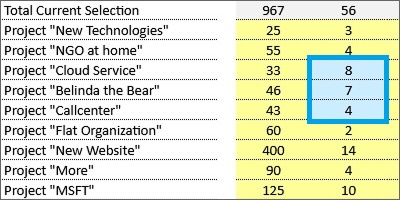
There was an issue in the Copy Data feature. The number of records shown which will be replaced (as preview before you start the copy data job) was not correct in some cases.

We have found a solution for the limitation for the execution of SQL statements with more than 2100 parameters – SQL statements are now executed piece by piece with 2000 parameters maximum.

We have also solved issues in the Admin Center in the Collector Users and in the RLS definition screens.


We hope you like the new features – we are very curious about your feedback!

Please let us know what you think about data1.io and what kind of planning and data collection processes you evaluate to automate.

We`ll be back after the summer break with the September Release!

we #StandWithUkraine

Release June 2025

We are happy to deliver the brandnew June 2025 Release with the new Admin Center UI and new Copy Data Features! Try it now!

Remember, the Frontend is the user friendly spreadsheet for your Collector Users to deliver their monthly/weekly/daily data. The Admin Center is the tool for the Power User to setup and control your organization’s collection workflows.

(1) Admin Center: New User Interface

We are very happy, to deliver a major update for the user interface of our Admin Center!

a. New Menu Format

We renewed the menu format by

  • adding symbols to the menu items
  • removing the enumeration of the major menu items
  • removing the vertical line on the second level of the menu
  • removing the hamburger icon on the top
  • moving the tenant information into the header

Compare the new menu format and page layout …

… with the old format and layout:

A major goal of these changes was also to replace the previous folded slim menu (which was titled “Navigation Pane” and was only a placeholder) …

… by a fully functionable slim scale menu based on the images (which is of course already a standard for many SaaS solutions):

b. New Landing Page

Since we removed the enumerations from the major menu items on the left, we thought it would be a good idea to replace also our old landing page which carried only very little information (i.e. a list of the available applications) …

… with a new info page, which is hopefully helpful to get a good orientation about the content of the menu structure on the left:

c. New Loading Behaviour

Another major change is a new loading behaviour for the sub-content of the selected menu item.

Until now, the whole content from the horicontal sub-navigation was loaded initially when selecting a menu item – which could take a quite long time.

From now on, only the content of the first menu item – which is currently the “Info” page – is loaded when selecting a menu item and is therefore very fast. When selecting another item from the horicontal sub-navigation, it will be loaded and you have to wait only for the selected content. This will save most of you a lot of time since usually we do not enter all the items from the horicontal sub-navigation.

d. New Mobile Layout

We are very happy, that with the new menu format we could reach a major improvement for the mobile view of the Admin Center! In portrait view, the slim navigation on the left makes it quite realistic to use also the mobile to change some settings within the Admin Center …

… while in landscape view the navigation can be expanded:

(2) Admin Center: New Copy Data Features

With the April 2025 Release we have delivered a major update for the Copy Data Feature, with the May 2025 Release we delivered another important improvement and with this release we deliver 2 more major features!

Please be aware that this feature is an Add-On which needs to be licensed seperately.

a. New Groups

The more features we deliver, the more Copy Data jobs will be defined. This made it necessary to add a new group level in order to bundle jobs which belong to the same logical process and usually should be executed in one batch.

If you enter the Copy Data definition you will see now a new group level called “Non-grouped copy data definitions”:

Sure, you can define now a new group …

… and move your existing jobs to the new group:

With the new “Execute all” button on the group level you can start all jobs in one batch:

The preview for the replacement of the existing records is now expanded to all included jobs:

The jobs are executed sequentially in the order of appearance:

b. New @ Parameter

Another big feature is the possibility to use now @ parameters for your target rules in order to define the result of a copy data job with a formula!

Think on the SYSTEM.Delta field:

In many cases you`ll need to fill this field dynamically in order to create a new forecast / planning version which can be edited after creating the base values with copy data jobs.

If you use an @ parameter, the Validate target value formula button will appear and deliver da preview of your formula:

Here is the compact information about the usage @ parameters:

Usable with every field in the target rules area

You can reference on all fields from the fact table and on all related attribute fields from the 10 dimension tables. Use the SQL name of the field as @ parameter, you’ll find them in the “Develop your Datamodel” section:

(3) Admin Center: Leading Zeros during Download

Until now, leading zeros from dimension keys where removed in the Excel download file. With this release, the download of data1.io tables into Excel files is executed on the basis of the field definition in the data1.io database. Therefore, leading zeros from dimension keys …

… will not be removed anymore, since dimension key fields are defined as alphanumeric fields in the database:

(4) Admin Center: Improvements for Parallel Hierarchies

We have released parallel Periods in our last May 2025 Release, this month we have two improvements.

First, you can change now the name of the Hierarchy Key, which is not a key anymore but only a display name (until now this was not a good idea since the relationship to the hierarchy levels was last after renaming the key):

Second, only one hierarchy can be the default hierarchy:

(5) Admin Center: Billing Infos

We have worked on automatization of our billing, visibly there are 2 new fields int he Capacity Changelog which shows you, which rows were already billed and which ones are open:

Please be aware that at this time there are no financial information from the bill are shown here.

(6) Further Improvements

The definition of the named range data1_CELLS0x_DIM001_Alternative did not work, if it contained only of 1 cell – this works now.

We have improved the message, if a Dim001 Key is not found on writeback in conjunction with active Row Level Security (RLS).

There was an issue with the browser message “Page does not respond” due to repeated attribute queries – this could be solved.

We have solved an issue with copy & paste on protected cells, another issue with the writeback of empty data entry sheets and an issue with “Drillthrough Documents” which are not allocated to any workflow.

Finally we could solve an issue with truncated dropdown lists.


We hope you like the new features – we are very curious about your feedback!

Please let us know what you think about data1.io and what kind of planning and data collection processes you evaluate to automate.

we #StandWithUkraine
Release May 2025

We are happy to deliver the brandnew May 2025 Release with the new Parallel Hierarchies and the new Sum-Level Trees! Try it now!

Remember, the Frontend is the user friendly spreadsheet for your Collector Users to deliver their monthly/weekly/daily data. The Admin Center is the tool for the Power User to setup and control your organization’s collection workflows.

(1) Frontend: New Parallel Hierarchies

We are very happy to provide this new feature which enables a lot of new applications.

a. Field of application

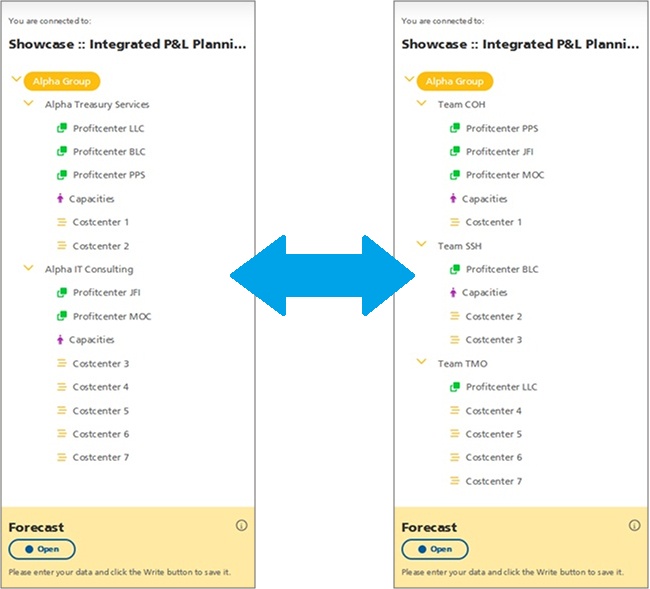
Basically, with parallel hierarchies the elements of the dimension tree can be grouped in alternative structures:

b. New Hierarchy Definition

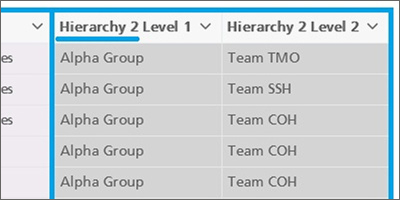
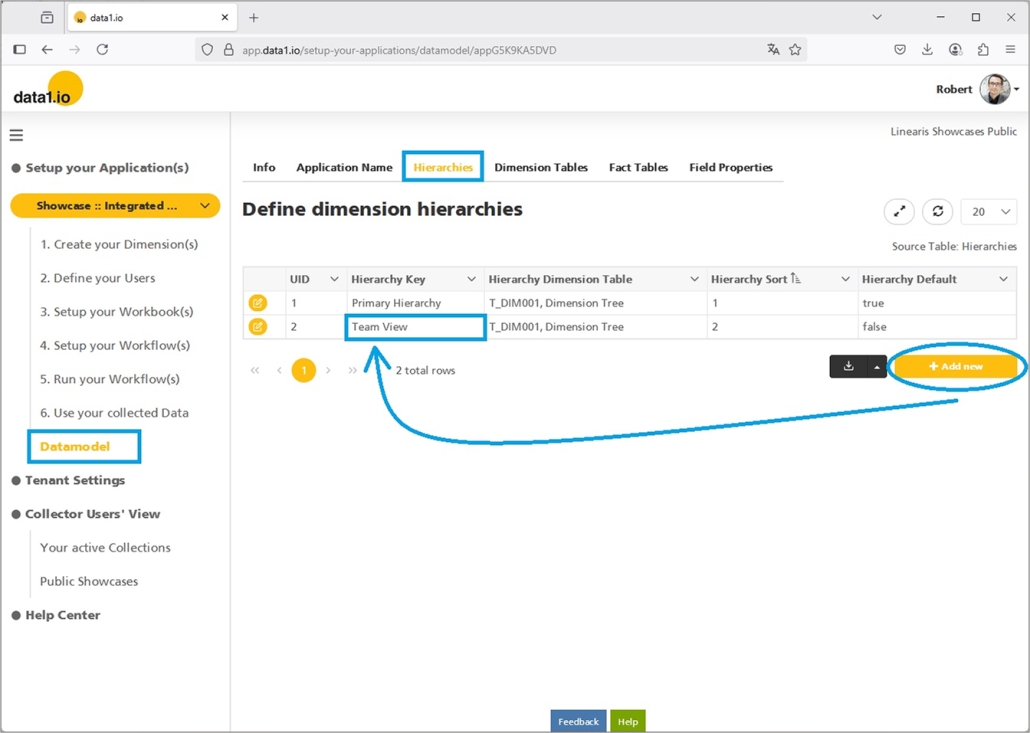
At first, you decide which attributes from the dimension table will be used for a parallel hierarchy. Then you can rename those fields in the “Datamodel” and upload the new dimension table:

Next, you create the parallel hierarchy in your datamodel and name it properly:

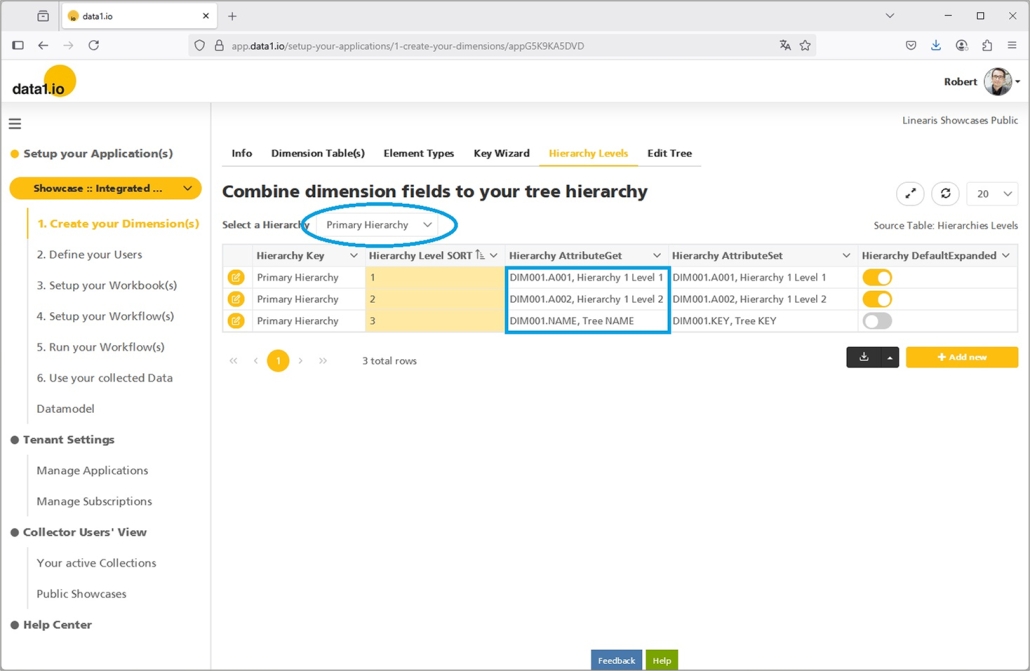
Then you define, which attributes from the dimension table belong to the new hierarchy:

That`s all!

c. Extended Row Level Security (RLS)

We have extended also the dialog for the Row Level Security (RLS) for parallel hierarchies.

Please be aware that the RLS from one hierarchy is NOT applicable to a parallel hierarchy (although the same bottom elements are involved) – if RLS is relevant also for the parallel hierarchy, then it has to be defined separately.

Please be also aware that at the moment, only the first 10 attributes from the dimension table can be used for RLS definitions (and the default names are shown in the dialog).

d. New Workbook Parameter

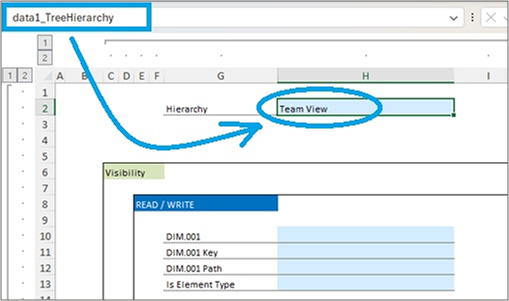
Finally we have created a new workbook parameter in order to define which hierarchy from the dimension tree should be used in certain sheet of the workbook:

  • data1_TreeHierarchy

Of course, this parameter is optionally. If not defined, the “Default Hierarchy” from the hierarchy definition will be applied.

(2) Frontend: New Aggregated Hierarchies

You can use the new parallel hierarchies also for another field of application. Instead of showing a fully detailled dimension tree e.g. in reports and landing pages …

… which is based on a definition like this (including the “Tree NAME” on the bottom level) …

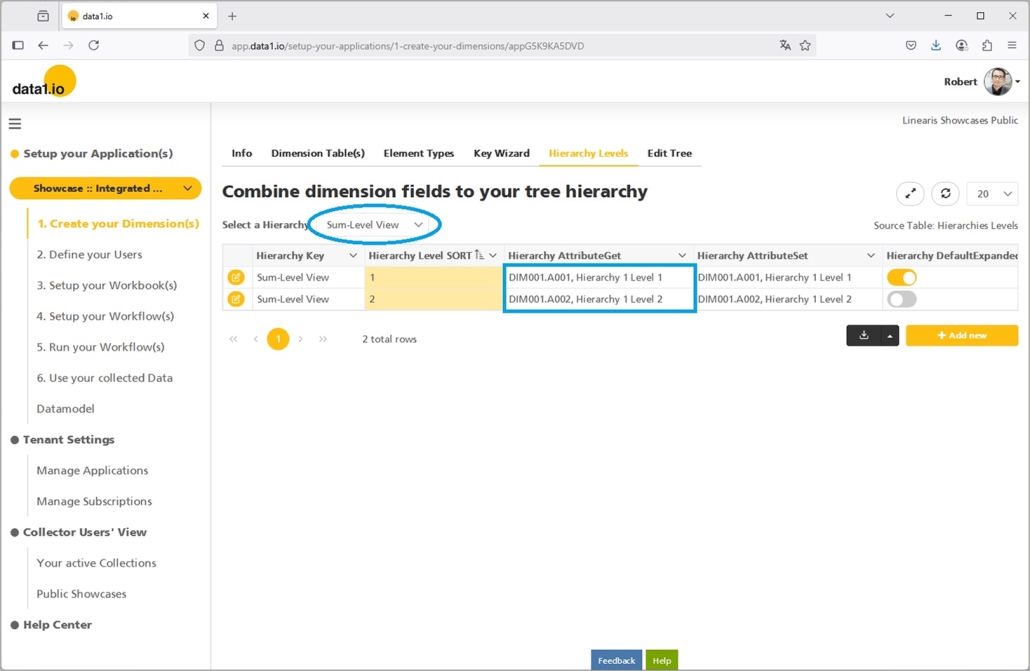
… you can define a separate hierarchy …

… which uses the same attributes but leaves the “Tree NAME” on the bottom level:

This leads to an aggregated “sum-level” tree which can be more effective especially in reports:

(3) Admin Center: New User Profile Image

From now on, the user profile image will be shown in all tables from the Admin Center …

… this makes it easier for you to recognize your collector users on the first view. 🙂

(4) Admin Center: Table Improvements

a. Editable Fact Table

We have removed the read-only restriction for the fact table. So from now on the records from the fact table can be edited – this makes it easier to correct individual errors:

b. Improved Element Type Display

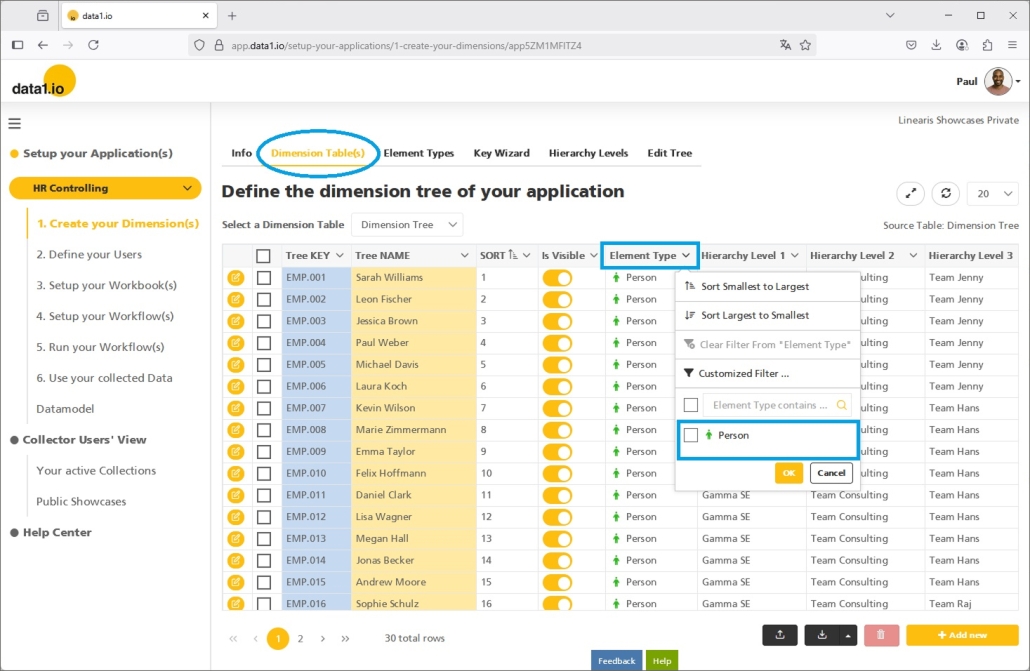
We have improved the display of the element type in the dimension table (column width) and also the content of the dropdown filter (symbols instead of html code and no “default” element anymore):

(5) Admin Center: Copy Data Improvements (Add-on)

Also this month we have improved the Copy Data feature. From now on you can define not only “is equal to” but also “is not equal to” filter conditions:

Copy Data works now also with applications with “Always Encrypted” on – this was a quite big issue to solve.

Last but not least, the execution of a Copy Data job in the Admin Center is not shown any more also in the Frontend.

(6) Further Improvements

    Now it is possible to wrap the names of the columns in an upload file in square brackets [], those brackets will be ignored and the files are uploaded the same as without square brackets.

    Furthermore we have solved an issue with the creation of new applications.


    We hope you like the new features – we are very curious about your feedback!

    Please let us know what you think about data1.io and what kind of planning and data collection processes you evaluate to automate.

    we #StandWithUkraine
    Release April 2025

    We are happy to deliver the brandnew April 2025 Release with the new Workflow Status functions and the new Capacity Management! Try it now!

    Remember, the Frontend is the user friendly spreadsheet for your Collector Users to deliver their monthly/weekly/daily data. The Admin Center is the tool for the Power User to setup and control your organization’s collection workflows.

    (1) Admin Center: New Workflow Status functions

    a. New Workflow Status change

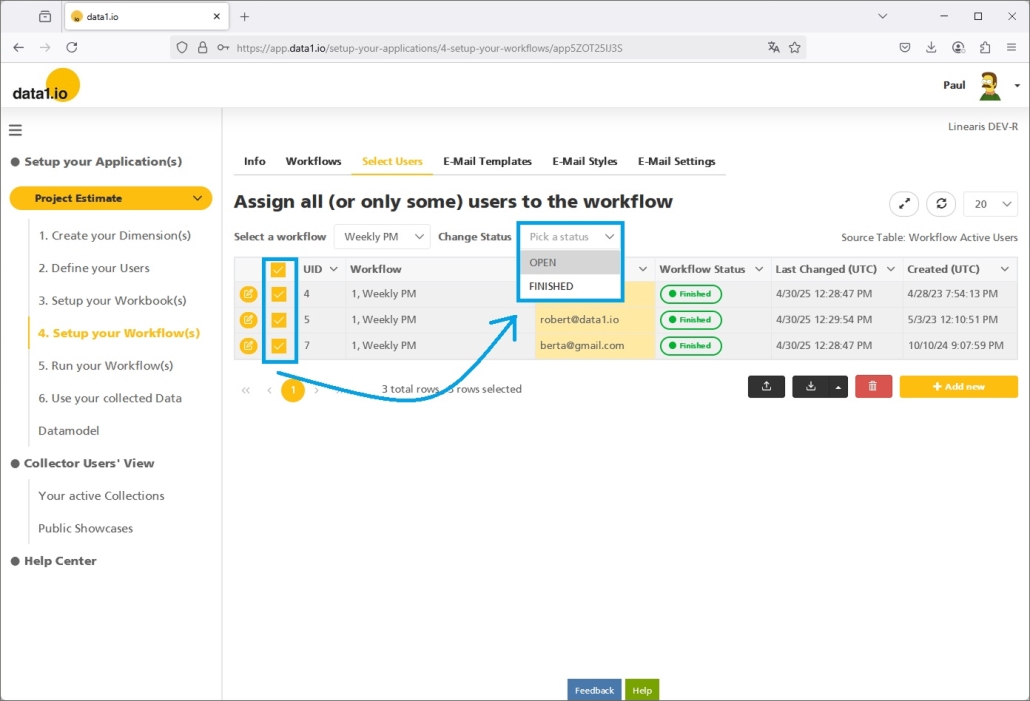
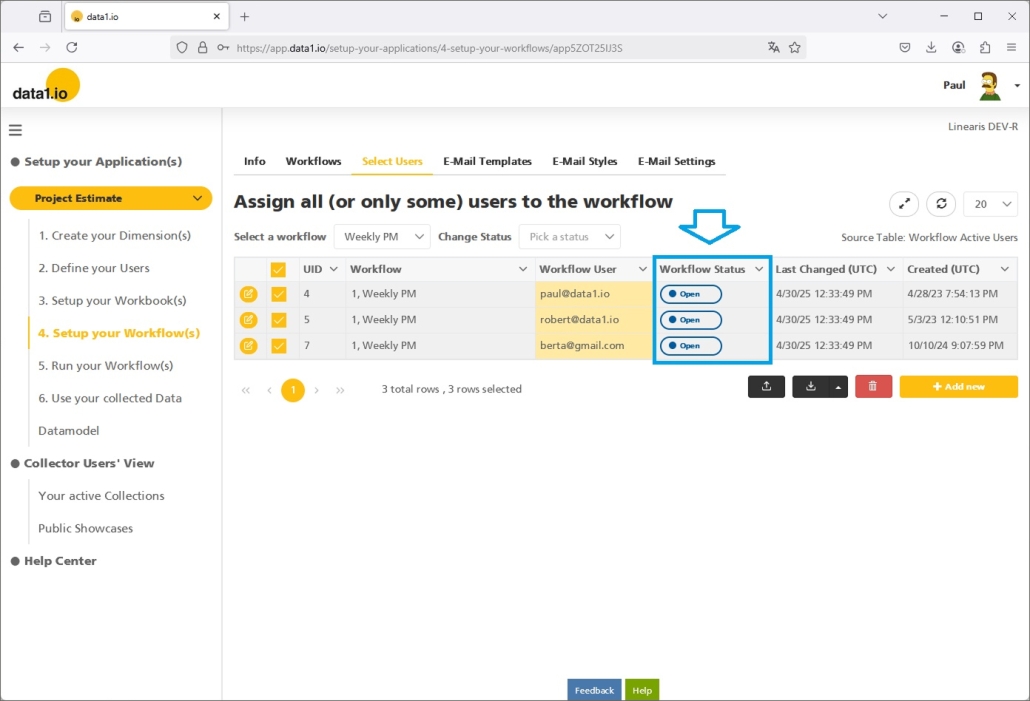
    We are very happy that with this release the Workflow Status of some ore all users that are allocated to a collection workflow can be changed with only 2 clicks:

    • Select the relevant users
    • Change the workflow status by selecting the status from the new dropdown

    Simply acknowledge the dialog …

    … and the status of all selected users will be changed at once:

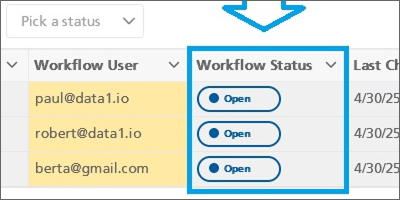
    b. New streamlined Workflow Status symbols

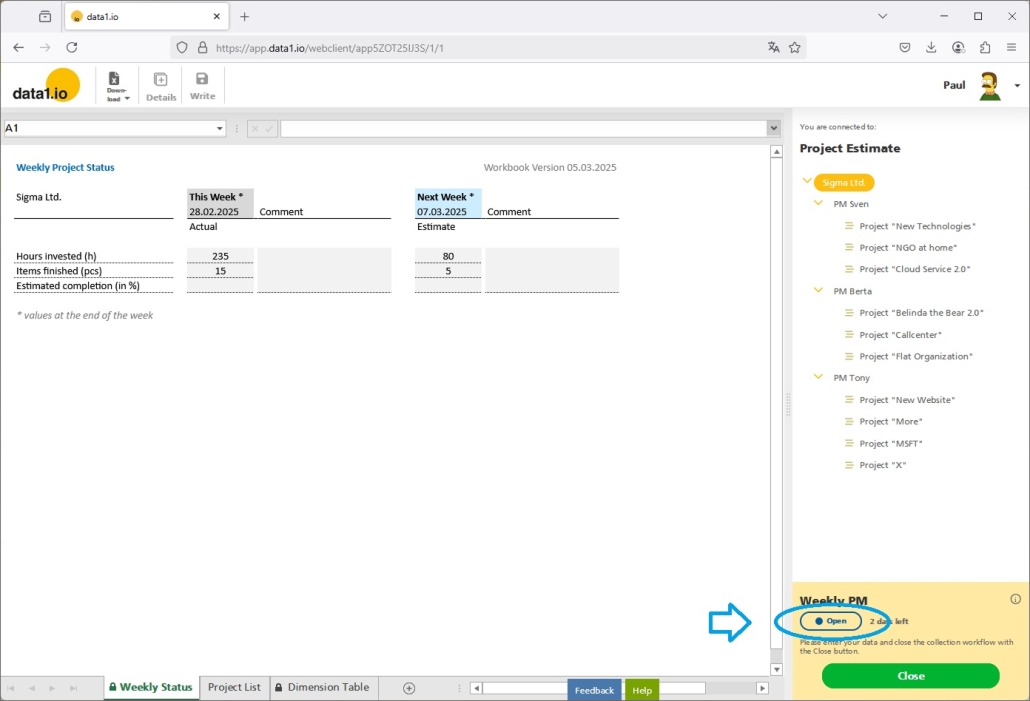
    Furthermore, we have streamlined the Workflow Status symbols all over the application. Beginning in the Admin Center (see screenshot above) over the Workflow Landing Page …

    … and also in the Collector Users frontend, the symbols for the Workflow Status are now everywhere the same:

    Just for your information, at this time 4 Workflow Status exist:

    • Open (blue)
    • Finished (green)
    • Paused (orange)
    • Waiting (grey)

    (2) Admin Center: New Copy Data functions

    We have done a lot on the “Copy Data” feature with this release. Please be aware that this feature is an Add-On which needs to be licensed seperately.

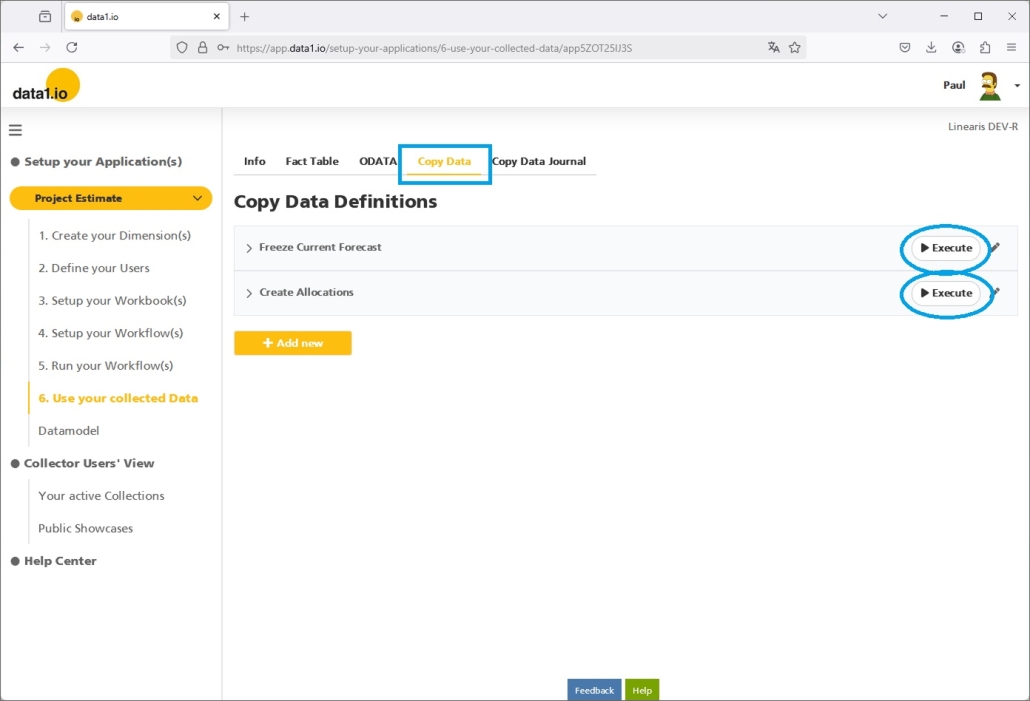
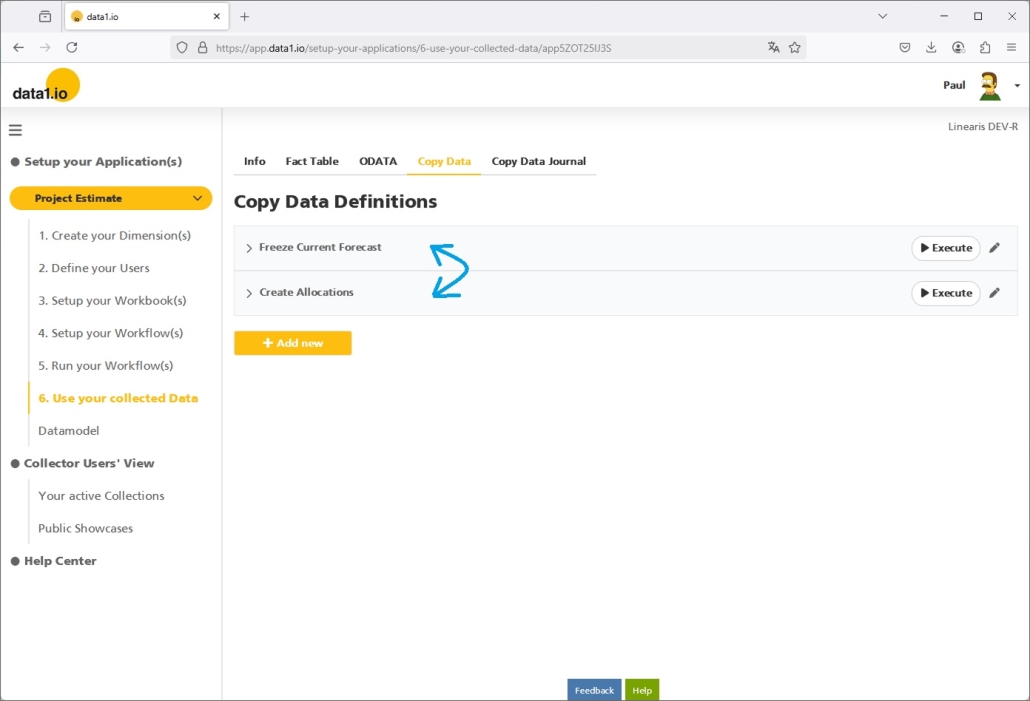
    a. Copy Data – New “Execute” button in the Admin Center

    Due to historical reasons, the Copy Data feature was only accessable via the Frontend but not from the backend. With this release we have changed that and we have added the new “Execute” button directly to the Copy Data job definitions:

    Pressing this button will directly open the Copy Data Job definition (where editable parameters cann be edited) and where the Copy Data process can be started with the “Start” button:

    b. Copy Data – Clean execution as “long running task”

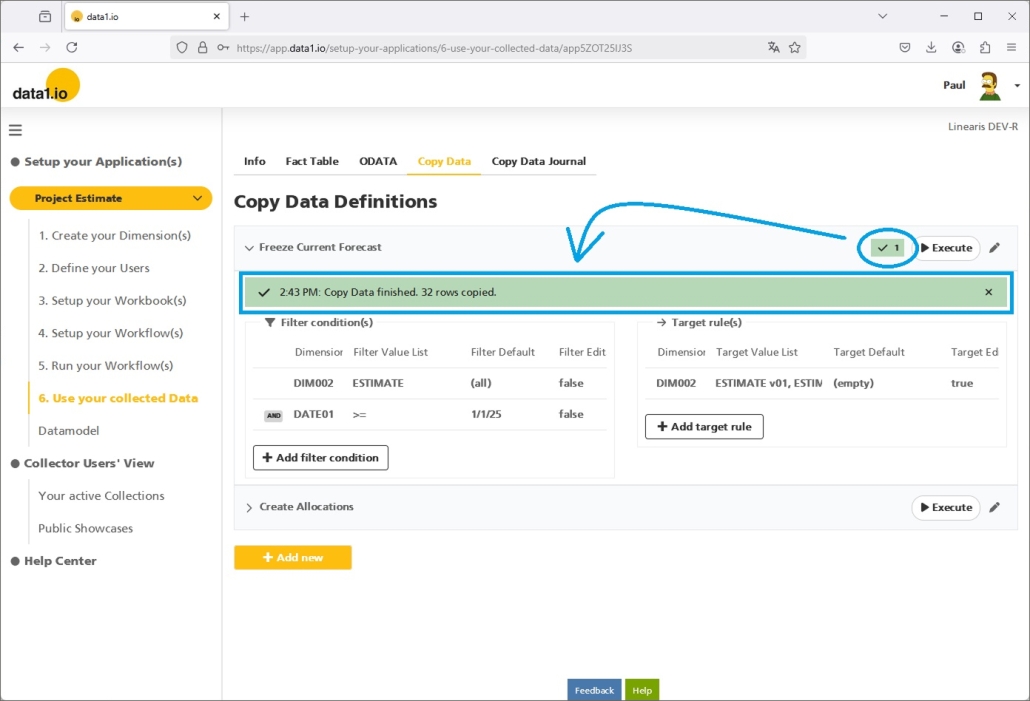
    We are happy, that Copy Data jobs are executed now as so-called “long running tasks”. This prevents you and us from timeout problems with larger jobs. You can see the “in progress” symbol on the Copy Data definition bar as long as the job is running …

    … and you will see the “finished” symbol when it is finished. Furthermore you get now the information how many records were created at which time directly on the task bar within the Copy Data definition dialog:

    c. Copy Data – Improved user interface

    We have improved the user interface for the Copy Data definition.

    First, the order of the Copy Data jobs can be changed now by drag and drop. This is very important for larger “Copy Data” processes since jobs often have to executed in a certain order.

    Second, the “is Editable” attribute has now the consequence that the “Filter value default” field is only visible as long as this option is activated:

    d. Copy Data – Extended definitions

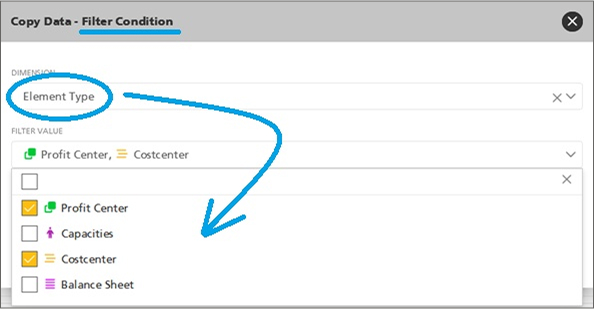
    Filters can be defined now also on the Element Type (from the connected Dim001 Table):

    Furthermore, you can define now Target Rules also on the TEXTxx Attributes in your fact table and you can define now also the value “(empty)” (which is “null” in SQL) in order to remove e.g. the comments from your source records when you copy them:

    e. Copy Data – Increase in price for the Add-On

    Due to those major investments we have increased the price from € 20 per month and application to € 30 per month and application. Like always in data1.io, price increases are not applied to customers who already have this license but only to new licenses.

    (3) Frontend: Two Add-Ons are core functions now

    a. “Iterate Sheet” is a core function now

    We have introduced the “Iterate Sheet” function back in January 2023 release and have improved this feature in many of the following releases. Until now this feature could only be used with an extra “Add-On” License. We are happy that with this release the “Iterate Sheet” function is a core function and can be used with every Free Plan or Enterprise Plan.

    b. “Calculation Wizard” is a core function now

    We have introduced the “Calculation Wizard” back in July 2023 release. Until now this feature could only be used with an extra “Add-On” License. We are happy that with this release the “Calculation Wizard” is a core function and can be used with every Free Plan or Enterprise Plan.

    (4) Admin Center: Enterprise Plan menu items

    Until now, menu items related with an Enterprise Plan and/or an Add-On license were only visible for Tenant Admins but not for Application Owners. With this release we have changed that and now also Application Owners can use all the advanced menu items in the Admin Center:

    (5) Further Improvements

    (will be described soon)

    We have updated the “Create Account” screen and we have improved the “Onboarding” messages. Furthermore we have solved some bugs with the Copy Data feature, with the conditional formatting in the workbook, with the format of the widget on the collection workflows landing page and with the List Queries.


    We hope you like the new features – we are very curious about your feedback!

    Please let us know what you think about data1.io and what kind of planning and data collection processes you evaluate to automate.

    we #StandWithUkraine
    Release March 2025

    We are happy to deliver the brandnew March 2025 Release with the new Writeback in List Queries and the new Capacity Management! Try it now!

    Remember, the Frontend is the user friendly spreadsheet for your Collector Users to deliver their monthly/weekly/daily data. The Admin Center is the tool for the Power User to setup and control your organization’s collection workflows.

    (1) Showcase: New Data Entry in List Queries

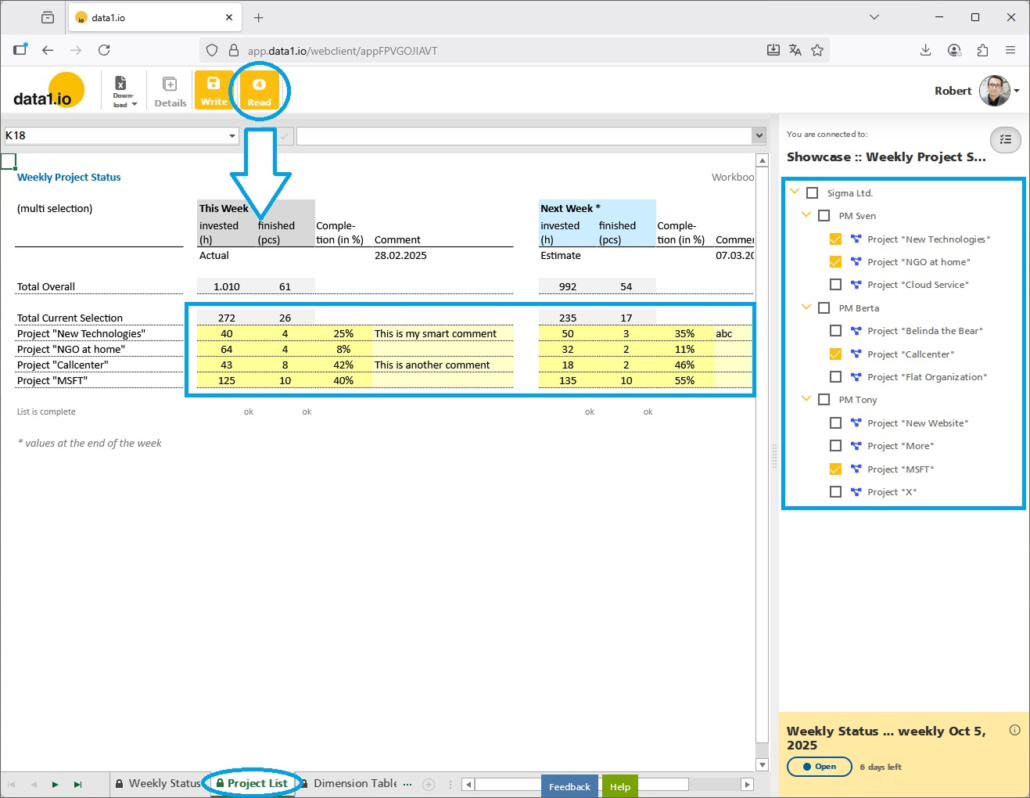
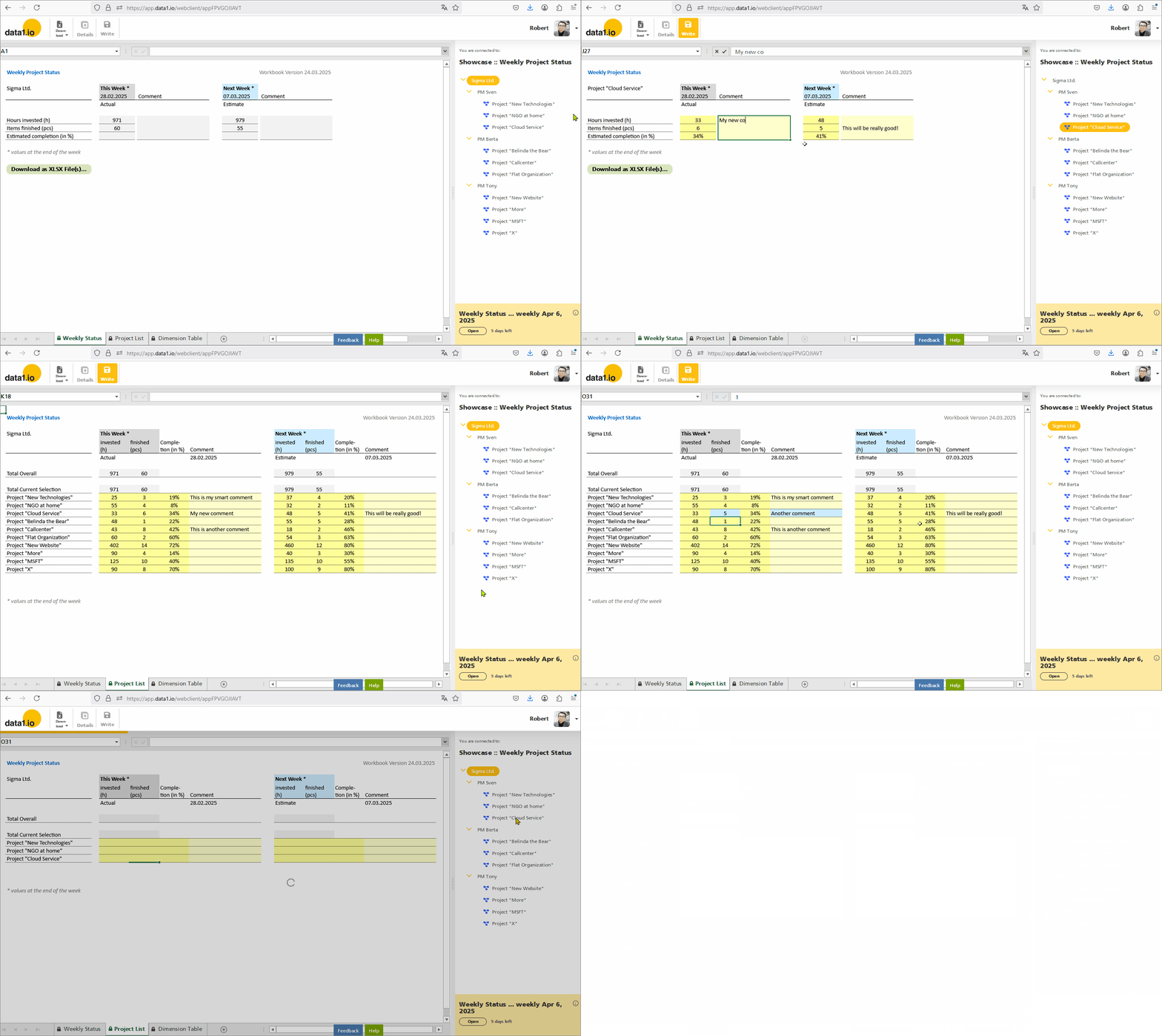
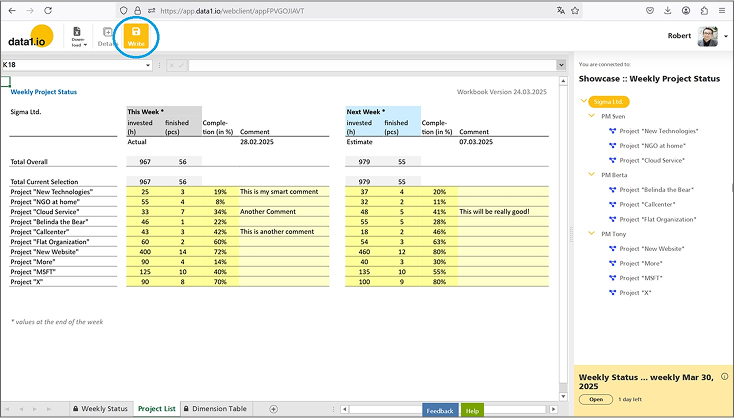
    Until now, planning and data entry was only possible on bottom level elements in the dimension tree (see sheet “Weekly Status” in GIF). From now on, you can enter data also in List Queries which are executed on a sum level element and list one ore more bottom level elements within the workbook. (see sheet “Project List” in GIF):
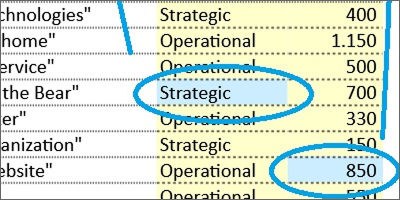
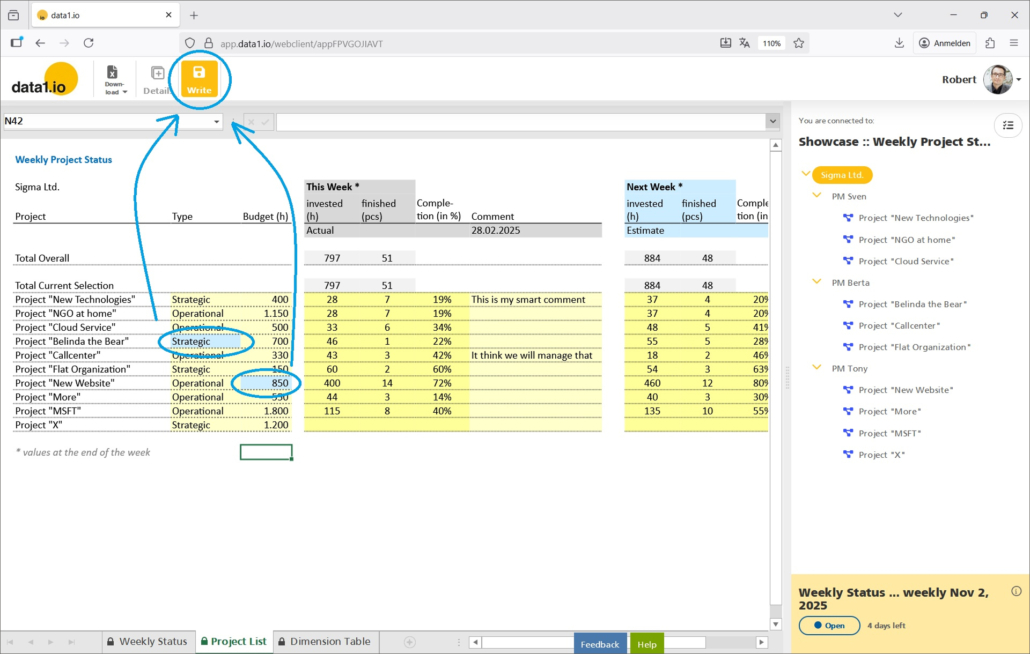
    This is enabled by the new writeback functionality in list queries and by a major optimization of alternative level queries. Try it yourself in our Public Showcase “Weekly Project Status”.

    Please be aware that at this stage it is not yet possible to enter data on the top level element itself and to splash the entered value to the underlying bottom elements.

    (2) Frontend: New Writeback Functionality in List Queries

    With this release, it is possible to select a sum level element and directly enter data e.g. in a list query on the underlying bottom level elements.

    a. New Option for the “data1_Write_AlwaysOn” parameter

    By default, the Write button is disabled on sum level elements:

    In November 2024 Release we have introduced the new parameter “data1_Write_AlwaysOn“, with this release we added the new status “2”:

    • 0 = normal behaviour
    • 1 = write button will be enabled – only on bottom level elements
    • 2 = write button will be enabled – also on sum level elements

    With the new status “2” …

    … the Write button is enabled also on sum level elements:

    b. Changes for sum level messages, analyze write process and RLS

    Of course we have removed the previous message that data entries are not possible on sum level elements.

    Furthermore we have adopted the “Analyze write process” dialog (Ctrl + right click on dimension tree element) for the writeback of a bundle of elements:

    Last but not least we have also extended the RLS (Row Level Security) functionality in order to validate the RLS rules not only on bottom level elements but also on sum level elements.

    c. Take care of your “SYSTEM Delta” definition!

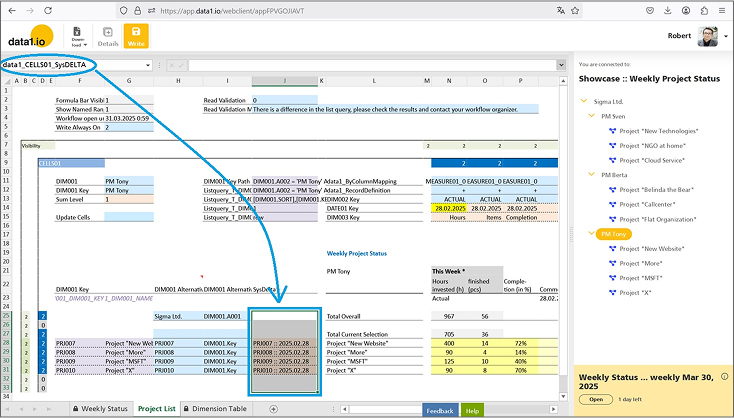
    The SYSTEM Delta parameter determines which records in the fact table will be replaced when the writeback of new data is executed. With the April 2024 Release we have introduced the new multi-cell “SYSTEM Delta” parameter, the understanding of this feature is essential for the successful usage of the new writeback for list queries.

    The SYSTEM Delta parameter must be defined as a multi-cell parameter – 1 string for every bottom element that is affected by the writeback:

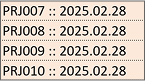
    Please be aware that all existing records in the fact table with one of those 4 SYSTEM Delta strings will be deleted when the Writeback is executed:

    Therefore you have to make sure that the SYSTEM Delta structure in your fact table fits to your data entry sheet!

    (3) Frontend: Major Optimizations for “DIM001 Alternative” Queries

    We have introduced the “DIM001 Alternative” parameter in October 2023 Release and have improved them in the January 2025 Release. With this release we deliver several major optimizations which makes it finally convenient to use list queries planning and data entry sheets.

    • Major performance increase by factor 2x to 4x for the READ process
      This was achieved by a major optimization of the number of the generated SQL queries in the backend.
    • Optimization of Always Encrypted
      There were also issues with the AE feature on the SQL database which could be solved.
    • Shorten the parameter name
      “data1_CELLS0x_DIM001_Alternative_Read_Attribute” to
      “data1_CELLS0x_DIM001_Alternative_Attribute”.

    Remember, the “DIM001 Alternative” ist defined with 2 parameters:

    • data1_CELLS0x_DIM001_Alternative
    • data1_CELLS0x_DIM001_Alternative_Attribute

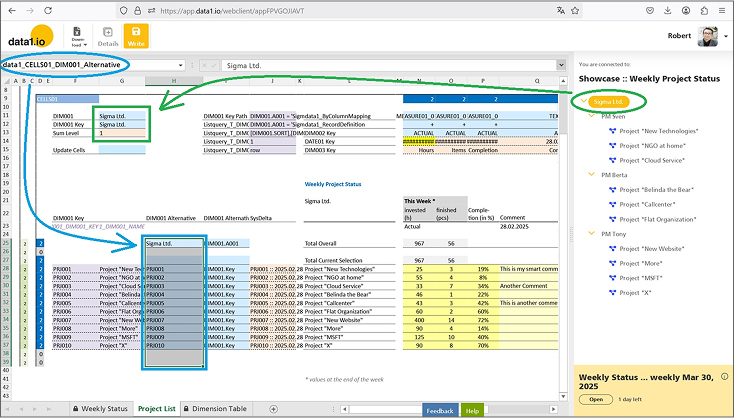
    The “data1_CELLS0x_DIM001_Alternative” parameter (= blue) replaces the selected element from the dimension tree (= green) with an alternative list of DIM001 elements (which are queried dynamically by a list query):

    The companion parameter “data1_CELLS0x_DIM001_Alternative_Attribute” defines, which Attributes from the dimension tree have to be used for the query of the value:

    (4) Admin Center: Manage Capacities

    We are happy that you can adjust the database capacities of your application / your tenant now with a new self-service screen. With this new tool you can increase your capacities e.g. for a few days if necessary and you can reduce your capacities if your workflow is finished.

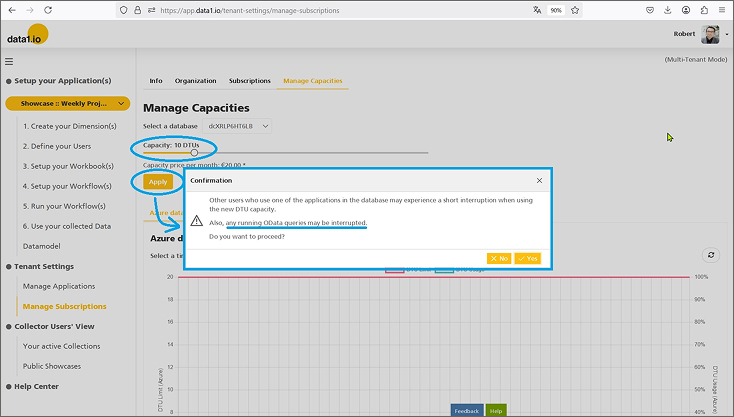
    Simply navigate to the new “Manage Capacities” menu item …

    … and change your database capacities with the capacities sliders and press the “Apply” button:

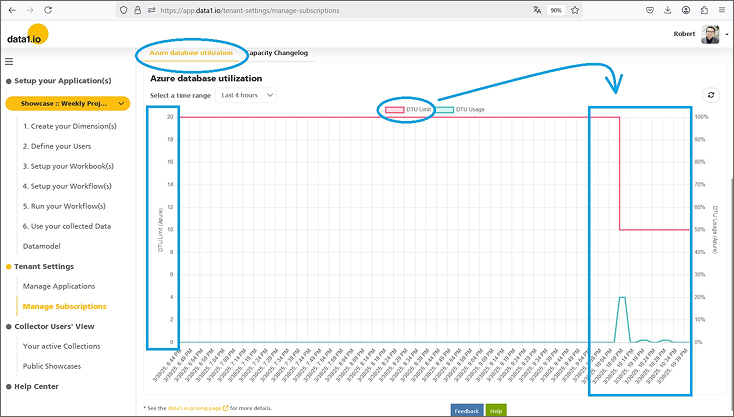
    This change takes a few minutes to be processed. In the “Azure database utilization” chart you can check, if your adjustment really works:

    (5) Frontend: Dimension Tree Reload

    Until now, switching between sheets triggered always a dimension tree reload even if the selected sheet uses the same tree.

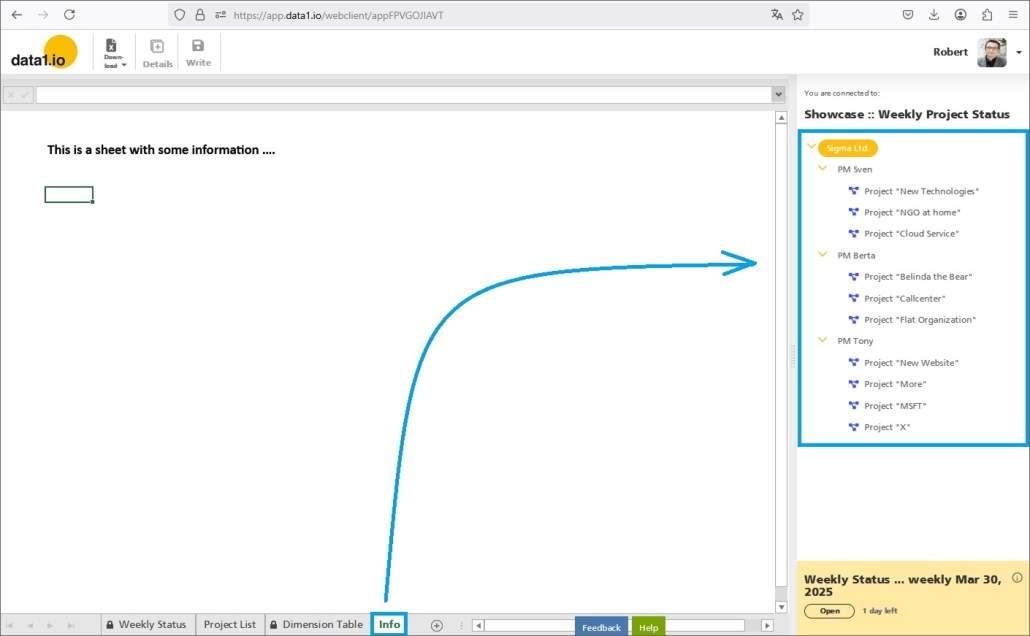
    Furthermore, switching to sheets that are not connected to the data1.io application triggered a reload of the dimension tree. Since this is not necessary, we have changed that:

    Furthermore, an empty dimension table led to an endless initial loading process. This will not happen any more, you as a user get a proper message and the loading process will stop.

    (6) Further Improvements

    In the Frontend we have added a feature to execute the visibility settings for rows and columns also on synced sheets. Furthermore we have solved an issue with ListQueries on the “DimType_UID” Attribute (with the parameter data1_LISTQUERY01_T_DIM001_DIMTYPE_UID). And we restored the search box for the dimension tree which was lost for a short time.

    In the Admin Center there were two issues with the refresh of the current page content either after selecting another application in the dropdown or after choosing another entry from the dimension table dropdown. We removed a little bug with the color and icon settings for element types in the dimension tree and another bug when deleting a whole table. Last but not least we solved a resolution bug for the filter box dropdown within the table object.


    We hope you like the new features – we are very curious about your feedback!

    Please let us know what you think about data1.io and what kind of planning and data collection processes you evaluate to automate.

    we #StandWithUkraine